Outputs and switching
MAX7219 LED matrix with ESP32
A MAX7219 matrix that glitches now and then on an ESP32 has a known cause. The datasheet asks for 3.5 V minimum as logic high at a 5 V supply, and an ESP32 outputs 3.3 V, which is out of spec. A forum thread sums it up: it mostly works, and sometimes does not. A guide may say it is tolerant, but if it matters, fit a 3.3 to 5 V level shifter on DIN, CLK and CS.
Power is the next limit. One user measured close to half an amp for a module with all 64 LEDs at full brightness, and advised 3 A or more for a four-module strip. Do not take this from the ESP32 board or its 3.3 V rail. Use a separate 5 V supply and join the grounds. Keep the brightness down: intensity has 16 levels, and a low setting is often enough indoors and cuts the current.
The chip wakes up in a poor state: shutdown on, scan limit at one digit, no decoding, minimum intensity. Your code has to set all four before anything shows, which the example does, and a display test register lights every LED to check the wiring. Modules chain by feeding DOUT into the next DIN, with CS and CLK shared. Each chained module needs its own 16 bits per transfer, so code for one matrix will not drive four. It uses three GPIOs, which may be hard to find on a parallel RGB board. It is a loud, simple and easily read sign, not a graphics panel.
Specifications
| Logic high | 3.5 V minimum at 5 V supply |
|---|---|
| Supply | 5 V |
| Current | Up to about 0.5 A per 8×8 module |
| Intensity | 16 levels |
| Chaining | DOUT to next DIN |
| Pins | DIN, CS, CLK |
Power and logic levels
5 V signal: needs a divider or level shifter
| Supply | 5 V |
|---|---|
| Signal level | Inputs need 3.5 V, ESP32 gives 3.3 V |
| On an ESP32 | Not dangerous to the ESP32, but out of spec. Use a level shifter. |
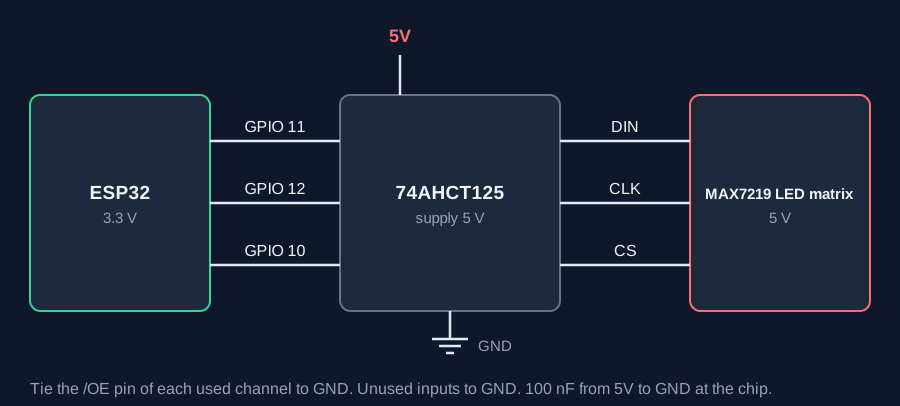
ESP32 pins, including those on a display board's connectors, work at 3.3 V and are not 5 V tolerant. Modules differ, so if in doubt, measure the signal before you connect it.
Wiring
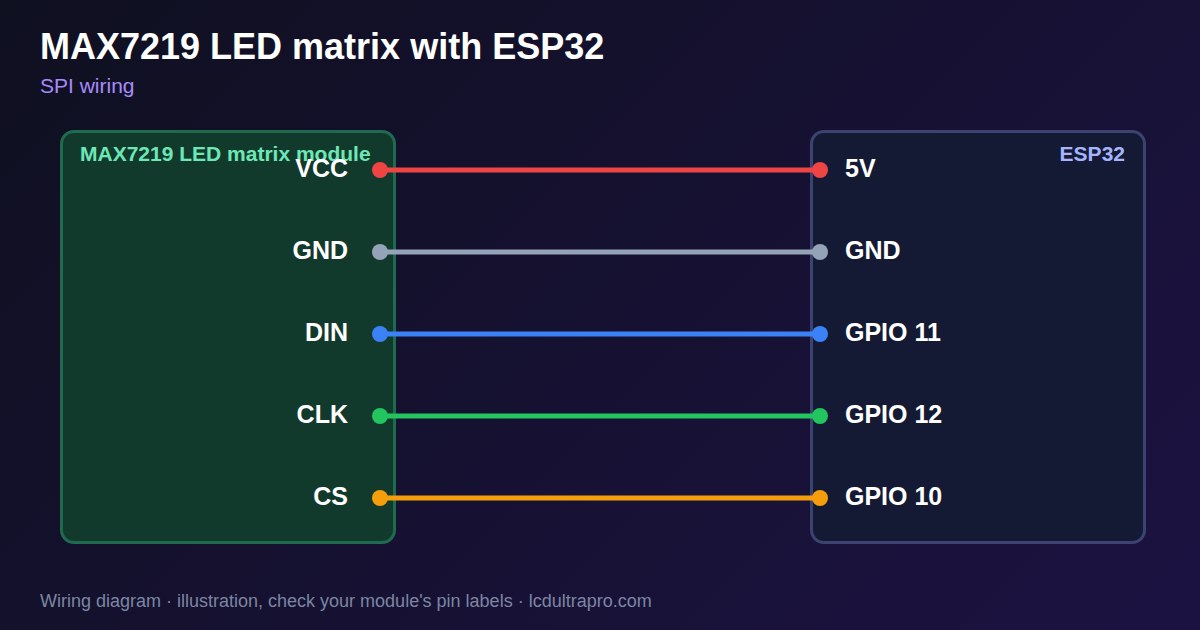
| MAX7219 LED matrix | Connect to | Note |
|---|---|---|
| VCC | 5V | Separate supply for several modules |
| GND | GND | Common ground |
| DIN | GPIO 11 | Through a level shifter |
| CLK | GPIO 12 | Through a level shifter |
| CS | GPIO 10 | Through a level shifter |
Arduino code
#include <SPI.h>

const int DIN_PIN = 11, CLK_PIN = 12, CS_PIN = 10;

void writeReg(uint8_t reg, uint8_t value) {
  digitalWrite(CS_PIN, LOW);
  SPI.transfer(reg);
  SPI.transfer(value);
  digitalWrite(CS_PIN, HIGH);
}

void setup() {
  pinMode(CS_PIN, OUTPUT);
  digitalWrite(CS_PIN, HIGH);
  SPI.begin(CLK_PIN, -1, DIN_PIN, -1);
  writeReg(0x0F, 0);                  // display test off
  writeReg(0x09, 0);                  // no decode
  writeReg(0x0B, 7);                  // scan all 8 rows
  writeReg(0x0A, 2);                  // low intensity
  writeReg(0x0C, 1);                  // leave shutdown
  const uint8_t tick[8] = {0, 1, 2, 4, 136, 80, 32, 0};
  for (int i = 0; i < 8; i++) writeReg(i + 1, tick[i]);
}

void loop() {}
No extra library needed. Compiled for ESP32-S3 with arduino-esp32 3.x. Not yet tested by us on a physical sensor. Change the pins to match your board.
On a display
Read the value in your sketch and pass it to a label, or send it over MQTT and show it with an MQTT value in the editor.
Design a display for MAX7219 LED matrixGood to know
- 3.3 V logic is out of spec.
- Use a separate 5 V supply.
- It must be set up before it shows anything.
- Chained modules need multi-module code.
What it is good for
- Large simple status signs
- Clocks and counters
- Scrolling messages
FAQ
Does a MAX7219 work at 3.3 V logic?
Often, but it is out of spec. Use a level shifter if you see glitches.
How much current does it need?
Up to about 0.5 A per module at full brightness.
Why does nothing light up?
The chip starts in shutdown. Set up its registers first.
Sources
Related parts
Use this information at your own risk. It is for general guidance only: the example code compiles, but it has not been tested on every part, and modules differ between sellers. Check the manufacturer's data before you build. Product names belong to their owners, and LCD Ultra Pro is not affiliated with them. See our Terms.