Input devices
EC11 rotary encoder with ESP32
A rotary encoder gives a display board a real knob: turn to change a value, press to confirm. The EC11 is a common mechanical type with two signal pins, A and B, plus a push switch. It has no absolute position. You only count steps and direction from which signal changes first.
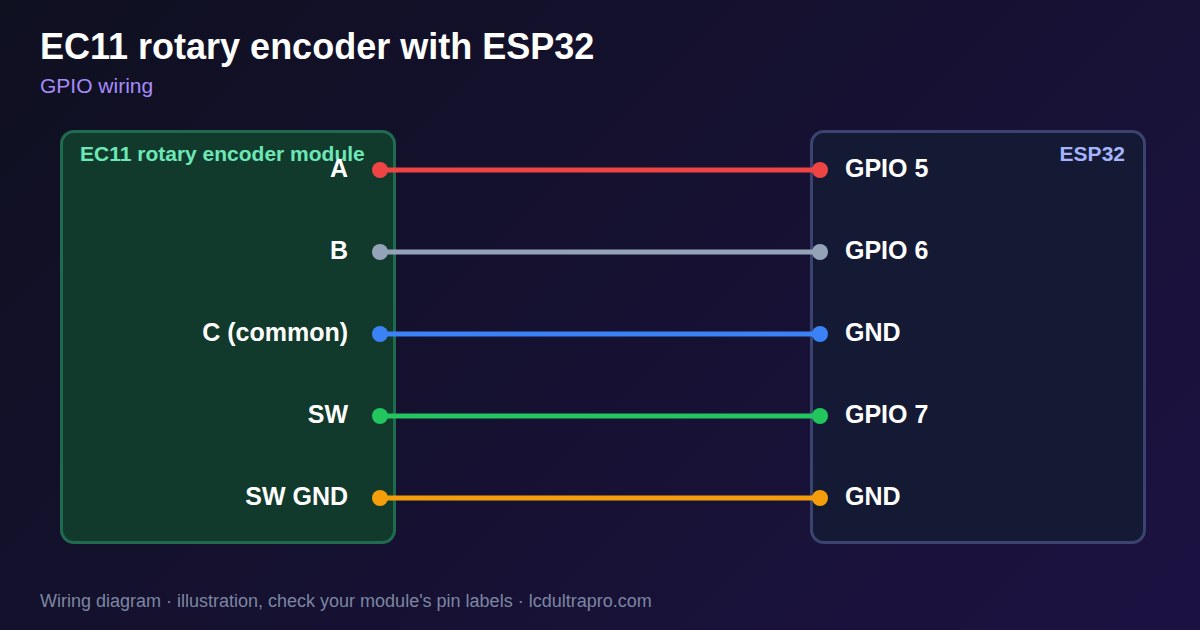
There is no power pin on a bare EC11. Connect the common pin to GND, A and B to two GPIOs, and enable the internal pull-ups. Modules with a small PCB add resistors and may have a VCC pin, which should go to 3.3 V, not 5 V, on an ESP32. Alps lists contact bounce of up to 2 ms, so read it with interrupts and tolerate a few false edges.
Models differ, which explains most 'it counts by two' complaints. Sources list 15, 18, 20 and 30 detents, and 9 or 15 pulses per turn, so one click may produce one or more steps. Adjust the divider in your code. Some boards, such as the MaTouch Rotary, already have a knob, and LCD Ultra Pro supports those.
Specifications
| Type | Incremental, A/B quadrature |
|---|---|
| Detents | 15, 18, 20 or 30, by model |
| Pulses per turn | 9 to 20, by model |
| Voltage | Up to 5 V, use 3.3 V on an ESP32 |
| Contact bounce | Up to 2 ms (Alps) |
| Extra | Push switch on most models |
Power and logic levels
3.3 V: safe to connect directly
| Supply | None, it is a switch |
|---|---|
| Signal level | Follows the pull-up |
| On an ESP32 | Use pull-ups to 3V3. |
ESP32 pins, including those on a display board's connectors, work at 3.3 V and are not 5 V tolerant. Modules differ, so if in doubt, measure the signal before you connect it.
Wiring
| EC11 rotary encoder | Connect to | Note |
|---|---|---|
| A | GPIO 5 | Internal pull-up |
| B | GPIO 6 | Internal pull-up |
| C (common) | GND | |
| SW | GPIO 7 | Internal pull-up |
| SW GND | GND |
Arduino code
const int A_PIN = 5, B_PIN = 6, SW_PIN = 7;
volatile long steps = 0;

void IRAM_ATTR onA() {
  steps += digitalRead(B_PIN) == digitalRead(A_PIN) ? -1 : 1;
}

void setup() {
  Serial.begin(115200);
  pinMode(A_PIN, INPUT_PULLUP);
  pinMode(B_PIN, INPUT_PULLUP);
  pinMode(SW_PIN, INPUT_PULLUP);
  attachInterrupt(digitalPinToInterrupt(A_PIN), onA, CHANGE);
}

void loop() {
  static long last = 0;
  long now = steps;
  if (now != last) {
    Serial.println(now);
    last = now;
  }
  if (digitalRead(SW_PIN) == LOW) Serial.println("Pressed");
  delay(20);
}
No extra library needed. Compiled for ESP32-S3 with arduino-esp32 3.x. Not yet tested by us on a physical sensor. Change the pins to match your board.
On a display
Read the value in your sketch and pass it to a label, or send it over MQTT and show it with an MQTT value in the editor.
Design a display for EC11 rotary encoderBoards with a ready connector
Only boards whose connectors we have surveyed. Others may still work on free GPIOs.
| LilyGO T-Display (classic) 1.14" | Left pin header: GPIO 21, 22, 17 |
| M5Stack AtomS3 0.85" | Bottom pin header: GPIO 5, 6, 7 |
| M5Stack M5StickC Plus2 1.14" | Top HAT header: GPIO 26, 25, 36GPIO 25 and GPIO 36 are on the same header pin — use only one of them (36 is input-only) |
| Waveshare ESP32-S3 Touch LCD 1.28" round | SH1.0 GPIO header: GPIO 15, 16, 17Six GPIOs led out per the wiki pin table |
| Waveshare ESP32-S3 Touch LCD 1.28" round (CNC metal housing) | SH1.0 GPIO header: GPIO 15, 16, 17Six GPIOs led out per the wiki pin table |
Good to know
- Use 3.3 V on module VCC pins with an ESP32.
- One click can give more than one step. Adjust by model.
- Expect some bounce. Filter it in software.
- LVGL needs focus groups to navigate with a knob.
What it is good for
- Menu navigation
- Volume and brightness
- Thermostat setpoints
FAQ
Why does my encoder count two steps per click?
Models differ. Divide the count to match your detents.
Does the EC11 need power?
A bare EC11 does not. Use the internal pull-ups and connect common to GND.
Why does one click count as two steps?
Encoder models differ in detents and pulses per turn. Divide the count to match yours.
Sources
Related parts
Use this information at your own risk. It is for general guidance only: the example code compiles, but it has not been tested on every part, and modules differ between sellers. Check the manufacturer's data before you build. Product names belong to their owners, and LCD Ultra Pro is not affiliated with them. See our Terms.