Outputs and switching
5 V relay module with ESP32
A relay module lets an ESP32 switch a load that it could never drive itself, through a clicking mechanical contact. Most modules have an optocoupler or a transistor, a coil at 5 V, and three contact terminals: common, normally open and normally closed.
Most modules are active-low: the relay turns on when the input goes LOW. That is deliberate, so a floating pin during boot does not switch the load. On an ESP32 there is a catch: 3.3 V high may not be high enough to hold some 5 V modules fully off. Pulling the pin up to 5 V is not an option either, because an ESP32 pin cannot take it. So remove the JD-VCC jumper if your module has one, or use an NPN transistor stage. Choose a pin that stays quiet during boot.
Mains voltage can kill. If you switch 230 V, use a certified enclosure, keep low voltage and mains apart, and let a qualified electrician do the wiring. Do not trust the printed rating on a cheap relay for its full load: motors and heaters need margin. Inductive DC loads need a flyback diode across the load. LCD Ultra Pro can switch a pin directly from a button or rule, and the Time Switch components can drive it on a schedule.
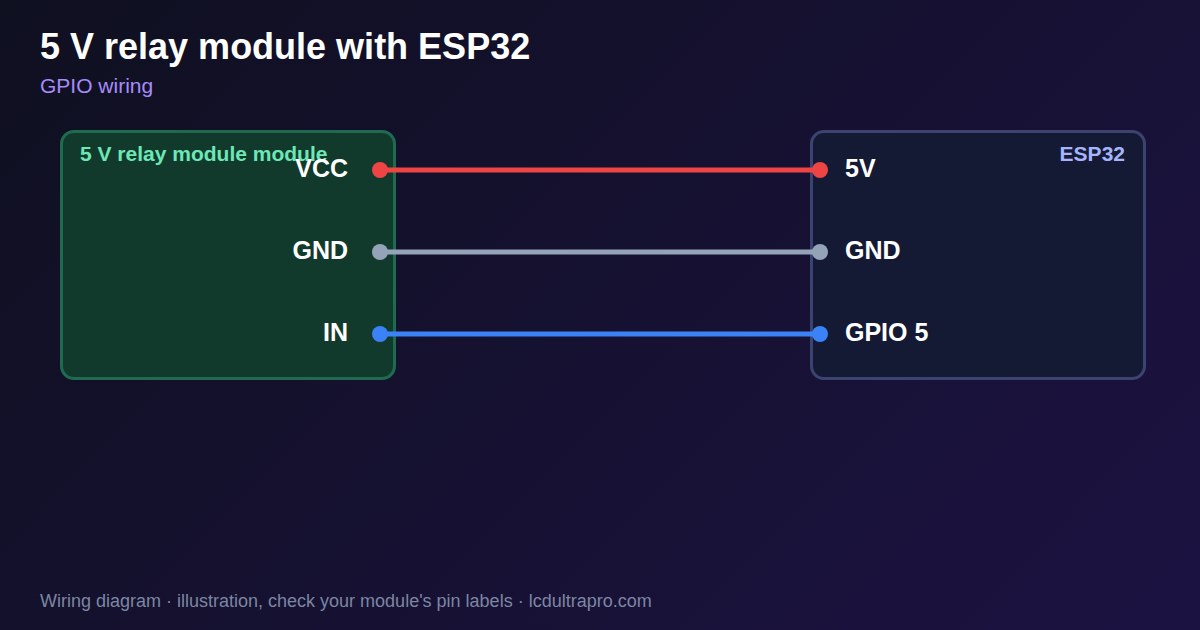
Specifications
| Coil supply | 5 V |
|---|---|
| Input | Usually active-low |
| Contacts | COM, NO, NC |
| Typical rating | Printed on the relay, often 10 A 250 V |
| Isolation | Depends on the module design |
Power and logic levels
3.3 V: check your module first
| Supply | Often 5 V coil |
|---|---|
| Signal level | Input level varies, an active-low input can sit near 5 V |
| On an ESP32 | Use one of the two circuits below. Modules with a JD-VCC jumper can use 3V3 on VCC. Other modules need an NPN transistor. |
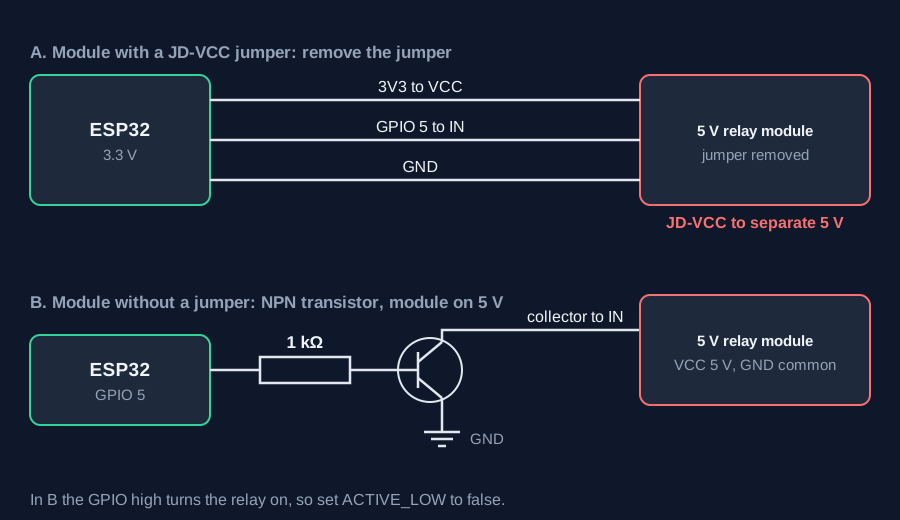
ESP32 pins, including those on a display board's connectors, work at 3.3 V and are not 5 V tolerant. Modules differ, so if in doubt, measure the signal before you connect it.
Wiring
| 5 V relay module | Connect to | Note |
|---|---|---|
| VCC | 3V3 | Module with a JD-VCC jumper, jumper removed |
| JD-VCC | 5V | Relay coil supply |
| GND | GND | Common ground |
| IN | GPIO 5 | Active-low on most modules |
Arduino code
const int RELAY_PIN = 5;    // choose a pin that stays quiet during boot
const bool ACTIVE_LOW = true;

void relay(bool on) {
  digitalWrite(RELAY_PIN, on == ACTIVE_LOW ? LOW : HIGH);
}

void setup() {
  relay(false);             // set the level before enabling the output
  pinMode(RELAY_PIN, OUTPUT);
}

void loop() {
  relay(true);
  delay(2000);
  relay(false);
  delay(2000);
}
No extra library needed. Compiled for ESP32-S3 with arduino-esp32 3.x. Not yet tested by us on a physical sensor. Change the pins to match your board.
On a display
In LCD Ultra Pro a button or rule can switch a pin directly, and the Time Switch components can drive it on a schedule, without writing code.
Design a display for 5 V relay moduleBoards with a ready connector
Only boards whose connectors we have surveyed. Others may still work on free GPIOs.
| Elecrow CrowPanel ESP32 HMI 2.4" | GPIO_D port: GPIO 25 |
| Elecrow CrowPanel ESP32 HMI 2.8" | GPIO_D port: GPIO 25 |
| Elecrow CrowPanel ESP32 HMI 3.5" | GPIO_D port: GPIO 25 |
| Elecrow CrowPanel ESP32-S3 HMI 4.3" | GPIO_D port: GPIO 37 |
| Elecrow CrowPanel ESP32-S3 HMI 5.0" | GPIO_D port: GPIO 38 |
| Elecrow CrowPanel ESP32-S3 HMI 7.0" | GPIO_D port: GPIO 38 |
| LilyGO T-Display (classic) 1.14" | Left pin header: GPIO 21 |
| LilyGO T-Display-S3-Pro 2.33" | QWIIC LEFT: GPIO 43 |
| LilyGO T-Deck 2.8" | Grove connector: GPIO 43On the T-Deck Plus this port is taken by the built-in GPS |
| M5Stack AtomS3 0.85" | Grove port: GPIO 2 |
| M5Stack M5StickC Plus2 1.14" | Grove port: GPIO 32 |
| Sunton ESP32-2432S028R 2.8" | GPIO header (P3): GPIO 22GPIO 21 is the display backlight — not usable. GPIO 35 is input-only. No 3V3 pin on P3 (only GND). |
| Sunton ESP32-4827S043R/C 4.3" | GPIO header (P4): GPIO 17P3 carries the same two pins |
| Sunton ESP32-8048S043C 4.3" | GPIO header (P4): GPIO 17P3 carries the same two pins |
| Sunton ESP32-8048S050C 5.0" | GPIO header (P4): GPIO 17P5 carries the same pins. Shared with the I2S amplifier of the speaker output (P6). |
| Sunton ESP32-8048S070C 7.0" | GPIO header (P4): GPIO 17P5 carries the same pins. Shared with the I2S amplifier of the speaker output (P6). |
| Waveshare ESP32-S3 Touch LCD 1.28" round | SH1.0 GPIO header: GPIO 15Six GPIOs led out per the wiki pin table |
| Waveshare ESP32-S3 Touch LCD 1.28" round (CNC metal housing) | SH1.0 GPIO header: GPIO 15Six GPIOs led out per the wiki pin table |
| Waveshare ESP32-S3-LCD-7B | GPIO connector (J8): GPIO 6 |
Good to know
- Mains voltage can kill. Use a qualified electrician.
- Most modules are active-low. Check yours.
- 3.3 V high may not hold some 5 V modules off. Test before relying on it.
- Set the output level before enabling the pin, to avoid a click at boot.
- Inductive DC loads need a flyback diode across the load.
What it is good for
- Pumps and valves
- Lights and fans
- Timed irrigation
FAQ
Why is my relay always on with an ESP32?
Many 5 V modules are active-low, and a 3.3 V high may not turn the input fully off. Use a 3.3 V module or a transistor stage.
Why does the relay click at boot?
The pin floats or toggles during boot. Pick a quiet pin and set the level before enabling the output.
Can I switch 230 V with it?
Only with proper enclosure and wiring by a qualified person.
Sources
Related parts
Use this information at your own risk. It is for general guidance only: the example code compiles, but it has not been tested on every part, and modules differ between sellers. Check the manufacturer's data before you build. Product names belong to their owners, and LCD Ultra Pro is not affiliated with them. See our Terms.