Light, distance and motion
HC-SR501 PIR with ESP32
The HC-SR501 detects moving warm bodies and sets one output pin high. There is no protocol, so reading it is a single digitalRead(). Its best job on a display project is waking the screen when someone walks up, and letting it dim again afterwards.
Power it from 5 V. The rated supply is 4.5 to 20 V, and an onboard regulator needs that headroom, so a 3.3 V rail alone will not run it reliably. The output is normally 3.3 V, which an ESP32 can read directly, but one seller lists 5 V for its modules, so measure yours before connecting it.
Two trimmers set sensitivity and hold time. Listed delay ranges differ between sellers, from 5 seconds to several minutes, and the direction of the knob varies too, so test it. A jumper chooses repeatable triggering, where movement extends the hold time. Give the sensor about 60 seconds after power-on to settle, because false triggers during that time are normal. Sunlight and warm air from heaters can also trigger it.
Specifications
| Detects | Moving warm bodies |
|---|---|
| Supply | 4.5–20 V |
| Output | High about 3.3 V, low 0 V |
| Range | About 7 m at high sensitivity |
| Hold time | Adjustable, sellers list 5–200 s or up to 5 min |
| Warm-up | About 60 s |
Power and logic levels
3.3 V: safe to connect directly
| Supply | 4.5–20 V |
|---|---|
| Signal level | Output about 3.3 V |
| On an ESP32 | 5 V goes in, 3.3 V comes out, so it connects directly. The onboard regulator feeds the logic. |
ESP32 pins, including those on a display board's connectors, work at 3.3 V and are not 5 V tolerant. Modules differ, so if in doubt, measure the signal before you connect it.
Wiring
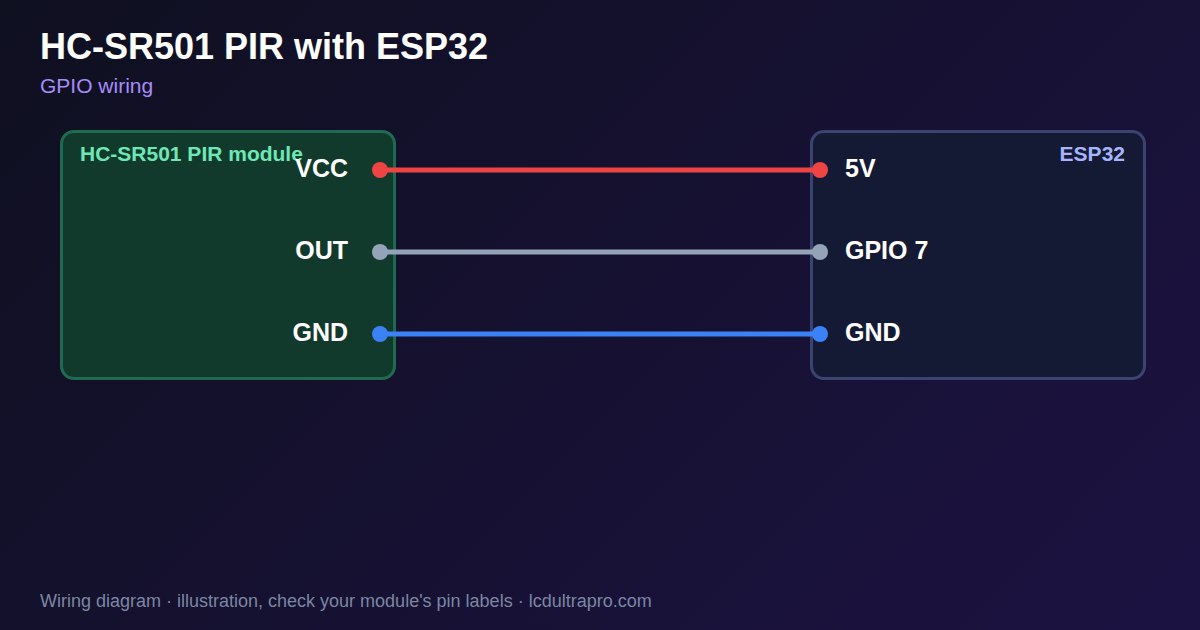
| HC-SR501 PIR | Connect to | Note |
|---|---|---|
| VCC | 5V | Not 3V3 |
| OUT | GPIO 7 | Measure it first: normally 3.3 V |
| GND | GND |
Arduino code
const int PIR_PIN = 7;   // any free GPIO
bool last = false;

void setup() {
  Serial.begin(115200);
  pinMode(PIR_PIN, INPUT);
  delay(60000);          // let the sensor settle after power-on
}

void loop() {
  bool now = digitalRead(PIR_PIN);
  if (now != last) {
    Serial.println(now ? "Motion" : "Clear");
    last = now;
  }
  delay(50);
}
No extra library needed. Compiled for ESP32-S3 with arduino-esp32 3.x. Not yet tested by us on a physical sensor. Change the pins to match your board.
On a display
In LCD Ultra Pro you can use it as a hardware input: a rule reacts when the pin changes, for example to wake the screen, without writing code.
Design a display for HC-SR501 PIRBoards with a ready connector
Only boards whose connectors we have surveyed. Others may still work on free GPIOs.
| Elecrow CrowPanel ESP32 HMI 2.4" | GPIO_D port: GPIO 25 |
| Elecrow CrowPanel ESP32 HMI 2.8" | GPIO_D port: GPIO 25 |
| Elecrow CrowPanel ESP32 HMI 3.5" | GPIO_D port: GPIO 25 |
| Elecrow CrowPanel ESP32-S3 HMI 4.3" | GPIO_D port: GPIO 37 |
| Elecrow CrowPanel ESP32-S3 HMI 5.0" | GPIO_D port: GPIO 38 |
| Elecrow CrowPanel ESP32-S3 HMI 7.0" | GPIO_D port: GPIO 38 |
| LilyGO T-Display (classic) 1.14" | Left pin header: GPIO 21 |
| LilyGO T-Display-S3-Pro 2.33" | QWIIC LEFT: GPIO 43 |
| LilyGO T-Deck 2.8" | Grove connector: GPIO 43On the T-Deck Plus this port is taken by the built-in GPS |
| M5Stack AtomS3 0.85" | Grove port: GPIO 2 |
| M5Stack M5StickC Plus2 1.14" | Grove port: GPIO 32 |
| Sunton ESP32-2432S028R 2.8" | GPIO header (P3): GPIO 22GPIO 21 is the display backlight — not usable. GPIO 35 is input-only. No 3V3 pin on P3 (only GND). |
| Sunton ESP32-4827S043R/C 4.3" | GPIO header (P4): GPIO 17P3 carries the same two pins |
| Sunton ESP32-8048S043C 4.3" | GPIO header (P4): GPIO 17P3 carries the same two pins |
| Sunton ESP32-8048S050C 5.0" | GPIO header (P4): GPIO 17P5 carries the same pins. Shared with the I2S amplifier of the speaker output (P6). |
| Sunton ESP32-8048S070C 7.0" | GPIO header (P4): GPIO 17P5 carries the same pins. Shared with the I2S amplifier of the speaker output (P6). |
| Waveshare ESP32-S3 Touch LCD 1.28" round | SH1.0 GPIO header: GPIO 15Six GPIOs led out per the wiki pin table |
| Waveshare ESP32-S3 Touch LCD 1.28" round (CNC metal housing) | SH1.0 GPIO header: GPIO 15Six GPIOs led out per the wiki pin table |
| Waveshare ESP32-S3-LCD-7B | GPIO connector (J8): GPIO 6 |
Good to know
- It needs 5 V on VCC. 3.3 V is not enough.
- Measure the output before connecting it. It is normally 3.3 V.
- False triggers are normal for about a minute after power-on.
- Sunlight and heaters can trigger it.
What it is good for
- Waking a display on approach
- Hallway and stair lights
- Simple presence alarms
FAQ
Can the HC-SR501 run on 3.3 V?
Not reliably. The rated supply is 4.5 to 20 V.
Is the output safe for an ESP32?
Normally yes, about 3.3 V, but measure your module first.
Why does it trigger by itself after power-on?
It needs about 60 seconds to settle.
Sources
Related parts
Use this information at your own risk. It is for general guidance only: the example code compiles, but it has not been tested on every part, and modules differ between sellers. Check the manufacturer's data before you build. Product names belong to their owners, and LCD Ultra Pro is not affiliated with them. See our Terms.