Light, distance and motion
HC-SR04 with ESP32
The HC-SR04 measures distance with sound, from about 2 cm to 400 cm. A 10 µs pulse on TRIG sends a 40 kHz burst, and ECHO stays high for the round trip. Divide the time in microseconds by 58 to get centimetres.
This is a 5 V part, and that is the trap on an ESP32. Power it from 5 V, because 3.3 V is often not enough to drive it. The ECHO pin then outputs 5 V, which is too much for an ESP32 GPIO. Use a divider, such as 1 kΩ in series and 2 kΩ to ground, which brings it to about 3.3 V. TRIG can be driven directly from a 3.3 V pin.
Readings depend on the target and on air temperature. Soft or angled surfaces scatter sound, and targets closer than 2 cm are unreliable. Keep at least 60 ms between measurements so old echoes die out. pulseIn() blocks while waiting, so a long timeout can make a display feel slow: keep it short, or measure on the other core.
Specifications
| Measures | Distance |
|---|---|
| Range | 2–400 cm |
| Supply | 5 V |
| Trigger | 10 µs high pulse on TRIG |
| Echo | High for the round trip, µs / 58 = cm |
| Measurement cycle | More than 60 ms |
Power and logic levels
5 V signal: needs a divider or level shifter
| Supply | 5 V |
|---|---|
| Signal level | ECHO is 5 V |
| On an ESP32 | Use a divider on ECHO. TRIG can go directly from the ESP32. |
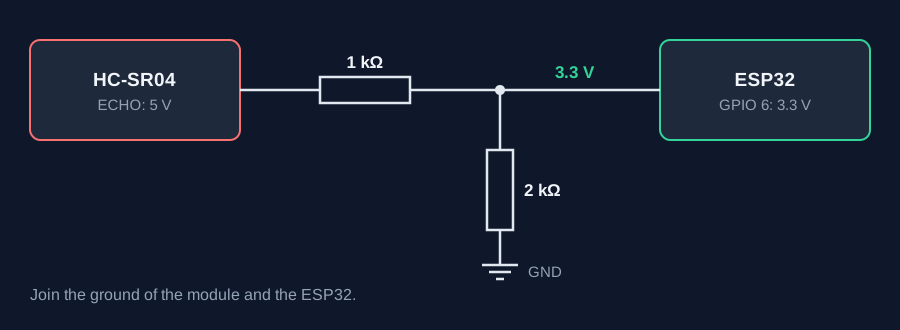
ESP32 pins, including those on a display board's connectors, work at 3.3 V and are not 5 V tolerant. Modules differ, so if in doubt, measure the signal before you connect it.
Wiring
| HC-SR04 | Connect to | Note |
|---|---|---|
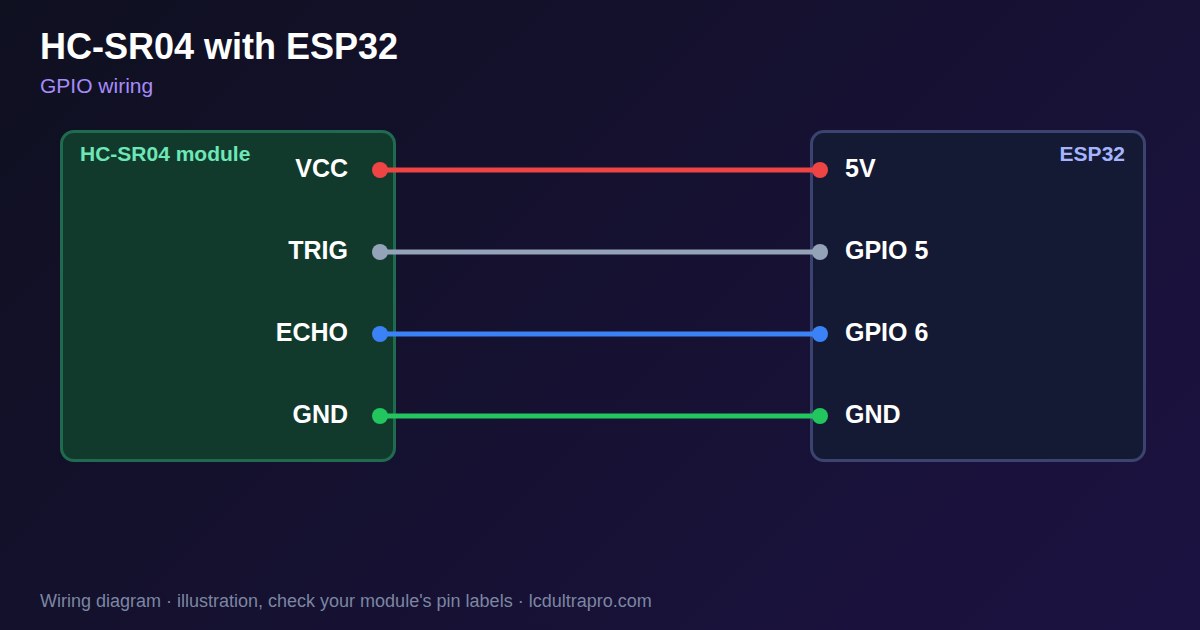
| VCC | 5V | Not 3V3 |
| TRIG | GPIO 5 | Direct |
| ECHO | GPIO 6 | Through a divider: 1 kΩ series, 2 kΩ to GND |
| GND | GND |
Arduino code
const int TRIG_PIN = 5, ECHO_PIN = 6;   // ECHO through a voltage divider

void setup() {
  Serial.begin(115200);
  pinMode(TRIG_PIN, OUTPUT);
  pinMode(ECHO_PIN, INPUT);
}

void loop() {
  digitalWrite(TRIG_PIN, HIGH);
  delayMicroseconds(10);
  digitalWrite(TRIG_PIN, LOW);
  unsigned long us = pulseIn(ECHO_PIN, HIGH, 30000);   // 30 ms timeout
  if (us == 0) Serial.println("No echo");
  else Serial.printf("%.1f cm\n", us / 58.0);
  delay(100);
}
No extra library needed. Compiled for ESP32-S3 with arduino-esp32 3.x. Not yet tested by us on a physical sensor. Change the pins to match your board.
On a display
Read the value in your sketch and pass it to a label, or send it over MQTT and show it with an MQTT value in the editor.
Design a display for HC-SR04Boards with a ready connector
Only boards whose connectors we have surveyed. Others may still work on free GPIOs.
| Elecrow CrowPanel ESP32 HMI 2.4" | GPIO_D port: GPIO 25, 32 |
| Elecrow CrowPanel ESP32 HMI 2.8" | GPIO_D port: GPIO 25, 32 |
| Elecrow CrowPanel ESP32 HMI 3.5" | GPIO_D port: GPIO 25, 32 |
| Elecrow CrowPanel ESP32-S3 HMI 4.3" | GPIO_D port: GPIO 37, 38 |
| LilyGO T-Display (classic) 1.14" | Left pin header: GPIO 21, 22 |
| LilyGO T-Display-S3-Pro 2.33" | QWIIC LEFT: GPIO 43, 44 |
| LilyGO T-Deck 2.8" | Grove connector: GPIO 43, 44On the T-Deck Plus this port is taken by the built-in GPS |
| M5Stack AtomS3 0.85" | Grove port: GPIO 2, 1 |
| M5Stack M5StickC Plus2 1.14" | Grove port: GPIO 32, 33 |
| Sunton ESP32-2432S028R 2.8" | GPIO / I2C header (CN1): GPIO 22, 27 |
| Sunton ESP32-4827S043R/C 4.3" | GPIO header (P4): GPIO 17, 18P3 carries the same two pins |
| Sunton ESP32-8048S043C 4.3" | GPIO header (P4): GPIO 17, 18P3 carries the same two pins |
| Sunton ESP32-8048S050C 5.0" | GPIO header (P4): GPIO 17, 18P5 carries the same pins. Shared with the I2S amplifier of the speaker output (P6). |
| Sunton ESP32-8048S070C 7.0" | GPIO header (P4): GPIO 17, 18P5 carries the same pins. Shared with the I2S amplifier of the speaker output (P6). |
| Waveshare ESP32-S3 Touch LCD 1.28" round | SH1.0 GPIO header: GPIO 15, 16Six GPIOs led out per the wiki pin table |
| Waveshare ESP32-S3 Touch LCD 1.28" round (CNC metal housing) | SH1.0 GPIO header: GPIO 15, 16Six GPIOs led out per the wiki pin table |
Good to know
- ECHO is 5 V. Always use a divider on an ESP32.
- Power it from 5 V, not 3.3 V.
- pulseIn() blocks. Keep the timeout short on a display project.
- Soft and angled targets give poor echoes.
What it is good for
- Water tank level displays
- Parking distance indicators
- Object presence detection
FAQ
Can I connect HC-SR04 ECHO directly to an ESP32?
No. ECHO outputs 5 V. Use a divider such as 1 kΩ and 2 kΩ.
Does the HC-SR04 work on 3.3 V?
Often not reliably. Power it from 5 V.
How do I convert the echo time to distance?
Divide the pulse time in microseconds by 58 to get centimetres.
Sources
Related parts
Use this information at your own risk. It is for general guidance only: the example code compiles, but it has not been tested on every part, and modules differ between sellers. Check the manufacturer's data before you build. Product names belong to their owners, and LCD Ultra Pro is not affiliated with them. See our Terms.