Current, voltage and power
TP4056 battery charger with ESP32
Do not connect a lithium cell straight to the 3V3 pin. A cell runs from about 4.2 V down to 3.0 V, which is too high when full and too low when empty, so a regulated 3.3 V rail is needed between them. A display board with a large backlight also pulls far more current than a bare ESP32, so test runtime on your real board. A TP4056 only handles charging.
Buy the module with protection, which has BAT and OUT terminals and a DW01 chip. It cuts off for over-discharge at around 2.5 V. That is too low to be a normal stopping point, so stop in software earlier, for example at 3.2 V, and put the board to sleep. The charge current is set by the PROG resistor: 1.2 kΩ gives about 1 A. Check that yours suits your cell. A small cell should not be charged at 1 A.
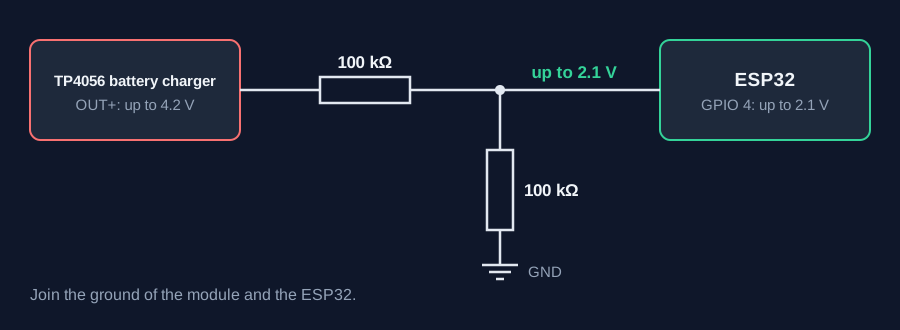
Using it while charging works on most boards, but load sharing is not a clean feature here, and forum users say to test your exact board. The load can confuse the charger's end-of-charge detection. Allow for USB current too, as the charger and the board both draw from it. To read the battery, use a divider from BAT+ to an ADC pin. Two equal resistors halve the voltage, so 4.2 V becomes 2.1 V, safely within range. High values cut the drain but load the ADC, so calibrate against a multimeter. Voltage is only a rough guide to charge left. LCD Ultra Pro can read an analog pin and show it on a bar or label without code. Use your measured empty and full values.
Specifications
| Charge current | About 1 A with 1.2 kΩ PROG |
|---|---|
| Cell range | About 3.0–4.2 V |
| DW01 cut-off | About 2.5 V |
| Terminals | BAT to cell, OUT to load |
| Battery divider | Two equal resistors, ratio 0.5 |
Power and logic levels
5 V signal: needs a divider or level shifter
| Supply | 5 V in, cell up to 4.2 V |
|---|---|
| Signal level | Cell voltage is above 3.3 V |
| On an ESP32 | Use a divider to read the cell. Never connect BAT+ to a GPIO or 3V3. |
ESP32 pins, including those on a display board's connectors, work at 3.3 V and are not 5 V tolerant. Modules differ, so if in doubt, measure the signal before you connect it.
Wiring
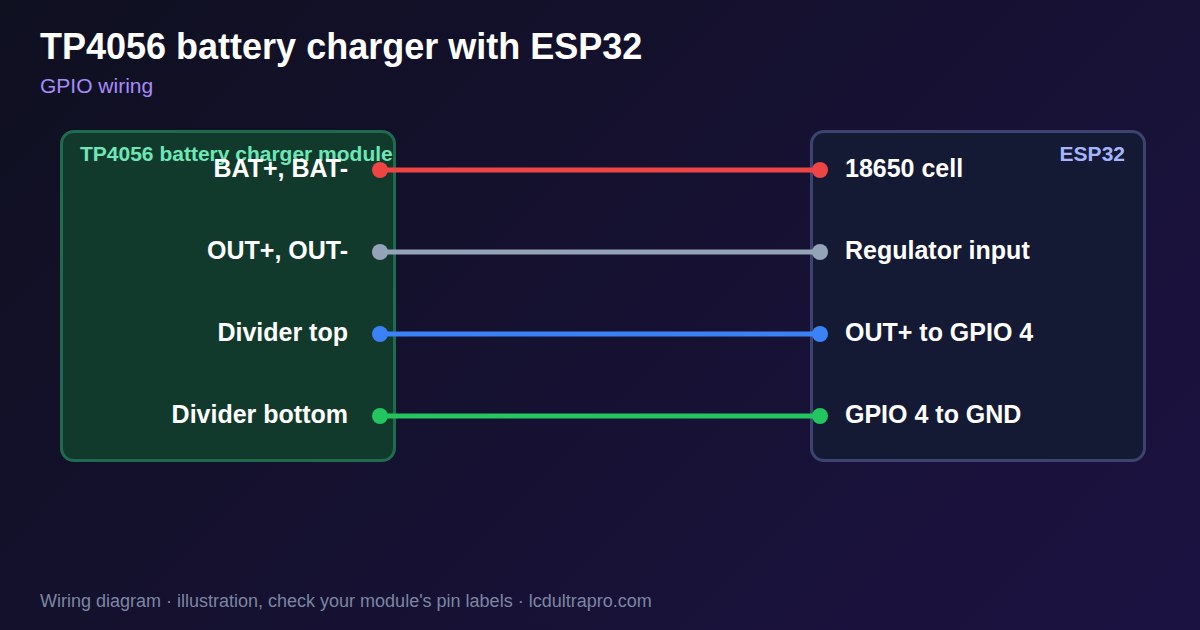
| TP4056 battery charger | Connect to | Note |
|---|---|---|
| BAT+, BAT- | 18650 cell | Check polarity |
| OUT+, OUT- | Regulator input | Not directly to 3V3 |
| Divider top | OUT+ to GPIO 4 | 100 kΩ |
| Divider bottom | GPIO 4 to GND | 100 kΩ |
Arduino code
const int ADC_PIN = 4;
const float DIVIDER = 2.0;            // two equal resistors
const float LOW_VOLTS = 3.2;          // stop before the DW01 cuts off

void setup() {
  Serial.begin(115200);
}

void loop() {
  long sum = 0;
  for (int i = 0; i < 32; i++) sum += analogReadMilliVolts(ADC_PIN);
  float volts = sum / 32.0 * DIVIDER / 1000.0;
  Serial.printf("Battery %.2f V\n", volts);
  if (volts < LOW_VOLTS) {
    Serial.println("Low battery: going to sleep");
    esp_deep_sleep_start();
  }
  delay(10000);
}
No extra library needed. Compiled for ESP32-S3 with arduino-esp32 3.x. Not yet tested by us on a physical sensor. Change the pins to match your board.
On a display
In LCD Ultra Pro a rule can read an analog pin and scale it, so a bar or label can show the battery level without code.
Design a display for TP4056 battery chargerBoards with a ready connector
Only boards whose connectors we have surveyed. Others may still work on free GPIOs.
| Elecrow CrowPanel ESP32 HMI 2.4" | GPIO_D port: GPIO 32 (ADC) |
| Elecrow CrowPanel ESP32 HMI 2.8" | GPIO_D port: GPIO 32 (ADC) |
| Elecrow CrowPanel ESP32 HMI 3.5" | GPIO_D port: GPIO 32 (ADC) |
| LilyGO T-Display (classic) 1.14" | Right pin header: GPIO 36 (ADC)36 / 37 / 38 / 39 are input-only |
| M5Stack AtomS3 0.85" | Grove port: GPIO 2 (ADC) |
| M5Stack M5StickC Plus2 1.14" | Grove port: GPIO 32 (ADC) |
| Sunton ESP32-2432S028R 2.8" | GPIO header (P3): GPIO 35 (ADC)GPIO 21 is the display backlight — not usable. GPIO 35 is input-only. No 3V3 pin on P3 (only GND). |
| Waveshare ESP32-S3-LCD-7B | GPIO connector (J8): GPIO 6 (ADC) |
Good to know
- Use a protected module.
- Do not feed a cell into 3V3.
- Stop in software above the DW01 cut-off.
- Match charge current to the cell.
What it is good for
- Portable display projects
- Battery backup
- Solar logging
FAQ
Can I power an ESP32 directly from the TP4056?
Not directly: use a 3.3 V regulator.
Can I use the board while charging?
Often yes, but test your exact board.
How do I set the charge current?
With the PROG resistor: 1.2 kΩ gives about 1 A.
Sources
Related parts
Use this information at your own risk. It is for general guidance only: the example code compiles, but it has not been tested on every part, and modules differ between sellers. Check the manufacturer's data before you build. Product names belong to their owners, and LCD Ultra Pro is not affiliated with them. See our Terms.