Motors
28BYJ-48 stepper with ESP32
If your 28BYJ-48 only buzzes and shakes, the likely cause is the pin order. AccelStepper needs IN1, IN3, IN2, IN4, and not the order printed on the board. Change that in the constructor before you check anything else. The example already has it.
This small geared motor costs very little and comes with a ULN2003 driver board. It takes four GPIOs and 5 V. The ULN2003 inputs work from 3.3 V logic, but the motor still needs 5 V, and it can pull about 250 mA. One motor on a strong supply may be fine. If the display board resets when it starts, use a separate 5 V supply and join the grounds.
Sources give different step counts: 4096 per output turn in half-step mode and 2048 in full-step mode. The example uses half steps, so 1024 steps per second gives about 15 RPM, a practical top speed. It is slow and has gearbox backlash, so it suits valves, blinds, dials and rotating displays better than anything that needs precision or speed. Going faster usually makes it skip, without warning. The coils stay powered between moves, and the sources warn that a long hold heats both motor and board, so turn the outputs off when it stops. Four GPIOs is a lot on a parallel RGB board, so check the board page first.
Specifications
| Supply | 5 V |
|---|---|
| Current | About 250 mA |
| Steps per turn | 4096 half steps, 2048 full |
| Practical speed | 10–15 RPM |
| Driver | ULN2003, 4 GPIOs |
Power and logic levels
3.3 V: safe to connect directly
| Supply | Motor 5 V |
|---|---|
| Signal level | ESP32 only drives the ULN2003 inputs, 3.3 V is enough |
| On an ESP32 | Nothing comes back to the ESP32, so no level shifting is needed. |
ESP32 pins, including those on a display board's connectors, work at 3.3 V and are not 5 V tolerant. Modules differ, so if in doubt, measure the signal before you connect it.
Wiring
| 28BYJ-48 stepper | Connect to | Note |
|---|---|---|
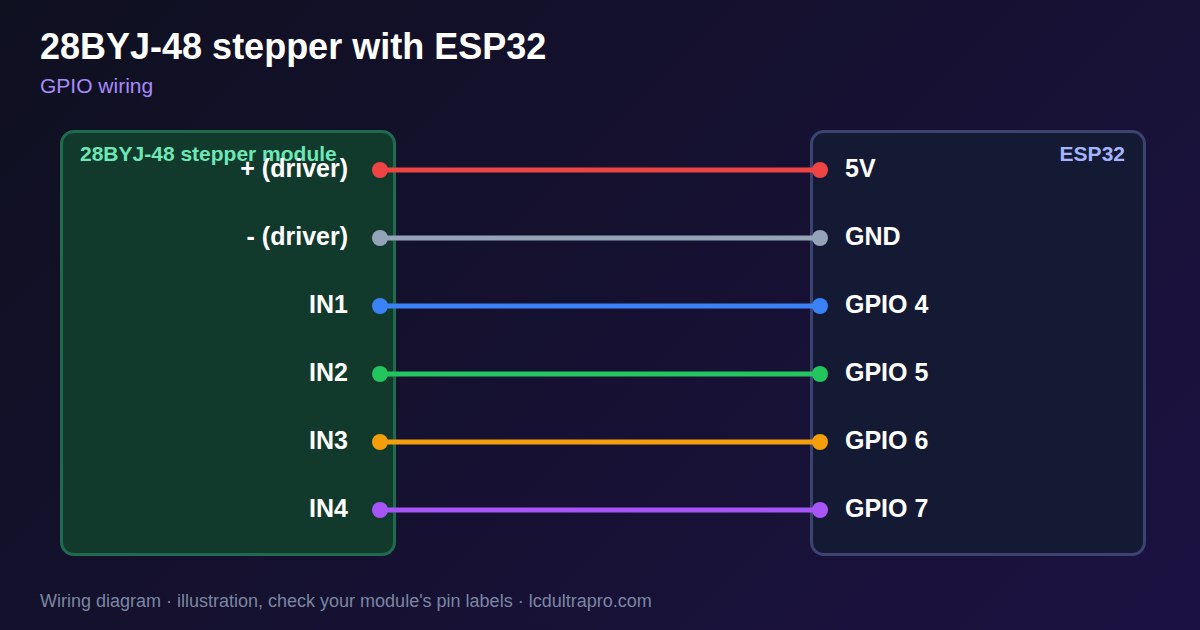
| + (driver) | 5V | External if the board resets |
| - (driver) | GND | Common ground |
| IN1 | GPIO 4 | |
| IN2 | GPIO 5 | |
| IN3 | GPIO 6 | |
| IN4 | GPIO 7 |
Arduino code
#include <AccelStepper.h>

// Note the order: IN1, IN3, IN2, IN4
AccelStepper stepper(AccelStepper::HALF4WIRE, 4, 6, 5, 7);
const long STEPS_PER_TURN = 4096;

void setup() {
  stepper.setMaxSpeed(1000);
  stepper.setAcceleration(400);
  stepper.moveTo(STEPS_PER_TURN);
}

void loop() {
  if (stepper.distanceToGo() == 0) {
    stepper.disableOutputs();            // stop heating the coils
    delay(1000);
    stepper.enableOutputs();
    stepper.moveTo(-stepper.currentPosition());
  }
  stepper.run();
}
Needs the AccelStepper library. Compiled for ESP32-S3 with arduino-esp32 3.x. Not yet tested by us on a physical sensor. Change the pins to match your board.
On a display
Read the value in your sketch and pass it to a label, or send it over MQTT and show it with an MQTT value in the editor.
Design a display for 28BYJ-48 stepperBoards with a ready connector
Only boards whose connectors we have surveyed. Others may still work on free GPIOs.
| LilyGO T-Display (classic) 1.14" | Left pin header: GPIO 21, 22, 17, 13 |
| M5Stack AtomS3 0.85" | Bottom pin header: GPIO 5, 6, 7, 8 |
| Waveshare ESP32-S3 Touch LCD 1.28" round | SH1.0 GPIO header: GPIO 15, 16, 17, 18Six GPIOs led out per the wiki pin table |
| Waveshare ESP32-S3 Touch LCD 1.28" round (CNC metal housing) | SH1.0 GPIO header: GPIO 15, 16, 17, 18Six GPIOs led out per the wiki pin table |
Good to know
- AccelStepper needs IN1, IN3, IN2, IN4.
- It is slow: 10 to 15 RPM.
- Turn the coils off while idle.
- Use a separate 5 V if the board resets.
What it is good for
- Valves and blinds
- Rotating dials
- Slow positioning
FAQ
Why does my 28BYJ-48 only vibrate?
The pin order is wrong. Use IN1, IN3, IN2, IN4.
How many steps per revolution?
4096 half steps or 2048 full steps.
Why does it get hot?
The coils stay powered while holding. Disable the outputs when idle.
Sources
Related parts
Use this information at your own risk. It is for general guidance only: the example code compiles, but it has not been tested on every part, and modules differ between sellers. Check the manufacturer's data before you build. Product names belong to their owners, and LCD Ultra Pro is not affiliated with them. See our Terms.