Motors
TB6612FNG motor driver with ESP32
If a motor runs weakly on an L298N, the driver may be the reason. That older chip uses bipolar transistors and sources report a loss of 1.4 V to 3 V, so a 6 V motor can get far less than 6 V. The TB6612FNG uses MOSFETs and sources put its drop at about 0.5 V or lower, depending on current. It also accepts 3.3 V logic directly, between 2.7 and 5.5 V, so an ESP32 can drive it with no level shifter.
Each of its two channels handles 1.2 A continuous and 3.2 A peak, with a motor supply from 2.5 to 13.5 V. Check your motor's stall current, not only its running current: a motor rated well under 1 A can stall at far more. Sources describe the L298N as covering higher voltages, up to 46 V, so it still has a place on a 24 V machine. For sustained 2 A or more, choose a bigger driver such as the BTS7960.
Each motor takes two direction pins and one PWM pin, and all motors share a STBY pin that must be high or nothing moves. That is five or more GPIOs, which is a lot for a parallel RGB board. Check the board page first. Give the motors their own supply, since their current spikes will reset a display board that shares it, and join the grounds. PWM around 5 kHz avoids most audible whine. LCD Ultra Pro can set PWM and output pins from a slider or rule, so simple speed and direction control needs no code.
Specifications
| Channels | 2 |
|---|---|
| Current | 1.2 A continuous, 3.2 A peak per channel |
| Motor supply | 2.5–13.5 V |
| Logic | 2.7–5.5 V |
| Control pins | IN1, IN2, PWM per motor, plus STBY |
| Typical PWM | 5 kHz |
Power and logic levels
3.3 V: safe to connect directly
| Supply | Logic 2.7–5.5 V, motor 2.5–13.5 V |
|---|---|
| Signal level | 3.3 V logic is fine |
| On an ESP32 | Keep VM away from every ESP32 pin. |
ESP32 pins, including those on a display board's connectors, work at 3.3 V and are not 5 V tolerant. Modules differ, so if in doubt, measure the signal before you connect it.
Wiring
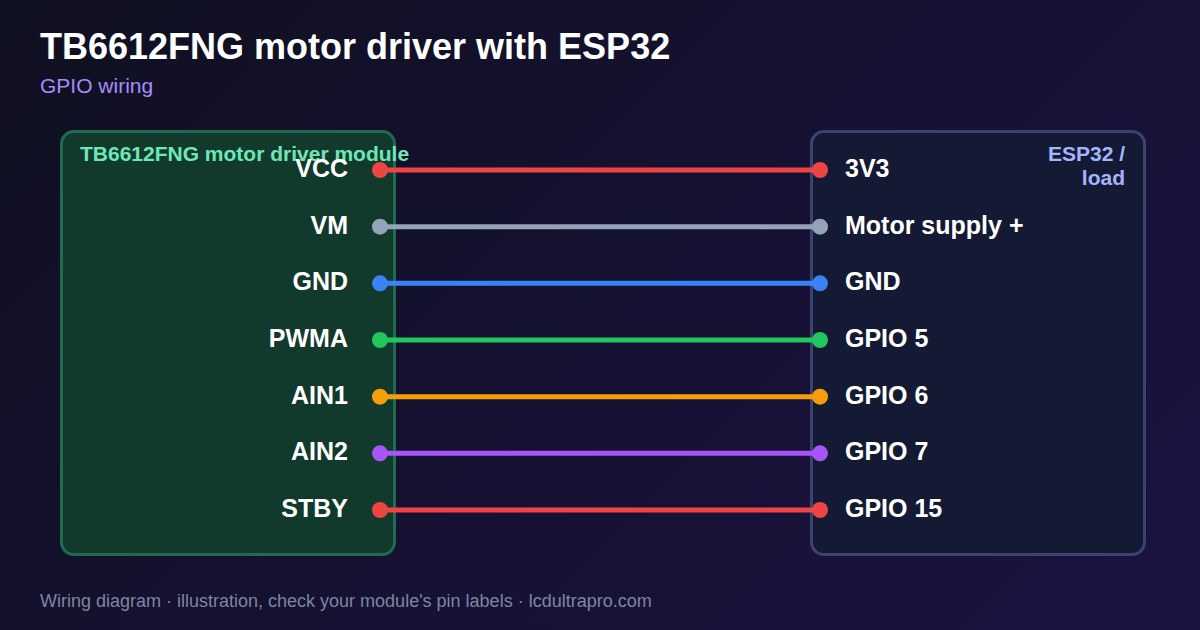
| TB6612FNG motor driver | Connect to | Note |
|---|---|---|
| VCC | 3V3 | Logic supply |
| VM | Motor supply + | Not the board's 3.3 V |
| GND | GND | Common with motor supply |
| PWMA | GPIO 5 | |
| AIN1 | GPIO 6 | |
| AIN2 | GPIO 7 | |
| STBY | GPIO 15 | High to run |
Arduino code
const int PWMA = 5, AIN1 = 6, AIN2 = 7, STBY = 15;
const int FREQ = 5000, BITS = 10;

void motor(int speed) {             // -1023 to 1023
  digitalWrite(AIN1, speed > 0);
  digitalWrite(AIN2, speed < 0);
  ledcWrite(PWMA, abs(speed));
}

void setup() {
  pinMode(AIN1, OUTPUT);
  pinMode(AIN2, OUTPUT);
  pinMode(STBY, OUTPUT);
  digitalWrite(STBY, HIGH);
  ledcAttach(PWMA, FREQ, BITS);
}

void loop() {
  motor(600);  delay(2000);
  motor(0);    delay(500);
  motor(-600); delay(2000);
  motor(0);    delay(500);
}
No extra library needed. Compiled for ESP32-S3 with arduino-esp32 3.x. Not yet tested by us on a physical sensor. Change the pins to match your board.
On a display
In LCD Ultra Pro a slider or rule can set a PWM value and output pins, so basic speed and direction control needs no code.
Design a display for TB6612FNG motor driverBoards with a ready connector
Only boards whose connectors we have surveyed. Others may still work on free GPIOs.
| LilyGO T-Display (classic) 1.14" | Left pin header: GPIO 21, 22, 17, 13 |
| M5Stack AtomS3 0.85" | Bottom pin header: GPIO 5, 6, 7, 8 |
| Waveshare ESP32-S3 Touch LCD 1.28" round | SH1.0 GPIO header: GPIO 15, 16, 17, 18Six GPIOs led out per the wiki pin table |
| Waveshare ESP32-S3 Touch LCD 1.28" round (CNC metal housing) | SH1.0 GPIO header: GPIO 15, 16, 17, 18Six GPIOs led out per the wiki pin table |
Good to know
- Check the motor's stall current.
- STBY must be high.
- Give motors their own supply and join the grounds.
- A motor needs at least three GPIOs, plus STBY.
What it is good for
- Small robots
- Pumps and small fans
- Replacing an L298N at low voltage
FAQ
Is the TB6612FNG better than an L298N?
At low voltage, yes: less loss and direct 3.3 V logic. The L298N reaches higher voltages.
Why does the motor not move?
Check that STBY is high and the motor supply is connected.
Why does the display reset when the motor starts?
The motor is pulling the supply down. Use a separate supply.
Sources
Related parts
Use this information at your own risk. It is for general guidance only: the example code compiles, but it has not been tested on every part, and modules differ between sellers. Check the manufacturer's data before you build. Product names belong to their owners, and LCD Ultra Pro is not affiliated with them. See our Terms.