Outputs and switching
IRLZ44N MOSFET with ESP32
A MOSFET switches or dims a DC load silently, where a relay would click and could not do PWM. A common use is a 12 V LED strip or fan controlled from a display board. It goes on the low side: load to +12 V, load to drain, source to ground, and the ESP32 gate signal turns it on.
The IRLZ44N is often called logic level, but be careful at 3.3 V. Sources disagree, and its best on-resistance is reached with about 5 V on the gate. At 3.3 V it can stay partly open and run hot at high current, so it is fine for small loads and not a safe choice for many amps. For larger loads use a gate driver, or a MOSFET that is specified at 3.3 V.
Add a resistor of about 100 to 330 Ω in series with the gate, and about 10 kΩ from gate to ground, so the load stays off while the ESP32 boots. Inductive loads such as fans, valves and motors need a flyback diode like a 1N4007 across them, with the cathode to +12 V. The grounds of both supplies must be connected. LCD Ultra Pro can set a PWM value on a pin from a slider or rule, without code.
Specifications
| Type | N-channel MOSFET |
|---|---|
| Use | Low-side switching and PWM |
| Gate-source maximum | ±16 V |
| Gate drive | Best near 5 V, partial at 3.3 V |
| Flyback diode | 1N4007 on inductive loads |
Power and logic levels
3.3 V: safe to connect directly
| Supply | Load supply is separate |
|---|---|
| Signal level | Gate takes 3.3 V, but opens only partly |
| On an ESP32 | Safe for the pin. For high current, use a gate driver. |
ESP32 pins, including those on a display board's connectors, work at 3.3 V and are not 5 V tolerant. Modules differ, so if in doubt, measure the signal before you connect it.
Wiring
| IRLZ44N MOSFET | Connect to | Note |
|---|---|---|
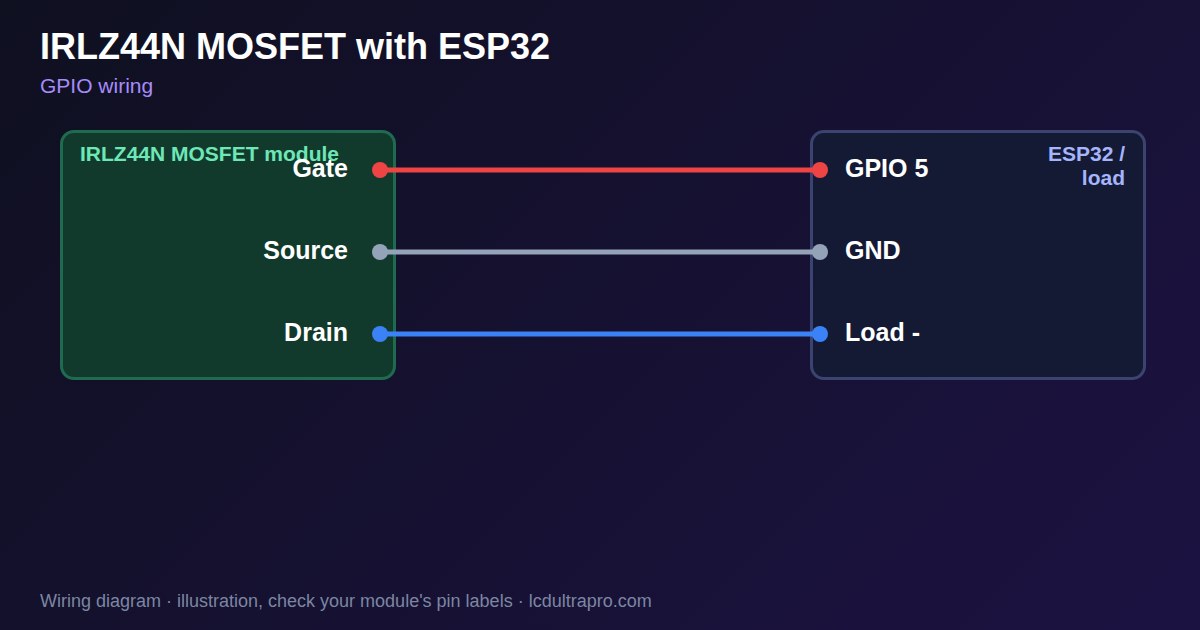
| Gate | GPIO 5 | Through 100–330 Ω, 10 kΩ to GND |
| Source | GND | Common with the load supply |
| Drain | Load - | Load + goes to +12 V |
Arduino code
const int GATE_PIN = 5;
const int FREQ = 1000, BITS = 10;

void setup() {
  ledcAttach(GATE_PIN, FREQ, BITS);
}

void loop() {
  for (int d = 0; d < 1024; d += 8) { ledcWrite(GATE_PIN, d); delay(10); }
  for (int d = 1023; d >= 0; d -= 8) { ledcWrite(GATE_PIN, d); delay(10); }
}
No extra library needed. Compiled for ESP32-S3 with arduino-esp32 3.x. Not yet tested by us on a physical sensor. Change the pins to match your board.
On a display
In LCD Ultra Pro a slider or rule can set a PWM value on a pin, so you can dim the load from the screen without writing code.
Design a display for IRLZ44N MOSFETBoards with a ready connector
Only boards whose connectors we have surveyed. Others may still work on free GPIOs.
| Elecrow CrowPanel ESP32 HMI 2.4" | GPIO_D port: GPIO 25 |
| Elecrow CrowPanel ESP32 HMI 2.8" | GPIO_D port: GPIO 25 |
| Elecrow CrowPanel ESP32 HMI 3.5" | GPIO_D port: GPIO 25 |
| Elecrow CrowPanel ESP32-S3 HMI 4.3" | GPIO_D port: GPIO 37 |
| Elecrow CrowPanel ESP32-S3 HMI 5.0" | GPIO_D port: GPIO 38 |
| Elecrow CrowPanel ESP32-S3 HMI 7.0" | GPIO_D port: GPIO 38 |
| LilyGO T-Display (classic) 1.14" | Left pin header: GPIO 21 |
| LilyGO T-Display-S3-Pro 2.33" | QWIIC LEFT: GPIO 43 |
| LilyGO T-Deck 2.8" | Grove connector: GPIO 43On the T-Deck Plus this port is taken by the built-in GPS |
| M5Stack AtomS3 0.85" | Grove port: GPIO 2 |
| M5Stack M5StickC Plus2 1.14" | Grove port: GPIO 32 |
| Sunton ESP32-2432S028R 2.8" | GPIO header (P3): GPIO 22GPIO 21 is the display backlight — not usable. GPIO 35 is input-only. No 3V3 pin on P3 (only GND). |
| Sunton ESP32-4827S043R/C 4.3" | GPIO header (P4): GPIO 17P3 carries the same two pins |
| Sunton ESP32-8048S043C 4.3" | GPIO header (P4): GPIO 17P3 carries the same two pins |
| Sunton ESP32-8048S050C 5.0" | GPIO header (P4): GPIO 17P5 carries the same pins. Shared with the I2S amplifier of the speaker output (P6). |
| Sunton ESP32-8048S070C 7.0" | GPIO header (P4): GPIO 17P5 carries the same pins. Shared with the I2S amplifier of the speaker output (P6). |
| Waveshare ESP32-S3 Touch LCD 1.28" round | SH1.0 GPIO header: GPIO 15Six GPIOs led out per the wiki pin table |
| Waveshare ESP32-S3 Touch LCD 1.28" round (CNC metal housing) | SH1.0 GPIO header: GPIO 15Six GPIOs led out per the wiki pin table |
| Waveshare ESP32-S3-LCD-7B | GPIO connector (J8): GPIO 6 |
Good to know
- At 3.3 V gate drive it may run hot at high current.
- Connect the grounds of both supplies.
- Inductive loads need a flyback diode.
- Check the temperature under real load.
What it is good for
- 12 V LED strip dimming
- Fan speed control
- Small solenoids and pumps
FAQ
Can an ESP32 drive an IRLZ44N directly?
For small loads, often yes. For high current, 3.3 V is not enough to open it fully.
Why does the MOSFET get hot?
It is only partly open at 3.3 V gate drive, or PWM switching is too slow.
Do I need a flyback diode?
Yes, on any inductive load.
Sources
Related parts
Use this information at your own risk. It is for general guidance only: the example code compiles, but it has not been tested on every part, and modules differ between sellers. Check the manufacturer's data before you build. Product names belong to their owners, and LCD Ultra Pro is not affiliated with them. See our Terms.