Motors
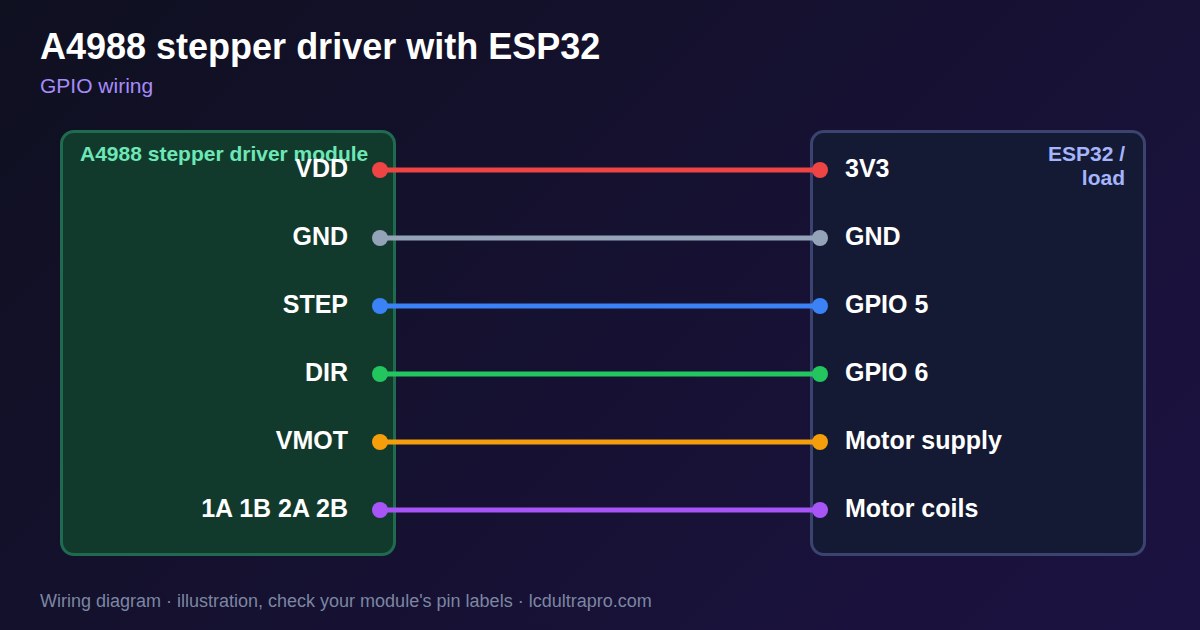
A4988 stepper driver with ESP32
The A4988 lets an ESP32 run a bipolar stepper motor with just two signals: STEP moves one step and DIR sets the direction. The small module has the power stage, current limiting and microstepping, so all the code has to do is send pulses.
Set the current limit before you connect anything valuable. Use Vref = Imot × 8 × Rs, where Rs is the sense resistor on your board. That value varies between clones, with 0.05, 0.068 and 0.1 Ω all seen. Measure Vref with the small trimmer and read the resistor marking instead of copying a value from a forum. Datasheet ratings look high, but expect about 1 A per phase without strong cooling, and up to 1.5 A with a heatsink and a fan.
Never unplug a motor while the driver is powered, because that can kill the driver. Motor power is separate, from about 8 V upward, and needs a large capacitor near the driver. Logic runs from the ESP32's 3.3 V. Step pulses must keep coming, so on a display board do not generate them in the same loop that redraws the screen. Use a timer or the second core, or the motor will stutter.
Specifications
| Control | STEP and DIR |
|---|---|
| Motor supply | From about 8 V, check your module |
| Logic | 3.3 V or 5 V |
| Current setting | Vref = Imot × 8 × Rs |
| Sense resistor | 0.05–0.1 Ω, varies by module |
| Practical current | About 1 A, up to 1.5 A with cooling |
Power and logic levels
3.3 V: safe to connect directly
| Supply | Logic 3–5.5 V, motor 8–35 V |
|---|---|
| Signal level | 3.3 V logic when VDD is 3V3 |
| On an ESP32 | Keep the motor supply away from every ESP32 pin. |
ESP32 pins, including those on a display board's connectors, work at 3.3 V and are not 5 V tolerant. Modules differ, so if in doubt, measure the signal before you connect it.
Wiring
| A4988 stepper driver | Connect to | Note |
|---|---|---|
| VDD | 3V3 | Logic |
| GND | GND | Both grounds |
| STEP | GPIO 5 | |
| DIR | GPIO 6 | |
| VMOT | Motor supply | With a large capacitor |
| 1A 1B 2A 2B | Motor coils | Never unplug live |
Arduino code
#include <AccelStepper.h>

const int STEP_PIN = 5, DIR_PIN = 6;
AccelStepper stepper(AccelStepper::DRIVER, STEP_PIN, DIR_PIN);

void setup() {
  stepper.setMaxSpeed(800);       // steps per second
  stepper.setAcceleration(400);
  stepper.moveTo(1600);
}

void loop() {
  if (stepper.distanceToGo() == 0) stepper.moveTo(-stepper.currentPosition());
  stepper.run();                  // call as often as possible
}
Needs the AccelStepper library. Compiled for ESP32-S3 with arduino-esp32 3.x. Not yet tested by us on a physical sensor. Change the pins to match your board.
On a display
Read the value in your sketch and pass it to a label, or send it over MQTT and show it with an MQTT value in the editor.
Design a display for A4988 stepper driverBoards with a ready connector
Only boards whose connectors we have surveyed. Others may still work on free GPIOs.
| Elecrow CrowPanel ESP32 HMI 2.4" | GPIO_D port: GPIO 25, 32 |
| Elecrow CrowPanel ESP32 HMI 2.8" | GPIO_D port: GPIO 25, 32 |
| Elecrow CrowPanel ESP32 HMI 3.5" | GPIO_D port: GPIO 25, 32 |
| Elecrow CrowPanel ESP32-S3 HMI 4.3" | GPIO_D port: GPIO 37, 38 |
| LilyGO T-Display (classic) 1.14" | Left pin header: GPIO 21, 22 |
| LilyGO T-Display-S3-Pro 2.33" | QWIIC LEFT: GPIO 43, 44 |
| LilyGO T-Deck 2.8" | Grove connector: GPIO 43, 44On the T-Deck Plus this port is taken by the built-in GPS |
| M5Stack AtomS3 0.85" | Grove port: GPIO 2, 1 |
| M5Stack M5StickC Plus2 1.14" | Grove port: GPIO 32, 33 |
| Sunton ESP32-2432S028R 2.8" | GPIO / I2C header (CN1): GPIO 22, 27 |
| Sunton ESP32-4827S043R/C 4.3" | GPIO header (P4): GPIO 17, 18P3 carries the same two pins |
| Sunton ESP32-8048S043C 4.3" | GPIO header (P4): GPIO 17, 18P3 carries the same two pins |
| Sunton ESP32-8048S050C 5.0" | GPIO header (P4): GPIO 17, 18P5 carries the same pins. Shared with the I2S amplifier of the speaker output (P6). |
| Sunton ESP32-8048S070C 7.0" | GPIO header (P4): GPIO 17, 18P5 carries the same pins. Shared with the I2S amplifier of the speaker output (P6). |
| Waveshare ESP32-S3 Touch LCD 1.28" round | SH1.0 GPIO header: GPIO 15, 16Six GPIOs led out per the wiki pin table |
| Waveshare ESP32-S3 Touch LCD 1.28" round (CNC metal housing) | SH1.0 GPIO header: GPIO 15, 16Six GPIOs led out per the wiki pin table |
Good to know
- Set Vref before use. The sense resistor varies by module.
- Never disconnect the motor while powered.
- Add a large capacitor on the motor supply.
- Generate steps away from the display redraw.
What it is good for
- Linear rails and small CNC
- Camera sliders
- Dosing pumps
FAQ
How do I set the A4988 current?
Vref = Imot × 8 × Rs. Check the sense resistor on your board.
Why does my stepper stutter with a display?
Display drawing delays the step pulses. Generate steps on a timer or the second core.
Why did my driver die?
Unplugging a motor while powered is a common cause, as is a missing capacitor.
Sources
Related parts
Use this information at your own risk. It is for general guidance only: the example code compiles, but it has not been tested on every part, and modules differ between sellers. Check the manufacturer's data before you build. Product names belong to their owners, and LCD Ultra Pro is not affiliated with them. See our Terms.