Motors
SG90 servo with ESP32
An SG90 is the small blue hobby servo found in most starter kits. You send one control pulse every 20 ms, and the pulse width sets the position. Because the control is a single signal pin, it is an easy way to move something from a touch display, such as a flap, a valve or a pointer.
Power it separately. Sources list 100 mA with no load, 200 to 250 mA under load, and stall current from about 360 mA to 750 mA or more. That is enough to reset a display board, so use a separate 4.8 to 6 V supply and connect only the grounds together. The signal wire works from a 3.3 V pin on most servos.
Pulse ranges differ between sources. Figures run from 900–2100 µs to 1000–2000 µs, and many examples stretch further. Pushing past the mechanical end makes the servo buzz and draw stall current, so find the real endpoints of yours and stay inside them. The code below uses the ESP32's LEDC PWM directly, so no library is needed, and it sweeps inside the safe 1000–2000 µs range.
Specifications
| Supply | 4.8–6 V |
|---|---|
| Current | About 100 mA idle, 200–250 mA loaded |
| Stall current | 360–750 mA, plan for 750 mA |
| Control | 50 Hz, about 1000–2000 µs |
| Wires | Brown GND, red V+, orange signal |
Power and logic levels
3.3 V: safe to connect directly
| Supply | 5 V from a separate supply |
|---|---|
| Signal level | Signal from ESP32, usually works at 3.3 V |
| On an ESP32 | Nothing comes back to the ESP32. Most servos accept 3.3 V, but one report found a cheap SG90 unreliable. |
ESP32 pins, including those on a display board's connectors, work at 3.3 V and are not 5 V tolerant. Modules differ, so if in doubt, measure the signal before you connect it.
Wiring
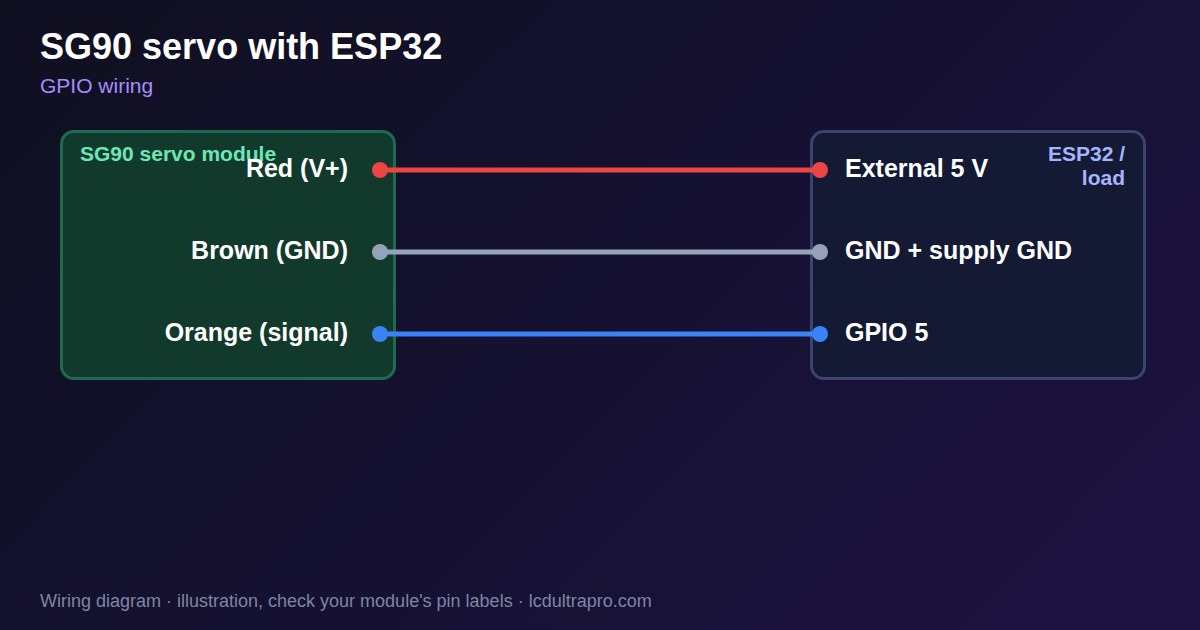
| SG90 servo | Connect to | Note |
|---|---|---|
| Red (V+) | External 5 V | Not from the display board |
| Brown (GND) | GND + supply GND | Common ground |
| Orange (signal) | GPIO 5 | Any PWM pin |
Arduino code
const int SERVO_PIN = 5;           // any free GPIO
const int FREQ = 50, BITS = 14;    // 20 ms period

void writeMicros(int us) {
  ledcWrite(SERVO_PIN, us * ((1 << BITS) - 1) / 20000);
}

void setup() {
  ledcAttach(SERVO_PIN, FREQ, BITS);
}

void loop() {
  for (int us = 1000; us <= 2000; us += 10) { writeMicros(us); delay(15); }
  for (int us = 2000; us >= 1000; us -= 10) { writeMicros(us); delay(15); }
}
No extra library needed. Compiled for ESP32-S3 with arduino-esp32 3.x. Not yet tested by us on a physical sensor. Change the pins to match your board.
On a display
Read the value in your sketch and pass it to a label, or send it over MQTT and show it with an MQTT value in the editor.
Design a display for SG90 servoBoards with a ready connector
Only boards whose connectors we have surveyed. Others may still work on free GPIOs.
| Elecrow CrowPanel ESP32 HMI 2.4" | GPIO_D port: GPIO 25 |
| Elecrow CrowPanel ESP32 HMI 2.8" | GPIO_D port: GPIO 25 |
| Elecrow CrowPanel ESP32 HMI 3.5" | GPIO_D port: GPIO 25 |
| Elecrow CrowPanel ESP32-S3 HMI 4.3" | GPIO_D port: GPIO 37 |
| Elecrow CrowPanel ESP32-S3 HMI 5.0" | GPIO_D port: GPIO 38 |
| Elecrow CrowPanel ESP32-S3 HMI 7.0" | GPIO_D port: GPIO 38 |
| LilyGO T-Display (classic) 1.14" | Left pin header: GPIO 21 |
| LilyGO T-Display-S3-Pro 2.33" | QWIIC LEFT: GPIO 43 |
| LilyGO T-Deck 2.8" | Grove connector: GPIO 43On the T-Deck Plus this port is taken by the built-in GPS |
| M5Stack AtomS3 0.85" | Grove port: GPIO 2 |
| M5Stack M5StickC Plus2 1.14" | Grove port: GPIO 32 |
| Sunton ESP32-2432S028R 2.8" | GPIO header (P3): GPIO 22GPIO 21 is the display backlight — not usable. GPIO 35 is input-only. No 3V3 pin on P3 (only GND). |
| Sunton ESP32-4827S043R/C 4.3" | GPIO header (P4): GPIO 17P3 carries the same two pins |
| Sunton ESP32-8048S043C 4.3" | GPIO header (P4): GPIO 17P3 carries the same two pins |
| Sunton ESP32-8048S050C 5.0" | GPIO header (P4): GPIO 17P5 carries the same pins. Shared with the I2S amplifier of the speaker output (P6). |
| Sunton ESP32-8048S070C 7.0" | GPIO header (P4): GPIO 17P5 carries the same pins. Shared with the I2S amplifier of the speaker output (P6). |
| Waveshare ESP32-S3 Touch LCD 1.28" round | SH1.0 GPIO header: GPIO 15Six GPIOs led out per the wiki pin table |
| Waveshare ESP32-S3 Touch LCD 1.28" round (CNC metal housing) | SH1.0 GPIO header: GPIO 15Six GPIOs led out per the wiki pin table |
| Waveshare ESP32-S3-LCD-7B | GPIO connector (J8): GPIO 6 |
Good to know
- Do not power it from the display board.
- Connect the grounds together.
- Buzzing at the end of travel means the pulse is too long. Reduce it.
- Check your servo's real pulse limits.
What it is good for
- Flaps and small valves
- Analog pointer gauges
- Pan and tilt mounts
FAQ
Why does my ESP32 reset when the servo moves?
The servo's current pulls the supply down. Use a separate 5 V supply and common ground.
Does an SG90 work with a 3.3 V signal?
Usually yes, with the servo powered from 5 V.
Do I need a servo library?
No. LEDC at 50 Hz can generate the pulse.
Sources
Related parts
Use this information at your own risk. It is for general guidance only: the example code compiles, but it has not been tested on every part, and modules differ between sellers. Check the manufacturer's data before you build. Product names belong to their owners, and LCD Ultra Pro is not affiliated with them. See our Terms.