Input devices
HX711 load cell with ESP32
Wrong scale readings usually come from the mechanics, not the code. A load cell has to bend, so it needs a mount that lets one end move and spacers at both ends. Screwed flat onto a base, it gives erratic numbers that no calibration will fix. Sort that out first.
The HX711 is a 24-bit ADC for weigh scales. Its datasheet gives a supply of 2.6 to 5.5 V, gains of 128 or 64 on channel A, and a choice of 10 or 80 samples per second. Many boards fix that at 10, so a display showing weight updates slowly by design. It uses two plain GPIOs, DT and SCK, and is not I2C, even though it has two wires. Most four-wire cells use red E+, black E-, white A- and green A+. Colours are not universal, so check yours with a multimeter. Swapped signal wires just reverse the sign.
Calibration is simple: take an empty reading as the offset, put a known weight on it, and divide. The result is your own factor, and it will not match anyone else's, so do not copy one. Use a weight near your normal load. Readings drift with temperature and over time, so tare after warm-up. Keep the wires short and away from the display cable, since the signals are tiny. The example does a basic tare and prints a raw value you can use to work out the factor.
Specifications
| Resolution | 24-bit |
|---|---|
| Supply | 2.6–5.5 V |
| Gain | 128 or 64 (A), 32 (B) |
| Output rate | 10 or 80 SPS |
| Interface | 2 GPIOs, DT and SCK (not I2C) |
| Usual cell colours | Red E+, black E-, white A-, green A+ |
Power and logic levels
3.3 V: safe to connect directly
| Supply | 2.6–5.5 V, use 3V3 |
|---|---|
| Signal level | DT follows the supply |
| On an ESP32 | Keep VCC at 3V3, otherwise DT can reach 5 V. |
ESP32 pins, including those on a display board's connectors, work at 3.3 V and are not 5 V tolerant. Modules differ, so if in doubt, measure the signal before you connect it.
Wiring
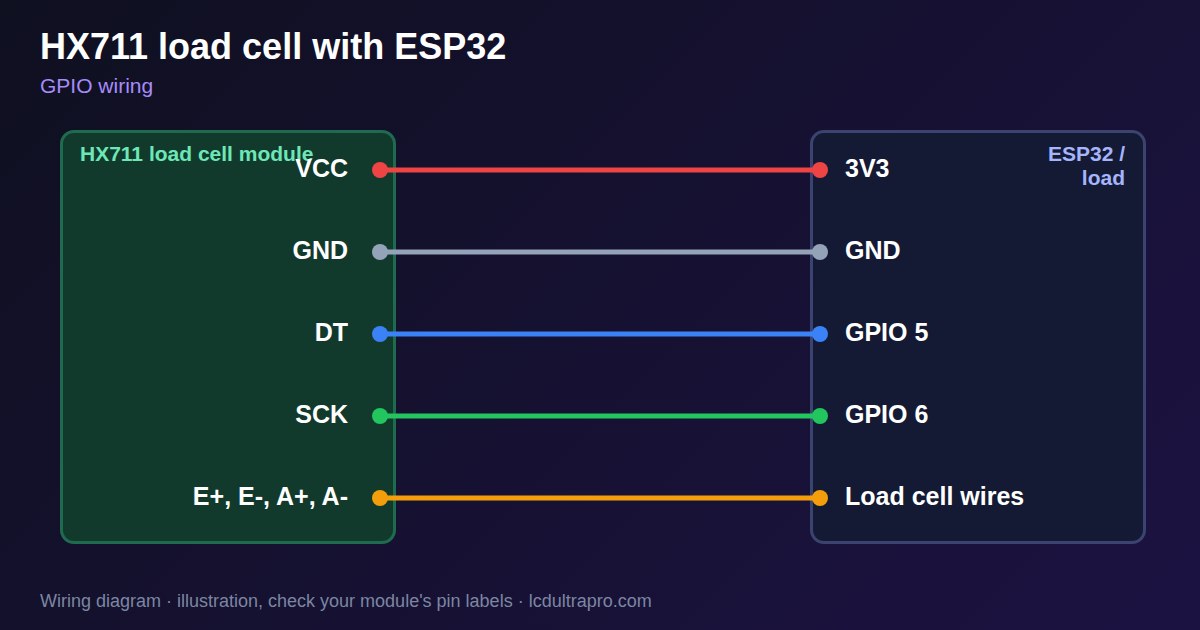
| HX711 load cell | Connect to | Note |
|---|---|---|
| VCC | 3V3 | 2.6–5.5 V allowed |
| GND | GND | |
| DT | GPIO 5 | |
| SCK | GPIO 6 | |
| E+, E-, A+, A- | Load cell wires | Check colours with a meter |
Arduino code
const int DT_PIN = 5, SCK_PIN = 6;
const float COUNTS_PER_GRAM = 420.0;  // replace with your own factor
long offset;

long readRaw() {
  while (digitalRead(DT_PIN)) delay(1);
  long v = 0;
  for (int i = 0; i < 24; i++) {
    digitalWrite(SCK_PIN, HIGH);
    delayMicroseconds(1);
    v = (v << 1) | digitalRead(DT_PIN);
    digitalWrite(SCK_PIN, LOW);
    delayMicroseconds(1);
  }
  digitalWrite(SCK_PIN, HIGH);        // 25th pulse: channel A, gain 128
  delayMicroseconds(1);
  digitalWrite(SCK_PIN, LOW);
  return (v << 8) >> 8;               // sign-extend 24 bits
}

long average(int n) {
  long sum = 0;
  for (int i = 0; i < n; i++) sum += readRaw();
  return sum / n;
}

void setup() {
  Serial.begin(115200);
  pinMode(DT_PIN, INPUT);
  pinMode(SCK_PIN, OUTPUT);
  offset = average(10);               // scale must be empty at boot
}

void loop() {
  long raw = average(5) - offset;
  Serial.printf("raw %ld  %.1f g\n", raw, raw / COUNTS_PER_GRAM);
}
No extra library needed. Compiled for ESP32-S3 with arduino-esp32 3.x. Not yet tested by us on a physical sensor. Change the pins to match your board.
On a display
Read the value in your sketch and pass it to a label, or send it over MQTT and show it with an MQTT value in the editor.
Design a display for HX711 load cellBoards with a ready connector
Only boards whose connectors we have surveyed. Others may still work on free GPIOs.
| Elecrow CrowPanel ESP32 HMI 2.4" | GPIO_D port: GPIO 25, 32 |
| Elecrow CrowPanel ESP32 HMI 2.8" | GPIO_D port: GPIO 25, 32 |
| Elecrow CrowPanel ESP32 HMI 3.5" | GPIO_D port: GPIO 25, 32 |
| Elecrow CrowPanel ESP32-S3 HMI 4.3" | GPIO_D port: GPIO 37, 38 |
| LilyGO T-Display (classic) 1.14" | Left pin header: GPIO 21, 22 |
| LilyGO T-Display-S3-Pro 2.33" | QWIIC LEFT: GPIO 43, 44 |
| LilyGO T-Deck 2.8" | Grove connector: GPIO 43, 44On the T-Deck Plus this port is taken by the built-in GPS |
| M5Stack AtomS3 0.85" | Grove port: GPIO 2, 1 |
| M5Stack M5StickC Plus2 1.14" | Grove port: GPIO 32, 33 |
| Sunton ESP32-2432S028R 2.8" | GPIO / I2C header (CN1): GPIO 22, 27 |
| Sunton ESP32-4827S043R/C 4.3" | GPIO header (P4): GPIO 17, 18P3 carries the same two pins |
| Sunton ESP32-8048S043C 4.3" | GPIO header (P4): GPIO 17, 18P3 carries the same two pins |
| Sunton ESP32-8048S050C 5.0" | GPIO header (P4): GPIO 17, 18P5 carries the same pins. Shared with the I2S amplifier of the speaker output (P6). |
| Sunton ESP32-8048S070C 7.0" | GPIO header (P4): GPIO 17, 18P5 carries the same pins. Shared with the I2S amplifier of the speaker output (P6). |
| Waveshare ESP32-S3 Touch LCD 1.28" round | SH1.0 GPIO header: GPIO 15, 16Six GPIOs led out per the wiki pin table |
| Waveshare ESP32-S3 Touch LCD 1.28" round (CNC metal housing) | SH1.0 GPIO header: GPIO 15, 16Six GPIOs led out per the wiki pin table |
Good to know
- The load cell must be free to bend.
- Your calibration factor is your own.
- It is not I2C.
- Boards are often fixed at 10 readings a second.
What it is good for
- Kitchen and workshop scales
- Tank and hopper level by weight
- Beehive and filament spool weighing
FAQ
Why are my HX711 readings erratic?
Check the mount first: the cell must bend. Then check wiring.
Why is the weight negative?
The signal wires are swapped, or the factor needs a minus sign.
Can the HX711 run from 3.3 V?
Yes, its datasheet allows 2.6 to 5.5 V.
Sources
Related parts
Use this information at your own risk. It is for general guidance only: the example code compiles, but it has not been tested on every part, and modules differ between sellers. Check the manufacturer's data before you build. Product names belong to their owners, and LCD Ultra Pro is not affiliated with them. See our Terms.