Input devices
INMP441 microphone with ESP32
If an INMP441 gives silence or digital noise, the wiring is often fine and the I2S settings are wrong. Forum reports of this are common. The mic sends 24-bit samples inside 32-bit slots, so read 32-bit values and shift them. Reading at 16 bits gives rubbish that looks like a dead sensor.
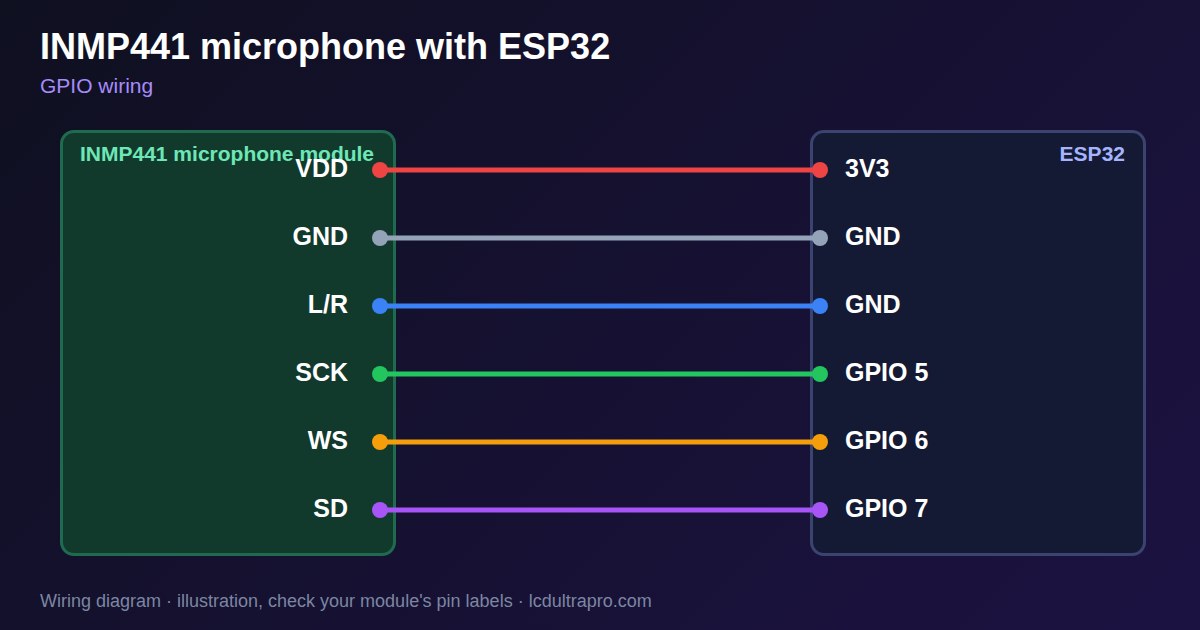
Power it from 3.3 V only. The L/R pin chooses which channel it answers on: to ground for left, to VDD for right. Do not leave it floating, and make sure it matches the code. A mismatch gives silence even with perfect wiring. The other three lines, WS, SCK and SD, can use any free pins, which is good news on a display board. There is a harder limit to check, though: I2S takes three pins, and a board's own speaker or RGB panel may use what is left.
Sample rate depends on the job: 16 kHz is enough for speech, and 44.1 or 48 kHz for better audio. The microphone is digital, so short wires and a clean supply matter more than shielding, but motors on the same rail can still be heard. Keep the sound hole clear and pointing at the source. Note which side the hole is on, since it is often on the back of the board. If a board has a speaker amplifier on the same I2S bus, check the pins before you share anything. The example prints a simple sound level, which is the quickest way to check that the mic works.
Specifications
| Type | Digital MEMS, I2S output |
|---|---|
| Supply | 3.3 V |
| Sample format | 24-bit in 32-bit slots |
| L/R pin | GND left, VDD right |
| Pins | WS, SCK, SD |
Power and logic levels
3.3 V: safe to connect directly
| Supply | 3.3 V |
|---|---|
| Signal level | 3.3 V |
| On an ESP32 | Do not power it from 5 V. |
ESP32 pins, including those on a display board's connectors, work at 3.3 V and are not 5 V tolerant. Modules differ, so if in doubt, measure the signal before you connect it.
Wiring
| INMP441 microphone | Connect to | Note |
|---|---|---|
| VDD | 3V3 | |
| GND | GND | |
| L/R | GND | Left channel |
| SCK | GPIO 5 | |
| WS | GPIO 6 | |
| SD | GPIO 7 |
Arduino code
#include <ESP_I2S.h>

const int SCK_PIN = 5, WS_PIN = 6, SD_PIN = 7;
I2SClass i2s;

void setup() {
  Serial.begin(115200);
  i2s.setPins(SCK_PIN, WS_PIN, -1, SD_PIN);
  if (!i2s.begin(I2S_MODE_STD, 16000, I2S_DATA_BIT_WIDTH_32BIT,
                 I2S_SLOT_MODE_MONO, I2S_STD_SLOT_LEFT)) {
    Serial.println("I2S failed");
  }
}

void loop() {
  static int32_t buf[256];
  size_t n = i2s.readBytes((char *)buf, sizeof(buf)) / 4;
  int32_t peak = 0;
  for (size_t i = 0; i < n; i++) {
    int32_t s = abs(buf[i] >> 14);       // keep the top bits
    if (s > peak) peak = s;
  }
  Serial.println(peak);
}
No extra library needed. Compiled for ESP32-S3 with arduino-esp32 3.x. Not yet tested by us on a physical sensor. Change the pins to match your board.
On a display
Read the value in your sketch and pass it to a label, or send it over MQTT and show it with an MQTT value in the editor.
Design a display for INMP441 microphoneBoards with a ready connector
Only boards whose connectors we have surveyed. Others may still work on free GPIOs.
| LilyGO T-Display (classic) 1.14" | Left pin header: GPIO 21, 22, 17 |
| M5Stack AtomS3 0.85" | Bottom pin header: GPIO 5, 6, 7 |
| Waveshare ESP32-S3 Touch LCD 1.28" round | SH1.0 GPIO header: GPIO 15, 16, 17Six GPIOs led out per the wiki pin table |
| Waveshare ESP32-S3 Touch LCD 1.28" round (CNC metal housing) | SH1.0 GPIO header: GPIO 15, 16, 17Six GPIOs led out per the wiki pin table |
Good to know
- Read 32-bit slots, not 16-bit.
- The L/R pin must match the code.
- It runs on 3.3 V only.
- I2S takes three free pins.
What it is good for
- Sound level displays
- Voice recording
- Knock and noise detection
FAQ
Why do I only get silence?
Check the L/R pin against the code, and that the data width is 32-bit.
Why does it sound like noise?
The I2S format or bit width does not match the microphone.
What sample rate should I use?
16 kHz for speech, 44.1 or 48 kHz for better audio.
Sources
Related parts
Use this information at your own risk. It is for general guidance only: the example code compiles, but it has not been tested on every part, and modules differ between sellers. Check the manufacturer's data before you build. Product names belong to their owners, and LCD Ultra Pro is not affiliated with them. See our Terms.