Outputs and switching
MAX98357A I2S amp with ESP32
The MAX98357A turns digital I2S audio into speaker output, with no external DAC and no master clock. From 5 V, Adafruit lists 3.2 W into 4 Ω and 1.8 W into 8 Ω at 10 % distortion, which is plenty for alerts, voice prompts or a small radio.
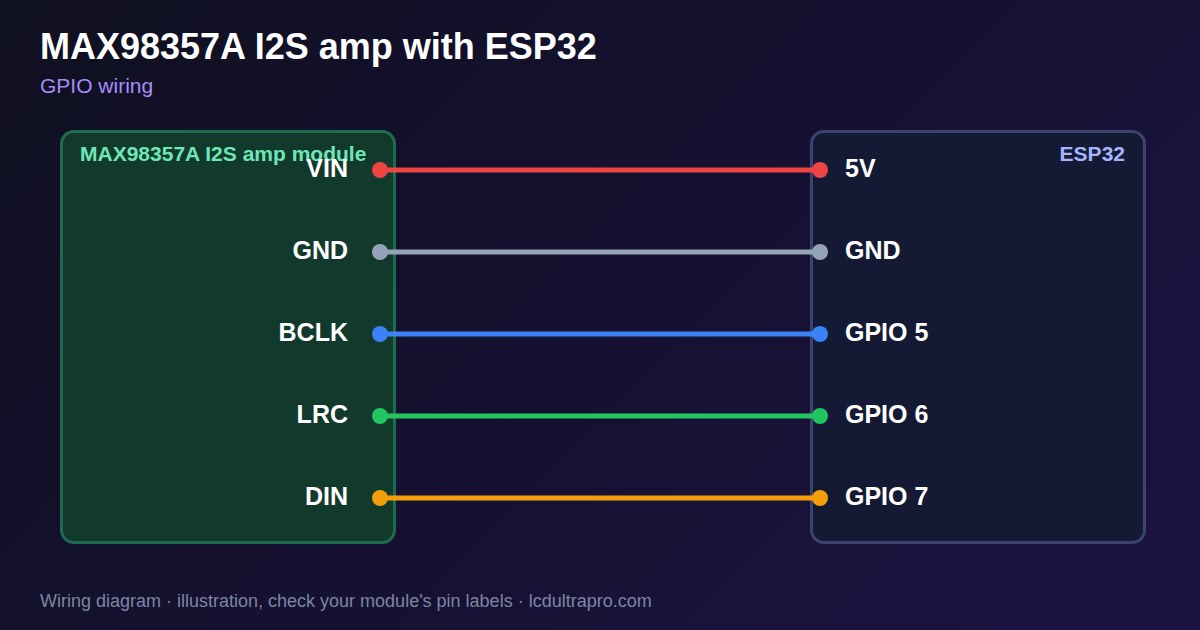
It takes three signal wires: bit clock, word select and data, at 3.3 V or 5 V logic. Power it from 5 V for full output, because audio peaks can pull a weak 3.3 V rail down and reset the board. The speaker connects directly to the module's two terminals. Do not connect either speaker wire to ground, because the output is bridged.
The GAIN pin defaults to 9 dB, and a resistor or direct wire selects 3, 6, 12 or 15 dB. By default the output mixes left and right into mono. A resistor on the SD pin selects one channel, and pulling it low shuts the amplifier down. Many display boards already have an I2S amplifier, so check the board page first. Note that I2S takes three pins, which may be scarce on parallel RGB boards.
Specifications
| Supply | 2.7–5.5 V |
|---|---|
| Output | 3.2 W into 4 Ω, 1.8 W into 8 Ω at 5 V |
| Interface | I2S, no MCLK needed |
| Sample rates | 8–96 kHz |
| Default gain | 9 dB, 3–15 dB selectable |
| Default output | (L+R)/2 mono |
Power and logic levels
3.3 V: safe to connect directly
| Supply | 2.7–5.5 V, 5 V for full power |
|---|---|
| Signal level | 3.3 V logic is fine |
| On an ESP32 | 5 V on VIN does not reach the I2S pins. |
ESP32 pins, including those on a display board's connectors, work at 3.3 V and are not 5 V tolerant. Modules differ, so if in doubt, measure the signal before you connect it.
Wiring
| MAX98357A I2S amp | Connect to | Note |
|---|---|---|
| VIN | 5V | 3.3 V works with less power |
| GND | GND | |
| BCLK | GPIO 5 | |
| LRC | GPIO 6 | |
| DIN | GPIO 7 |
Arduino code
#include <ESP_I2S.h>

const int BCLK = 5, LRC = 6, DIN = 7;
const int RATE = 22050;
I2SClass i2s;

void setup() {
  i2s.setPins(BCLK, LRC, DIN);
  i2s.begin(I2S_MODE_STD, RATE, I2S_DATA_BIT_WIDTH_16BIT, I2S_SLOT_MODE_MONO);
}

void loop() {                       // 440 Hz square wave at low volume
  static int16_t buf[50];
  for (int i = 0; i < 50; i++) buf[i] = i < 25 ? 2000 : -2000;
  i2s.write((uint8_t *)buf, sizeof(buf));
}
No extra library needed. Compiled for ESP32-S3 with arduino-esp32 3.x. Not yet tested by us on a physical sensor. Change the pins to match your board.
On a display
Read the value in your sketch and pass it to a label, or send it over MQTT and show it with an MQTT value in the editor.
Design a display for MAX98357A I2S ampBoards with a ready connector
Only boards whose connectors we have surveyed. Others may still work on free GPIOs.
| LilyGO T-Display (classic) 1.14" | Left pin header: GPIO 21, 22, 17 |
| M5Stack AtomS3 0.85" | Bottom pin header: GPIO 5, 6, 7 |
| Waveshare ESP32-S3 Touch LCD 1.28" round | SH1.0 GPIO header: GPIO 15, 16, 17Six GPIOs led out per the wiki pin table |
| Waveshare ESP32-S3 Touch LCD 1.28" round (CNC metal housing) | SH1.0 GPIO header: GPIO 15, 16, 17Six GPIOs led out per the wiki pin table |
Good to know
- Never connect a speaker wire to ground.
- Power it from 5 V for full volume.
- Audio peaks can reset a weak supply.
- Check the board first: many already have an amplifier.
What it is good for
- Alarm tones and alerts
- Voice prompts
- Small internet radios
FAQ
How loud is the MAX98357A?
At 5 V, 3.2 W into 4 Ω and 1.8 W into 8 Ω.
Does it need a master clock?
No, only bit clock, word select and data.
Why is there no sound?
Check the SD pin is not low, the pin assignment and the speaker connection.
Sources
Related parts
Use this information at your own risk. It is for general guidance only: the example code compiles, but it has not been tested on every part, and modules differ between sellers. Check the manufacturer's data before you build. Product names belong to their owners, and LCD Ultra Pro is not affiliated with them. See our Terms.