Time and storage
microSD card with ESP32
A microSD card gives a display board real storage for logs, images or audio. Many display boards already have a slot, so check the board page first. Its pins are often wired through the board and shared with the display or other parts, so the example pins below are only a starting point.
A separate reader connects over SPI at 3.3 V. Look for a module with pull-ups on the data lines, and avoid ones without them. Modules with a regulator accept 5 V on VCC, but feeding 5 V to a direct adapter can damage the card, so read the module. Sources agree that FAT32 on cards up to 32 GB is the reliable choice. Larger cards often ship as exFAT, which the ESP32 does not read by default.
Writes are slow compared with RAM, and a long write can stall a display task. Log small batches, close or flush the file, and keep heavy file work away from the drawing loop. If power is cut while writing, the file can be damaged, so do not rely on the card as the only copy of important data.
Specifications
| Interface | SPI (or SDMMC on boards with a slot) |
|---|---|
| Supply | 3.3 V, module regulators accept 5 V |
| Reliable format | FAT32, up to 32 GB |
| Pull-ups | Prefer modules with 10 kΩ |
Power and logic levels
3.3 V: check your module first
| Supply | Card 3.3 V, some modules have a regulator |
|---|---|
| Signal level | Depends on the module |
| On an ESP32 | The common type with an AMS1117 regulator and a 74LVC125 buffer takes 5 V on VCC. Check that MISO stays at 3.3 V before you connect it. |
ESP32 pins, including those on a display board's connectors, work at 3.3 V and are not 5 V tolerant. Modules differ, so if in doubt, measure the signal before you connect it.
Wiring
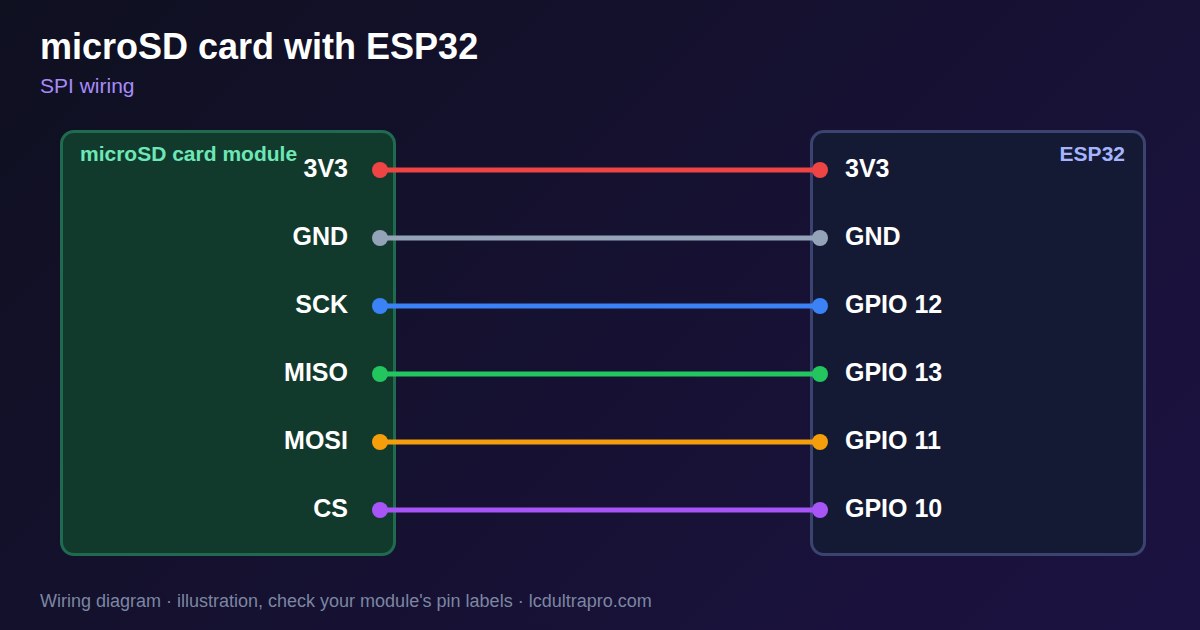
| microSD card | Connect to | Note |
|---|---|---|
| 3V3 | 3V3 | Unless the module has a regulator |
| GND | GND | |
| SCK | GPIO 12 | |
| MISO | GPIO 13 | |
| MOSI | GPIO 11 | |
| CS | GPIO 10 |
Arduino code
#include <SPI.h>
#include <SD.h>

const int SCK_PIN = 12, MISO_PIN = 13, MOSI_PIN = 11, CS_PIN = 10;

void setup() {
  Serial.begin(115200);
  SPI.begin(SCK_PIN, MISO_PIN, MOSI_PIN, CS_PIN);
  if (!SD.begin(CS_PIN)) {
    Serial.println("Card not found: check wiring and FAT32");
    return;
  }
  File f = SD.open("/log.txt", FILE_APPEND);
  if (f) {
    f.printf("boot at %lu ms\n", millis());
    f.close();
  }
  Serial.printf("Card size: %llu MB\n", SD.cardSize() / (1024 * 1024));
}

void loop() {}
No extra library needed. Compiled for ESP32-S3 with arduino-esp32 3.x. Not yet tested by us on a physical sensor. Change the pins to match your board.
On a display
Read the value in your sketch and pass it to a label, or send it over MQTT and show it with an MQTT value in the editor.
Design a display for microSD cardGood to know
- Format as FAT32, 32 GB or smaller is safest.
- Many boards already have a slot.
- Long writes can stall a display.
- Power loss during a write can damage the file.
What it is good for
- Data logging
- Image and audio storage
- Settings backup
FAQ
Why does the ESP32 not read my SD card?
Common causes are exFAT format, wrong pins or a module without pull-ups.
What card size should I use?
FAT32 up to 32 GB is the reliable choice.
Does my display board need a module?
Many boards have a slot. Check the board page.
Sources
Related parts
Use this information at your own risk. It is for general guidance only: the example code compiles, but it has not been tested on every part, and modules differ between sellers. Check the manufacturer's data before you build. Product names belong to their owners, and LCD Ultra Pro is not affiliated with them. See our Terms.