Time and storage
DS3231 RTC with ESP32
A DS3231 keeps the time when the ESP32 is off or has no Wi-Fi. It has its own temperature-compensated crystal and a CR2032 backup cell, so a display that has been powered down still shows the right time at startup. If your project always has internet, NTP is enough and you can skip it.
Accuracy is the reason to choose this part over a cheaper DS1307. The datasheet gives ±2 ppm from 0 to 40 °C, which is about a minute a year, and ±3.5 ppm from -40 to 85 °C. It sits on I2C at 0x68, and common modules add an AT24C32 EEPROM at 0x57.
Check the address if your board has an IMU, because an MPU6050 and many other parts also use 0x68. Some cheap modules try to charge the battery through a resistor and a diode, which is unsafe with a non-rechargeable CR2032. If yours has that circuit, read about it before leaving a battery in. Set the time once, then read it. Some display boards, such as those with a PCF85063, already have a clock chip, so check the board page first. LCD Ultra Pro has clock components that use internet time.
Specifications
| Function | Real-time clock with crystal |
|---|---|
| Accuracy | ±2 ppm (0–40 °C), ±3.5 ppm (-40–85 °C) |
| Supply | 3.3–5.5 V on modules |
| Backup | CR2032 cell |
| Interface | I2C, 400 kHz |
| I2C address | 0x68, EEPROM 0x57 on modules |
Power and logic levels
3.3 V: safe to connect directly
| Supply | 2.3–5.5 V, use 3V3 |
|---|---|
| Signal level | I2C follows the module pull-ups |
| On an ESP32 | Run it from 3V3, so the I2C lines stay at 3.3 V. |
ESP32 pins, including those on a display board's connectors, work at 3.3 V and are not 5 V tolerant. Modules differ, so if in doubt, measure the signal before you connect it.
Wiring
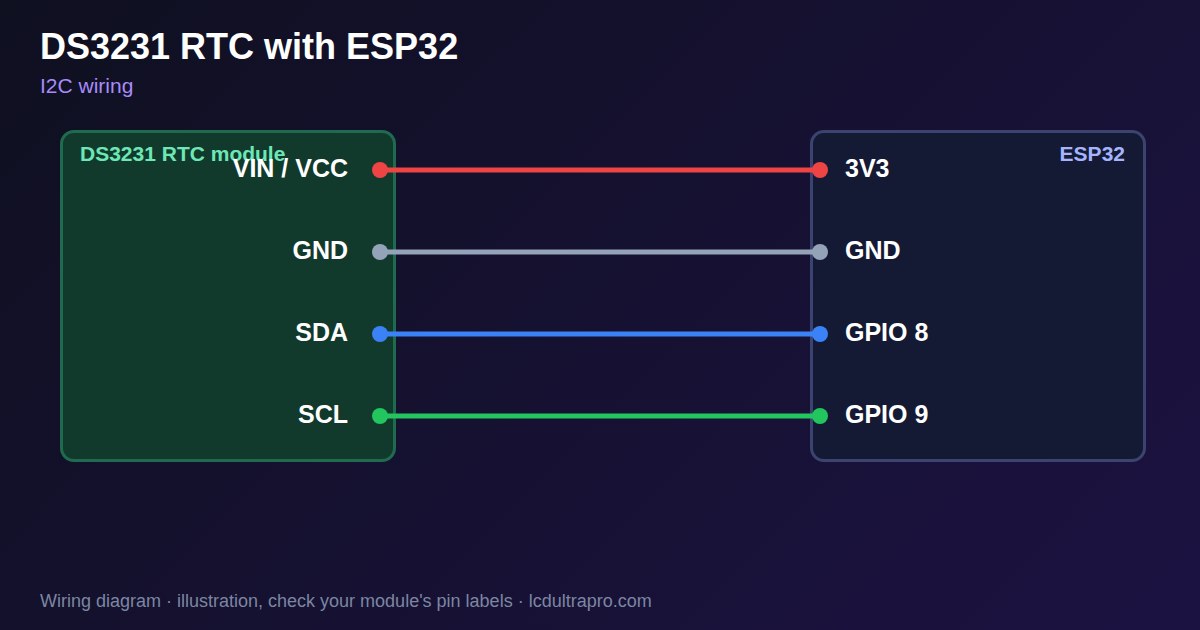
| DS3231 RTC | Connect to | Note |
|---|---|---|
| VIN / VCC | 3V3 | |
| GND | GND | |
| SDA | GPIO 8 | Any free pin, set in Wire.begin() |
| SCL | GPIO 9 | Any free pin, set in Wire.begin() |
Arduino code
#include <Wire.h>
#include <RTClib.h>

const int SDA_PIN = 8, SCL_PIN = 9;   // use your board's I2C pins
RTC_DS3231 rtc;

void setup() {
  Serial.begin(115200);
  Wire.begin(SDA_PIN, SCL_PIN);
  if (!rtc.begin(&Wire)) {
    Serial.println("DS3231 not found");
    while (true) delay(1000);
  }
  if (rtc.lostPower()) rtc.adjust(DateTime(F(__DATE__), F(__TIME__)));
}

void loop() {
  DateTime n = rtc.now();
  Serial.printf("%04d-%02d-%02d %02d:%02d:%02d\n", n.year(), n.month(), n.day(), n.hour(), n.minute(), n.second());
  delay(1000);
}
Needs the RTClib library. Compiled for ESP32-S3 with arduino-esp32 3.x. Not yet tested by us on a physical sensor. Change the pins to match your board.
On a display
Read the value in your sketch and pass it to a label, or send it over MQTT and show it with an MQTT value in the editor.
Design a display for DS3231 RTCBoards with a ready connector
Only boards whose connectors we have surveyed. Others may still work on free GPIOs.
| Elecrow CrowPanel ESP32 HMI 2.4" | I2C port: SDA 22, SCL 21Not shared with the touch controller (it is on SPI) — free for sensors |
| Elecrow CrowPanel ESP32 HMI 2.8" | I2C port: SDA 22, SCL 21Not shared with the touch controller (it is on SPI) — free for sensors |
| Elecrow CrowPanel ESP32 HMI 3.5" | I2C port: SDA 22, SCL 21Not shared with the touch controller (it is on SPI) — free for sensors |
| Elecrow CrowPanel ESP32-S3 HMI 5.0" | I2C port: SDA 19, SCL 20Same I2C bus as the GT911 touch (0x14 / 0x5D) and, on V3.0 boards, the PCA9557 touch-reset expander (0x18) |
| Elecrow CrowPanel ESP32-S3 HMI 7.0" | I2C port: SDA 19, SCL 20Same I2C bus as the GT911 touch (0x14 / 0x5D) and, on V3.0 boards, the PCA9557 touch-reset expander (0x18) |
| LilyGO T-Display-S3-Pro 2.33" | QWIIC RIGHT: SDA 5, SCL 6I2C only — same bus as the touch, the PMU (SY6970) and the light sensor |
| M5Stack AtomS3 0.85" | Bottom I2C pins: SDA 38, SCL 39Same I2C bus as the built-in IMU (MPU6886, 0x68) |
| Makerfabs MaTouch ESP32-S3 Rotary IPS 2.1 Round | Mabee I2C (J1): SDA 17, SCL 18Same I2C bus as the touch controller (CST826) |
| Makerfabs MaTouch ESP32-S3 Parallel TFT 4.3" | Mabee I2C: SDA 17, SCL 18Same I2C bus as the touch controller (GT911) |
| Makerfabs MaTouch ESP32-S3 Parallel TFT with Touch 5.0" | Mabee I2C: SDA 17, SCL 18Same I2C bus as the touch controller (GT911) |
| Makerfabs MaTouch ESP32-S3 Parallel TFT with Touch 7.0" | Mabee I2C: SDA 17, SCL 18Same I2C bus as the touch controller (GT911) |
| Sunton ESP32-4827S043R/C 4.3" | I2C header (P3): SDA 19, SCL 20Same I2C bus as the GT911 touch controller. P3 also carries GPIO 17 / 18. |
| Sunton ESP32-8048S043C 4.3" | I2C header (P3): SDA 19, SCL 20Same I2C bus as the GT911 touch controller. P3 also carries GPIO 17 / 18. |
| Sunton ESP32-8048S050C 5.0" | I2C header (P3): SDA 19, SCL 20Same I2C bus as the GT911 touch controller. P3 also carries GPIO 17 / 18. |
| Sunton ESP32-8048S070C 7.0" | I2C header (P3): SDA 19, SCL 20Same I2C bus as the GT911 touch controller. P3 also carries GPIO 17 / 18. |
| Waveshare ESP32-S3 Touch LCD 2.1" round | I2C connector: SDA 15, SCL 7Same I2C bus as the touch controller, the IO expander, the RTC and the IMU (addresses 0x15/0x5D, 0x20, 0x51, 0x6B, 0x7E taken) |
| Waveshare ESP32-S3 Touch LCD 2.8" | I2C connector: SDA 11, SCL 10Same I2C bus as the RTC and the IMU (0x51, 0x6B, 0x7E taken) — the touch has its own bus |
| Waveshare ESP32-S3 Touch LCD 2.8" Type B | I2C connector: SDA 15, SCL 7Same I2C bus as the touch controller, the IO expander, the RTC and the IMU (addresses 0x15/0x5D, 0x20, 0x51, 0x6B, 0x7E taken) |
| Waveshare ESP32-S3-Touch-LCD-2.8C | I2C connector: SDA 15, SCL 7Same I2C bus as the touch controller, the IO expander, the RTC and the IMU (addresses 0x15/0x5D, 0x20, 0x51, 0x6B, 0x7E taken) |
| Waveshare ESP32-S3-LCD-7B | I2C connector (H1): SDA 8, SCL 9Same I2C bus as the touch controller (GT911) and the IO expander (CH422G) |
Good to know
- Address 0x68 clashes with MPU6050 by default.
- Some cheap modules charge the cell. Do not charge a CR2032.
- With Wi-Fi available, NTP may be all you need.
- Some boards already have an RTC chip.
What it is good for
- Clocks without Wi-Fi
- Timers and schedules
- Data logging with timestamps
FAQ
What is the DS3231 I2C address?
0x68. Modules with EEPROM also show 0x57.
How accurate is it?
±2 ppm from 0 to 40 °C, about a minute a year.
Do I need an RTC with Wi-Fi?
Only if the clock must be right without internet.
Sources
Related parts
Use this information at your own risk. It is for general guidance only: the example code compiles, but it has not been tested on every part, and modules differ between sellers. Check the manufacturer's data before you build. Product names belong to their owners, and LCD Ultra Pro is not affiliated with them. See our Terms.