Temperature, humidity and air
BME280 with ESP32
A BME280 measures temperature, humidity and air pressure on one chip, over I2C or SPI. Bosch rates the sensor for 1.71 to 3.6 V, so a bare module on an ESP32's 3.3 V rail is fine. Many cheap blue modules add a regulator and accept 5 V, but read the module's own label before you connect it.
The usual trouble is the address. The SDO pin selects 0x76 or 0x77, and module makers do not agree on the default: Adafruit modules use 0x77, many low-cost boards use 0x76. If the sensor is not found, try the other address before you suspect the wiring. A BMP280 looks almost the same but has no humidity sensor, and sellers mix them up.
On a display board the I2C bus is often shared with the touch controller. That normally works, because GT911 touch sits on 0x5D or 0x14. The board table below shows where each connector goes. Heat from the board also reads high: keep the sensor away from the ESP32 and the backlight if room temperature matters.
Specifications
| Measures | Temperature, humidity, pressure |
|---|---|
| Sensor supply | 1.71–3.6 V |
| Interface supply | 1.2–3.6 V |
| Pressure range | 300–1100 hPa |
| Humidity accuracy | ±3 %RH |
| Interface | I2C or SPI |
| I2C address | 0x76 (SDO low) or 0x77 (SDO high) |
Power and logic levels
3.3 V: safe to connect directly
| Supply | Chip up to 3.6 V, some modules have a regulator |
|---|---|
| Signal level | 3.3 V |
| On an ESP32 | Run it from 3V3, so the I2C lines stay at 3.3 V. |
ESP32 pins, including those on a display board's connectors, work at 3.3 V and are not 5 V tolerant. Modules differ, so if in doubt, measure the signal before you connect it.
Wiring
| BME280 | Connect to | Note |
|---|---|---|
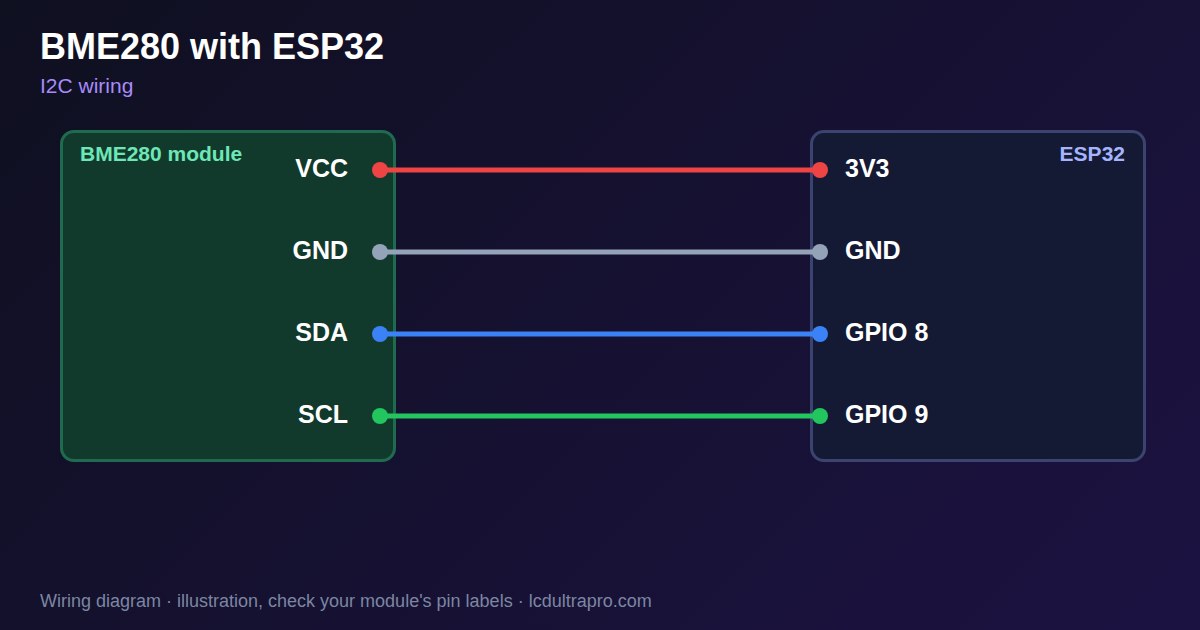
| VCC | 3V3 | Check the module: the bare sensor is not 5 V |
| GND | GND | |
| SDA | GPIO 8 | Any free pin, set in Wire.begin() |
| SCL | GPIO 9 | Any free pin, set in Wire.begin() |
Arduino code
#include <Wire.h>
#include <Adafruit_Sensor.h>
#include <Adafruit_BME280.h>

const int SDA_PIN = 8, SCL_PIN = 9;   // use your board's I2C pins
Adafruit_BME280 bme;

void setup() {
  Serial.begin(115200);
  Wire.begin(SDA_PIN, SCL_PIN);
  if (!bme.begin(0x76, &Wire) && !bme.begin(0x77, &Wire)) {
    Serial.println("BME280 not found: check wiring and address");
    while (true) delay(1000);
  }
}

void loop() {
  Serial.printf("%.1f C  %.0f %%  %.1f hPa\n",
                bme.readTemperature(), bme.readHumidity(), bme.readPressure() / 100.0);
  delay(2000);
}
Needs the Adafruit BME280 library. Compiled for ESP32-S3 with arduino-esp32 3.x. Not yet tested by us on a physical sensor. Change the pins to match your board.
On a display
LCD Ultra Pro has this sensor as a built-in value source. Choose it in a rule, and a label or gauge shows the reading without writing code.
Design a display for BME280Boards with a ready connector
Only boards whose connectors we have surveyed. Others may still work on free GPIOs.
| Elecrow CrowPanel ESP32 HMI 2.4" | I2C port: SDA 22, SCL 21Not shared with the touch controller (it is on SPI) — free for sensors |
| Elecrow CrowPanel ESP32 HMI 2.8" | I2C port: SDA 22, SCL 21Not shared with the touch controller (it is on SPI) — free for sensors |
| Elecrow CrowPanel ESP32 HMI 3.5" | I2C port: SDA 22, SCL 21Not shared with the touch controller (it is on SPI) — free for sensors |
| Elecrow CrowPanel ESP32-S3 HMI 5.0" | I2C port: SDA 19, SCL 20Same I2C bus as the GT911 touch (0x14 / 0x5D) and, on V3.0 boards, the PCA9557 touch-reset expander (0x18) |
| Elecrow CrowPanel ESP32-S3 HMI 7.0" | I2C port: SDA 19, SCL 20Same I2C bus as the GT911 touch (0x14 / 0x5D) and, on V3.0 boards, the PCA9557 touch-reset expander (0x18) |
| LilyGO T-Display-S3-Pro 2.33" | QWIIC RIGHT: SDA 5, SCL 6I2C only — same bus as the touch, the PMU (SY6970) and the light sensor |
| M5Stack AtomS3 0.85" | Bottom I2C pins: SDA 38, SCL 39Same I2C bus as the built-in IMU (MPU6886, 0x68) |
| Makerfabs MaTouch ESP32-S3 Rotary IPS 2.1 Round | Mabee I2C (J1): SDA 17, SCL 18Same I2C bus as the touch controller (CST826) |
| Makerfabs MaTouch ESP32-S3 Parallel TFT 4.3" | Mabee I2C: SDA 17, SCL 18Same I2C bus as the touch controller (GT911) |
| Makerfabs MaTouch ESP32-S3 Parallel TFT with Touch 5.0" | Mabee I2C: SDA 17, SCL 18Same I2C bus as the touch controller (GT911) |
| Makerfabs MaTouch ESP32-S3 Parallel TFT with Touch 7.0" | Mabee I2C: SDA 17, SCL 18Same I2C bus as the touch controller (GT911) |
| Sunton ESP32-4827S043R/C 4.3" | I2C header (P3): SDA 19, SCL 20Same I2C bus as the GT911 touch controller. P3 also carries GPIO 17 / 18. |
| Sunton ESP32-8048S043C 4.3" | I2C header (P3): SDA 19, SCL 20Same I2C bus as the GT911 touch controller. P3 also carries GPIO 17 / 18. |
| Sunton ESP32-8048S050C 5.0" | I2C header (P3): SDA 19, SCL 20Same I2C bus as the GT911 touch controller. P3 also carries GPIO 17 / 18. |
| Sunton ESP32-8048S070C 7.0" | I2C header (P3): SDA 19, SCL 20Same I2C bus as the GT911 touch controller. P3 also carries GPIO 17 / 18. |
| Waveshare ESP32-S3 Touch LCD 2.1" round | I2C connector: SDA 15, SCL 7Same I2C bus as the touch controller, the IO expander, the RTC and the IMU (addresses 0x15/0x5D, 0x20, 0x51, 0x6B, 0x7E taken) |
| Waveshare ESP32-S3 Touch LCD 2.8" | I2C connector: SDA 11, SCL 10Same I2C bus as the RTC and the IMU (0x51, 0x6B, 0x7E taken) — the touch has its own bus |
| Waveshare ESP32-S3 Touch LCD 2.8" Type B | I2C connector: SDA 15, SCL 7Same I2C bus as the touch controller, the IO expander, the RTC and the IMU (addresses 0x15/0x5D, 0x20, 0x51, 0x6B, 0x7E taken) |
| Waveshare ESP32-S3-Touch-LCD-2.8C | I2C connector: SDA 15, SCL 7Same I2C bus as the touch controller, the IO expander, the RTC and the IMU (addresses 0x15/0x5D, 0x20, 0x51, 0x6B, 0x7E taken) |
| Waveshare ESP32-S3-LCD-7B | I2C connector (H1): SDA 8, SCL 9Same I2C bus as the touch controller (GT911) and the IO expander (CH422G) |
Good to know
- BME280 and BMP280 modules look alike. BMP280 has no humidity reading.
- Try both addresses, 0x76 and 0x77.
- The sensor warms itself and picks up board heat. Mount it away from the ESP32.
- Altitude from pressure needs your local sea-level pressure to be accurate.
What it is good for
- Room climate displays
- Weather stations
- Altitude and pressure logging
FAQ
What is the BME280 I2C address?
0x76 or 0x77, set by the SDO pin. Which one your module uses depends on the maker.
Can the BME280 run on 5 V?
The chip is rated up to 3.6 V. Some modules have a regulator and accept 5 V, so check yours.
What is the difference between BME280 and BMP280?
The BME280 also measures humidity. The BMP280 measures only temperature and pressure.
Why does my BME280 read too warm?
Heat from the ESP32 and the backlight reaches it. Move it away from the board.
Sources
Related parts
Use this information at your own risk. It is for general guidance only: the example code compiles, but it has not been tested on every part, and modules differ between sellers. Check the manufacturer's data before you build. Product names belong to their owners, and LCD Ultra Pro is not affiliated with them. See our Terms.