Temperature, humidity and air
DS18B20 with ESP32
The DS18B20 is the waterproof probe on the end of a metal tube you see in aquarium and heating projects. It needs only one data pin, and several sensors can share that pin, because every chip has its own factory ID. That makes it a good fit for display boards, where free pins are scarce.
It runs from 3.0 to 5.5 V and is accurate to ±0.5 °C between -10 and +85 °C. At 12-bit resolution one conversion takes 750 ms, and 9-bit takes about 94 ms. The data line needs a 4.7 kΩ pull-up resistor to 3.3 V. If you forget it, the usual result is a reading of -127 °C, which means the sensor did not answer. Some probes come with the resistor on a small adapter board.
Cheap DS18B20 clones are common, and clones can differ from the genuine Maxim part in voltage range and accuracy. On a board with few free pins, one connector pin is enough, and LCD Ultra Pro includes the DS18B20 as a value source, so a label can show it without writing code. Keep the probe cable away from the display's flat cable to reduce noise.
Specifications
| Measures | Temperature |
|---|---|
| Supply | 3.0–5.5 V |
| Accuracy | ±0.5 °C from -10 to +85 °C |
| Resolution | 9–12 bit |
| Conversion time | 94 ms (9-bit) to 750 ms (12-bit) |
| Interface | 1-Wire, unique 64-bit ID |
| Pull-up | 4.7 kΩ to 3.3 V on the data line |
Power and logic levels
3.3 V: safe to connect directly
| Supply | 3–5.5 V, use 3V3 |
|---|---|
| Signal level | Data line follows its pull-up |
| On an ESP32 | Pull the data line up to 3V3, not 5 V. |
ESP32 pins, including those on a display board's connectors, work at 3.3 V and are not 5 V tolerant. Modules differ, so if in doubt, measure the signal before you connect it.
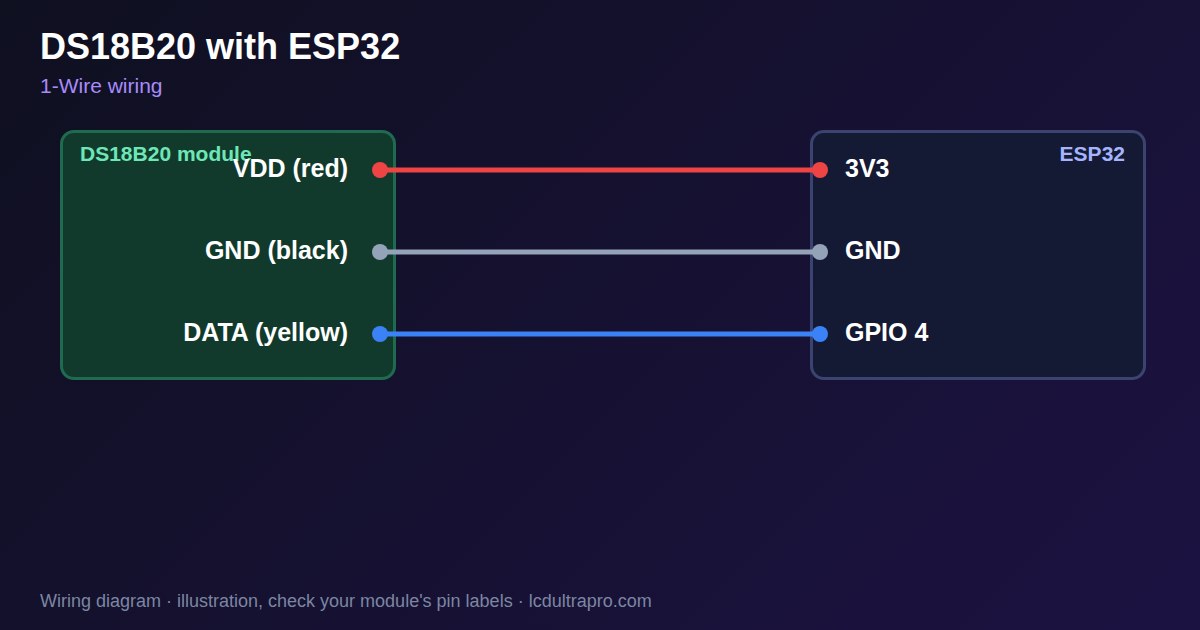
Wiring
| DS18B20 | Connect to | Note |
|---|---|---|
| VDD (red) | 3V3 | |
| GND (black) | GND | |
| DATA (yellow) | GPIO 4 | Any free pin, with 4.7 kΩ to 3V3 |
Arduino code
#include <OneWire.h>
#include <DallasTemperature.h>

const int ONE_WIRE_PIN = 4;   // any free GPIO
OneWire oneWire(ONE_WIRE_PIN);
DallasTemperature sensors(&oneWire);

void setup() {
  Serial.begin(115200);
  sensors.begin();
  Serial.printf("%d sensor(s) found\n", sensors.getDeviceCount());
}

void loop() {
  sensors.requestTemperatures();
  float t = sensors.getTempCByIndex(0);
  if (t == DEVICE_DISCONNECTED_C) Serial.println("No answer: check the 4.7k pull-up");
  else Serial.printf("%.2f C\n", t);
  delay(2000);
}
Needs the DallasTemperature library. Compiled for ESP32-S3 with arduino-esp32 3.x. Not yet tested by us on a physical sensor. Change the pins to match your board.
On a display
LCD Ultra Pro has this sensor as a built-in value source. Choose it in a rule, and a label or gauge shows the reading without writing code.
Design a display for DS18B20Boards with a ready connector
Only boards whose connectors we have surveyed. Others may still work on free GPIOs.
| Elecrow CrowPanel ESP32 HMI 2.4" | GPIO_D port: GPIO 25 |
| Elecrow CrowPanel ESP32 HMI 2.8" | GPIO_D port: GPIO 25 |
| Elecrow CrowPanel ESP32 HMI 3.5" | GPIO_D port: GPIO 25 |
| Elecrow CrowPanel ESP32-S3 HMI 4.3" | GPIO_D port: GPIO 37 |
| Elecrow CrowPanel ESP32-S3 HMI 5.0" | GPIO_D port: GPIO 38 |
| Elecrow CrowPanel ESP32-S3 HMI 7.0" | GPIO_D port: GPIO 38 |
| LilyGO T-Display (classic) 1.14" | Left pin header: GPIO 21 |
| LilyGO T-Display-S3-Pro 2.33" | QWIIC LEFT: GPIO 43 |
| LilyGO T-Deck 2.8" | Grove connector: GPIO 43On the T-Deck Plus this port is taken by the built-in GPS |
| M5Stack AtomS3 0.85" | Grove port: GPIO 2 |
| M5Stack M5StickC Plus2 1.14" | Grove port: GPIO 32 |
| Sunton ESP32-2432S028R 2.8" | GPIO header (P3): GPIO 22GPIO 21 is the display backlight — not usable. GPIO 35 is input-only. No 3V3 pin on P3 (only GND). |
| Sunton ESP32-4827S043R/C 4.3" | GPIO header (P4): GPIO 17P3 carries the same two pins |
| Sunton ESP32-8048S043C 4.3" | GPIO header (P4): GPIO 17P3 carries the same two pins |
| Sunton ESP32-8048S050C 5.0" | GPIO header (P4): GPIO 17P5 carries the same pins. Shared with the I2S amplifier of the speaker output (P6). |
| Sunton ESP32-8048S070C 7.0" | GPIO header (P4): GPIO 17P5 carries the same pins. Shared with the I2S amplifier of the speaker output (P6). |
| Waveshare ESP32-S3 Touch LCD 1.28" round | SH1.0 GPIO header: GPIO 15Six GPIOs led out per the wiki pin table |
| Waveshare ESP32-S3 Touch LCD 1.28" round (CNC metal housing) | SH1.0 GPIO header: GPIO 15Six GPIOs led out per the wiki pin table |
| Waveshare ESP32-S3-LCD-7B | GPIO connector (J8): GPIO 6 |
Good to know
- A reading of -127 °C means the sensor did not answer. Check the pull-up.
- 12-bit conversion takes 750 ms. Do not block your display loop waiting for it.
- Wire colours vary between probes. Check the seller's pinout.
- Clones can behave differently from genuine parts.
What it is good for
- Aquariums and water tanks
- Heating and boiler monitors
- Several temperature points on one pin
FAQ
Why does my DS18B20 read -127?
The sensor did not answer, most often because the 4.7 kΩ pull-up is missing or the wiring is wrong.
How many DS18B20 can share one pin?
Several, because each has a unique 64-bit ID. Long cables and many sensors may need a stronger pull-up.
Is it accurate?
±0.5 °C from -10 to +85 °C on genuine parts.
Sources
Related parts
Use this information at your own risk. It is for general guidance only: the example code compiles, but it has not been tested on every part, and modules differ between sellers. Check the manufacturer's data before you build. Product names belong to their owners, and LCD Ultra Pro is not affiliated with them. See our Terms.