Temperature, humidity and air
SCD40 with ESP32
The SCD40 measures real CO2 with a photoacoustic sensor, which is why it costs more than the cheap gas sensors sold as CO2 modules. Those often estimate from other gases. Sensirion specifies the SCD40 at ±(50 ppm + 5 %) between 400 and 2000 ppm, with output up to 40,000 ppm. It also reports temperature and humidity from a built-in SHT4x.
It takes 2.4 to 5.5 V and speaks I2C at address 0x62. Current is the detail to plan for: the average is 15 mA, but peaks reach 205 mA. A weak 3.3 V pin on a small display board can sag, so power it from a solid rail. In periodic mode a new value arrives about every 5 seconds, and the response time is 60 s, so do not expect a fast number on screen.
The code below uses only Wire, without an extra library. It starts periodic measurement and reads CO2, temperature and humidity. Self-heating of the display board affects its temperature reading more than its CO2 value.
Specifications
| Measures | CO2, temperature, humidity |
|---|---|
| CO2 output range | 0–40,000 ppm |
| Specified range | 400–2,000 ppm |
| CO2 accuracy | ±(50 ppm + 5 %) |
| Response time | 60 s (τ63%) |
| Supply | 2.4–5.5 V |
| Current | 15 mA average, 205 mA peak |
| Interface | I2C, address 0x62 |
Power and logic levels
3.3 V: safe to connect directly
| Supply | 2.4–5.5 V, use 3V3 |
|---|---|
| Signal level | I2C follows the module pull-ups |
| On an ESP32 | Run it from 3V3, so the I2C lines stay at 3.3 V. |
ESP32 pins, including those on a display board's connectors, work at 3.3 V and are not 5 V tolerant. Modules differ, so if in doubt, measure the signal before you connect it.
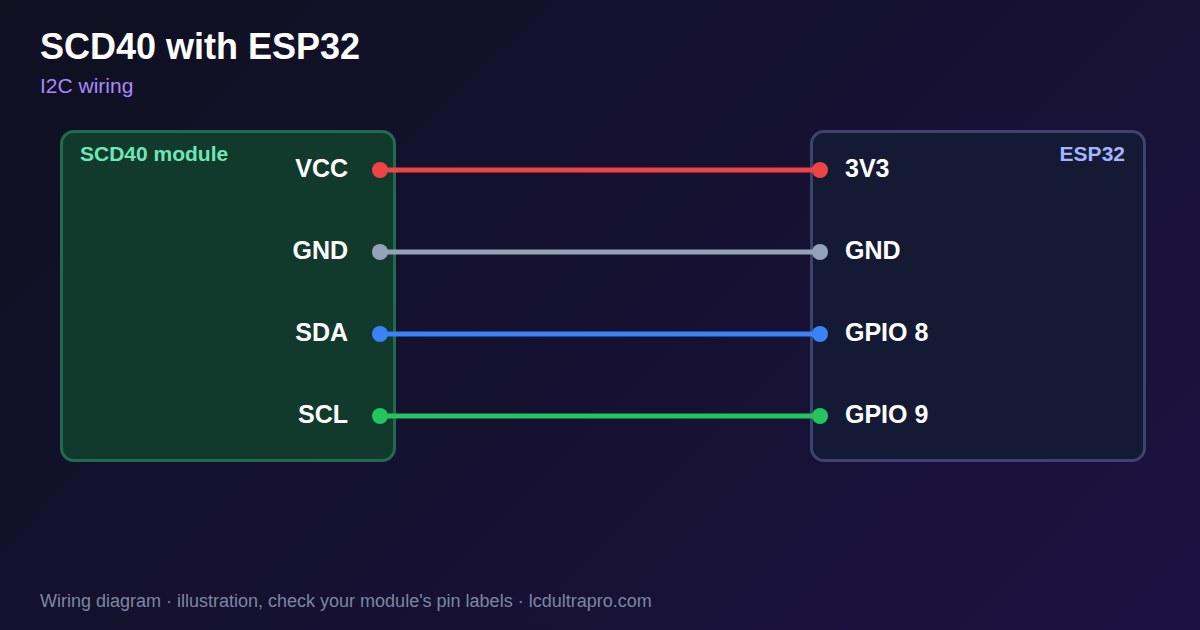
Wiring
| SCD40 | Connect to | Note |
|---|---|---|
| VCC | 3V3 | Check the module: the bare sensor is not 5 V |
| GND | GND | |
| SDA | GPIO 8 | Any free pin, set in Wire.begin() |
| SCL | GPIO 9 | Any free pin, set in Wire.begin() |
Arduino code
#include <Wire.h>

const int SDA_PIN = 8, SCL_PIN = 9;   // use your board's I2C pins
const uint8_t SCD40_ADDR = 0x62;

void command(uint16_t cmd) {
  Wire.beginTransmission(SCD40_ADDR);
  Wire.write(cmd >> 8);
  Wire.write(cmd & 0xFF);
  Wire.endTransmission();
}

void setup() {
  Serial.begin(115200);
  Wire.begin(SDA_PIN, SCL_PIN);
  command(0x21B1);   // start periodic measurement
}

void loop() {
  delay(5000);       // a new value about every 5 s
  command(0xEC05);   // read measurement
  delay(1);
  if (Wire.requestFrom(SCD40_ADDR, (uint8_t)9) != 9) {
    Serial.println("SCD40 not responding");
    return;
  }
  uint16_t raw[3];
  for (int i = 0; i < 3; i++) {
    raw[i] = (Wire.read() << 8) | Wire.read();
    Wire.read();     // CRC byte, not checked in this short example
  }
  Serial.printf("%u ppm  %.1f C  %.1f %%\n", raw[0],
                -45.0 + 175.0 * raw[1] / 65535.0, 100.0 * raw[2] / 65535.0);
}
No extra library needed. Compiled for ESP32-S3 with arduino-esp32 3.x. Not yet tested by us on a physical sensor. Change the pins to match your board.
On a display
Read the value in your sketch and pass it to a label, or send it over MQTT and show it with an MQTT value in the editor.
Design a display for SCD40Boards with a ready connector
Only boards whose connectors we have surveyed. Others may still work on free GPIOs.
| Elecrow CrowPanel ESP32 HMI 2.4" | I2C port: SDA 22, SCL 21Not shared with the touch controller (it is on SPI) — free for sensors |
| Elecrow CrowPanel ESP32 HMI 2.8" | I2C port: SDA 22, SCL 21Not shared with the touch controller (it is on SPI) — free for sensors |
| Elecrow CrowPanel ESP32 HMI 3.5" | I2C port: SDA 22, SCL 21Not shared with the touch controller (it is on SPI) — free for sensors |
| Elecrow CrowPanel ESP32-S3 HMI 5.0" | I2C port: SDA 19, SCL 20Same I2C bus as the GT911 touch (0x14 / 0x5D) and, on V3.0 boards, the PCA9557 touch-reset expander (0x18) |
| Elecrow CrowPanel ESP32-S3 HMI 7.0" | I2C port: SDA 19, SCL 20Same I2C bus as the GT911 touch (0x14 / 0x5D) and, on V3.0 boards, the PCA9557 touch-reset expander (0x18) |
| LilyGO T-Display-S3-Pro 2.33" | QWIIC RIGHT: SDA 5, SCL 6I2C only — same bus as the touch, the PMU (SY6970) and the light sensor |
| M5Stack AtomS3 0.85" | Bottom I2C pins: SDA 38, SCL 39Same I2C bus as the built-in IMU (MPU6886, 0x68) |
| Makerfabs MaTouch ESP32-S3 Rotary IPS 2.1 Round | Mabee I2C (J1): SDA 17, SCL 18Same I2C bus as the touch controller (CST826) |
| Makerfabs MaTouch ESP32-S3 Parallel TFT 4.3" | Mabee I2C: SDA 17, SCL 18Same I2C bus as the touch controller (GT911) |
| Makerfabs MaTouch ESP32-S3 Parallel TFT with Touch 5.0" | Mabee I2C: SDA 17, SCL 18Same I2C bus as the touch controller (GT911) |
| Makerfabs MaTouch ESP32-S3 Parallel TFT with Touch 7.0" | Mabee I2C: SDA 17, SCL 18Same I2C bus as the touch controller (GT911) |
| Sunton ESP32-4827S043R/C 4.3" | I2C header (P3): SDA 19, SCL 20Same I2C bus as the GT911 touch controller. P3 also carries GPIO 17 / 18. |
| Sunton ESP32-8048S043C 4.3" | I2C header (P3): SDA 19, SCL 20Same I2C bus as the GT911 touch controller. P3 also carries GPIO 17 / 18. |
| Sunton ESP32-8048S050C 5.0" | I2C header (P3): SDA 19, SCL 20Same I2C bus as the GT911 touch controller. P3 also carries GPIO 17 / 18. |
| Sunton ESP32-8048S070C 7.0" | I2C header (P3): SDA 19, SCL 20Same I2C bus as the GT911 touch controller. P3 also carries GPIO 17 / 18. |
| Waveshare ESP32-S3 Touch LCD 2.1" round | I2C connector: SDA 15, SCL 7Same I2C bus as the touch controller, the IO expander, the RTC and the IMU (addresses 0x15/0x5D, 0x20, 0x51, 0x6B, 0x7E taken) |
| Waveshare ESP32-S3 Touch LCD 2.8" | I2C connector: SDA 11, SCL 10Same I2C bus as the RTC and the IMU (0x51, 0x6B, 0x7E taken) — the touch has its own bus |
| Waveshare ESP32-S3 Touch LCD 2.8" Type B | I2C connector: SDA 15, SCL 7Same I2C bus as the touch controller, the IO expander, the RTC and the IMU (addresses 0x15/0x5D, 0x20, 0x51, 0x6B, 0x7E taken) |
| Waveshare ESP32-S3-Touch-LCD-2.8C | I2C connector: SDA 15, SCL 7Same I2C bus as the touch controller, the IO expander, the RTC and the IMU (addresses 0x15/0x5D, 0x20, 0x51, 0x6B, 0x7E taken) |
| Waveshare ESP32-S3-LCD-7B | I2C connector (H1): SDA 8, SCL 9Same I2C bus as the touch controller (GT911) and the IO expander (CH422G) |
Good to know
- Peaks reach 205 mA. Use a solid supply.
- A new value arrives about every 5 seconds, and the response time is 60 s.
- The example skips the CRC check to stay short. Add it in a product.
- Accuracy is specified from 400 to 2000 ppm.
What it is good for
- Indoor air quality displays
- Meeting room CO2 traffic lights
- Ventilation control
FAQ
What is the SCD40 I2C address?
0x62.
How often does the SCD40 update?
About every 5 seconds in periodic mode.
Why does my SCD40 reset the board?
Peaks reach 205 mA, so a weak 3.3 V supply can sag. Use a stronger rail.
Sources
Related parts
Use this information at your own risk. It is for general guidance only: the example code compiles, but it has not been tested on every part, and modules differ between sellers. Check the manufacturer's data before you build. Product names belong to their owners, and LCD Ultra Pro is not affiliated with them. See our Terms.