Input devices
KY-023 joystick with ESP32
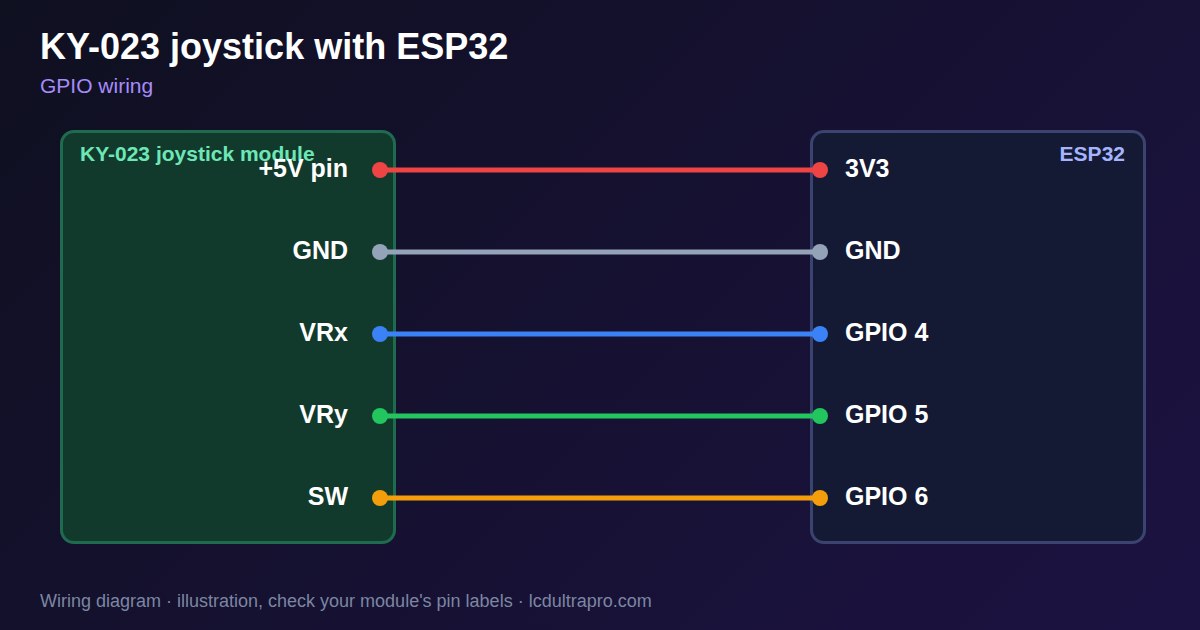
Two potentiometers and a push switch make up the KY-023. It needs two analog pins and one digital pin, and the analog pins are where most problems begin. On ESP32 chips, ADC2 channels clash with WiFi, so a joystick that works on the bench can read nonsense as soon as WiFi starts. Use ADC1 pins: GPIO 1 to 10 on the ESP32-S3, or GPIO 32 to 39 on a classic ESP32.
Power it from 3V3, even though the module is marked +5V. At 5 V the outputs can exceed what the ADC can read, and the reading sticks at 4095 before the stick reaches its end. Display boards often expose few ADC pins, so check the connector on the board page before you buy one.
Do not assume the middle is 2048. Each stick rests at a slightly different value, and the ESP32 ADC is not exactly linear, so read the centre at start-up and keep your hands off the stick while it boots. Then add a deadzone: without one, a resting stick slowly moves whatever it controls. The example uses 200 counts, which is a reasonable start. If the stick feels jumpy, average a few readings. The button pulls SW to ground, so it needs INPUT_PULLUP and some debounce. LCD Ultra Pro can read an analog pin in a rule and scale it, which is enough to show a position on a bar.
Specifications
| Outputs | VRx, VRy analog, SW digital |
|---|---|
| Supply on ESP32 | 3.3 V |
| Pins used | 2 ADC + 1 GPIO |
| Rest position | Near mid-scale, differs per stick |
| Starting deadzone | About 200 counts |
Power and logic levels
3.3 V: safe to connect directly
| Supply | 3.3 V |
|---|---|
| Signal level | Outputs follow the supply |
| On an ESP32 | At 5 V the outputs exceed 3.3 V. Keep it on 3V3. |
ESP32 pins, including those on a display board's connectors, work at 3.3 V and are not 5 V tolerant. Modules differ, so if in doubt, measure the signal before you connect it.
Wiring
| KY-023 joystick | Connect to | Note |
|---|---|---|
| +5V pin | 3V3 | Yes, 3.3 V on an ESP32 |
| GND | GND | |
| VRx | GPIO 4 | ADC1 pin |
| VRy | GPIO 5 | ADC1 pin |
| SW | GPIO 6 | INPUT_PULLUP |
Arduino code
const int X_PIN = 4, Y_PIN = 5, SW_PIN = 6;
const int DEADZONE = 200;
int cx, cy;

int axis(int raw, int centre) {
  int d = raw - centre;
  return abs(d) < DEADZONE ? 0 : d;
}

void setup() {
  Serial.begin(115200);
  pinMode(SW_PIN, INPUT_PULLUP);
  cx = analogRead(X_PIN);          // do not touch the stick during boot
  cy = analogRead(Y_PIN);
}

void loop() {
  Serial.printf("x %d  y %d  button %d\n", axis(analogRead(X_PIN), cx),
                axis(analogRead(Y_PIN), cy), digitalRead(SW_PIN) == LOW);
  delay(100);
}
No extra library needed. Compiled for ESP32-S3 with arduino-esp32 3.x. Not yet tested by us on a physical sensor. Change the pins to match your board.
On a display
In LCD Ultra Pro a rule can read an analog pin and scale it, so one axis can move a bar or update a label.
Design a display for KY-023 joystickBoards with a ready connector
Only boards whose connectors we have surveyed. Others may still work on free GPIOs.
| LilyGO T-Display (classic) 1.14" | Right pin header: GPIO 36 (ADC), 37 (ADC), 3836 / 37 / 38 / 39 are input-only |
| M5Stack AtomS3 0.85" | Bottom pin header: GPIO 5 (ADC), 6 (ADC), 7 |
Good to know
- Use ADC1 pins if WiFi is on.
- Power it from 3.3 V.
- Read the centre at boot.
- Add a deadzone.
What it is good for
- Menu navigation
- Pan and tilt control
- Manual machine jogging
FAQ
Why does my joystick stop working when WiFi starts?
It is probably on ADC2. Move it to ADC1 pins.
Why is the reading stuck at 4095 near the end?
It may be powered from 5 V. Use 3.3 V.
Why is the centre not 2048?
Each stick differs. Read the centre at start-up.
Sources
Related parts
Use this information at your own risk. It is for general guidance only: the example code compiles, but it has not been tested on every part, and modules differ between sellers. Check the manufacturer's data before you build. Product names belong to their owners, and LCD Ultra Pro is not affiliated with them. See our Terms.