Input devices
Push button with ESP32
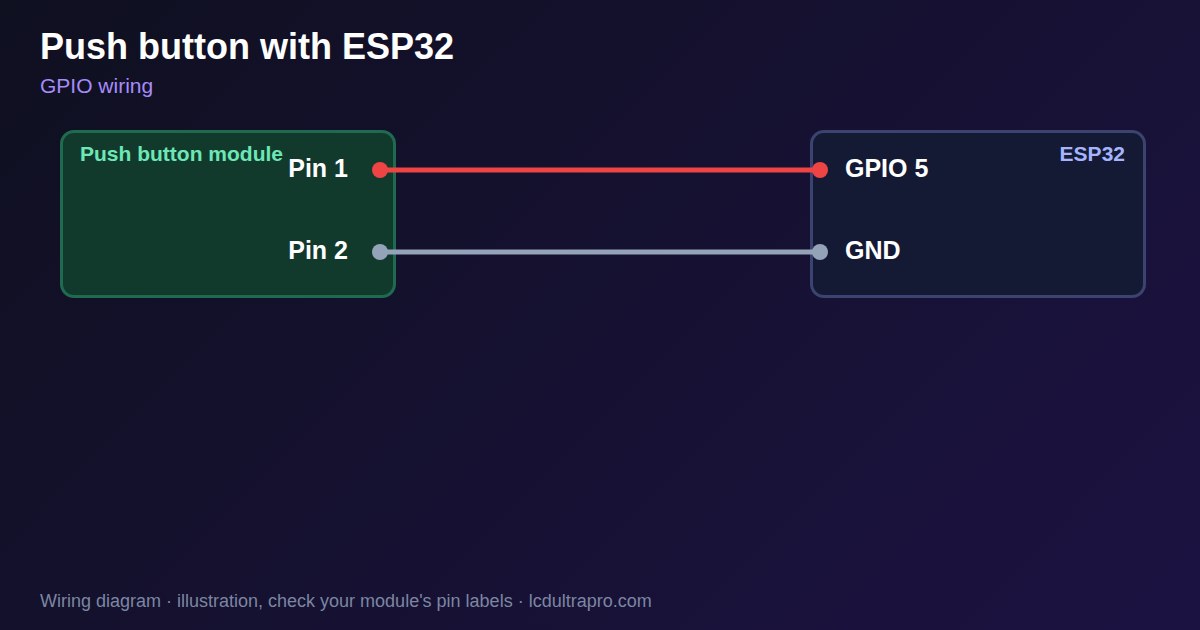
A physical button is still the most dependable input on a touch panel: for an emergency stop on a project, a wake-up, or a screen behind a glove. The wiring needs two wires, one to a GPIO and one to ground, with the internal pull-up keeping the pin high until you press.
Avoid strapping pins. On the ESP32-S3, GPIO 0, 3, 45 and 46 are read at reset, and a button held at the wrong moment can stop the board booting or start download mode. GPIO 0 is normally the BOOT button. Pick another free pin from the board page.
Mechanical contacts bounce, so one press can look like several. Ignoring changes for 20 to 50 ms solves that, which the example does. A long wire behaves like an antenna, so add a capacitor or use a lower-value external pull-up if you see false presses near motors or relays. A button that must stop dangerous machinery belongs in hardware, not in software. LCD Ultra Pro has a hardware button trigger, so a rule can react to a press without writing code.
Specifications
| Wiring | GPIO to button to GND |
|---|---|
| Input mode | INPUT_PULLUP |
| Debounce | 20–50 ms |
| Avoid on ESP32-S3 | GPIO 0, 3, 45, 46 |
Power and logic levels
3.3 V: safe to connect directly
| Supply | None, it is a switch |
|---|---|
| Signal level | Follows the pull-up |
| On an ESP32 | Wire it to GND with INPUT_PULLUP. Never to 5 V. |
ESP32 pins, including those on a display board's connectors, work at 3.3 V and are not 5 V tolerant. Modules differ, so if in doubt, measure the signal before you connect it.
Wiring
| Push button | Connect to | Note |
|---|---|---|
| Pin 1 | GPIO 5 | Internal pull-up |
| Pin 2 | GND |
Arduino code
const int BUTTON_PIN = 5;         // not a strapping pin
const unsigned long DEBOUNCE_MS = 30;
int stable = HIGH, last = HIGH;
unsigned long changed = 0;

void setup() {
  Serial.begin(115200);
  pinMode(BUTTON_PIN, INPUT_PULLUP);
}

void loop() {
  int now = digitalRead(BUTTON_PIN);
  if (now != last) { changed = millis(); last = now; }
  if (millis() - changed > DEBOUNCE_MS && now != stable) {
    stable = now;
    if (stable == LOW) Serial.println("Pressed");
  }
}
No extra library needed. Compiled for ESP32-S3 with arduino-esp32 3.x. Not yet tested by us on a physical sensor. Change the pins to match your board.
On a display
In LCD Ultra Pro a hardware button is a built-in trigger: a rule reacts to the press, for example to change a screen or switch a pin, without writing code.
Design a display for Push buttonBoards with a ready connector
Only boards whose connectors we have surveyed. Others may still work on free GPIOs.
| Elecrow CrowPanel ESP32 HMI 2.4" | GPIO_D port: GPIO 25 |
| Elecrow CrowPanel ESP32 HMI 2.8" | GPIO_D port: GPIO 25 |
| Elecrow CrowPanel ESP32 HMI 3.5" | GPIO_D port: GPIO 25 |
| Elecrow CrowPanel ESP32-S3 HMI 4.3" | GPIO_D port: GPIO 37 |
| Elecrow CrowPanel ESP32-S3 HMI 5.0" | GPIO_D port: GPIO 38 |
| Elecrow CrowPanel ESP32-S3 HMI 7.0" | GPIO_D port: GPIO 38 |
| LilyGO T-Display (classic) 1.14" | Left pin header: GPIO 21 |
| LilyGO T-Display-S3-Pro 2.33" | QWIIC LEFT: GPIO 43 |
| LilyGO T-Deck 2.8" | Grove connector: GPIO 43On the T-Deck Plus this port is taken by the built-in GPS |
| M5Stack AtomS3 0.85" | Grove port: GPIO 2 |
| M5Stack M5StickC Plus2 1.14" | Grove port: GPIO 32 |
| Sunton ESP32-2432S028R 2.8" | GPIO header (P3): GPIO 22GPIO 21 is the display backlight — not usable. GPIO 35 is input-only. No 3V3 pin on P3 (only GND). |
| Sunton ESP32-4827S043R/C 4.3" | GPIO header (P4): GPIO 17P3 carries the same two pins |
| Sunton ESP32-8048S043C 4.3" | GPIO header (P4): GPIO 17P3 carries the same two pins |
| Sunton ESP32-8048S050C 5.0" | GPIO header (P4): GPIO 17P5 carries the same pins. Shared with the I2S amplifier of the speaker output (P6). |
| Sunton ESP32-8048S070C 7.0" | GPIO header (P4): GPIO 17P5 carries the same pins. Shared with the I2S amplifier of the speaker output (P6). |
| Waveshare ESP32-S3 Touch LCD 1.28" round | SH1.0 GPIO header: GPIO 15Six GPIOs led out per the wiki pin table |
| Waveshare ESP32-S3 Touch LCD 1.28" round (CNC metal housing) | SH1.0 GPIO header: GPIO 15Six GPIOs led out per the wiki pin table |
| Waveshare ESP32-S3-LCD-7B | GPIO connector (J8): GPIO 6 |
Good to know
- Avoid strapping pins.
- Debounce in software.
- Long wires can pick up noise.
- Safety stops must not depend on software.
What it is good for
- Wake and menu buttons
- Physical backup for a touch screen
- Gloved use
FAQ
Do I need a resistor?
Usually not. Use INPUT_PULLUP and connect the button to ground.
Why does one press count twice?
Contacts bounce. Ignore changes for 20 to 50 ms.
Why does my board not boot with the button connected?
It may be on a strapping pin. Move it to another GPIO.
Sources
Related parts
Use this information at your own risk. It is for general guidance only: the example code compiles, but it has not been tested on every part, and modules differ between sellers. Check the manufacturer's data before you build. Product names belong to their owners, and LCD Ultra Pro is not affiliated with them. See our Terms.