Temperature, humidity and air
MQ-2 gas sensor with ESP32
Do not use an MQ-2 as a safety device. It is a cheap heated sensor that reacts to several gases and cannot tell them apart, so a reading says that something has changed, not what is in the room or how much. For gas leaks and fire, use a certified alarm. For a workshop experiment or a chart of air changes, the MQ-2 is fine.
Its heater needs a steady 5 V, which means a real 5 V supply and not the 3.3 V pin. The module warms up noticeably, which is normal. New or long-stored sensors need preheating: one reference gives at least 24 hours for the best stability, and calibration can drift during storage. Even after that, allow a few minutes after every power-on before you trust the value.
The analog output can rise towards 5 V, and that is too much for an ESP32 pin. Use a divider, such as 10 kΩ from AO to the pin and 20 kΩ from the pin to ground, which limits 5 V to about 3.3 V. The ESP32 ADC is not perfectly linear, so compare readings with each other instead of trusting one number. Converting to ppm needs a clean-air baseline and a curve for one gas, and the result stays an estimate. LCD Ultra Pro can read an analog pin in a rule and scale it for a bar or label without code, which suits this kind of relative display.
Specifications
| Supply | 5 V, steady |
|---|---|
| Output | Analog AO, plus digital DO on most modules |
| Preheat | At least 24 h for best stability |
| ESP32 input | Needs a divider, output can reach about 5 V |
| Selectivity | None, reacts to several gases |
Power and logic levels
5 V signal: needs a divider or level shifter
| Supply | 5 V heater |
|---|---|
| Signal level | AO and DO can reach about 5 V |
| On an ESP32 | Use a divider on AO. Do not connect DO without one. |
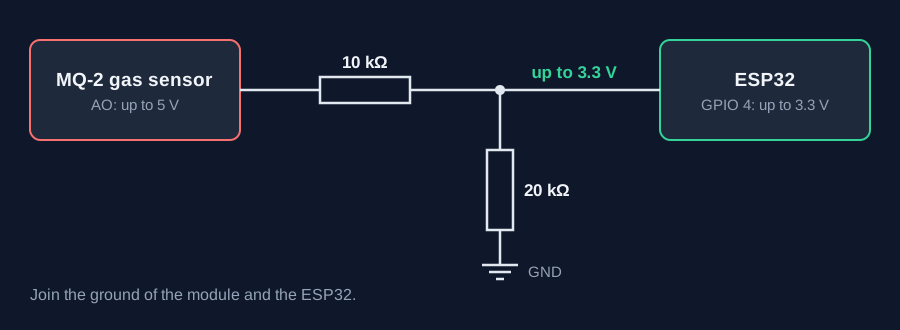
ESP32 pins, including those on a display board's connectors, work at 3.3 V and are not 5 V tolerant. Modules differ, so if in doubt, measure the signal before you connect it.
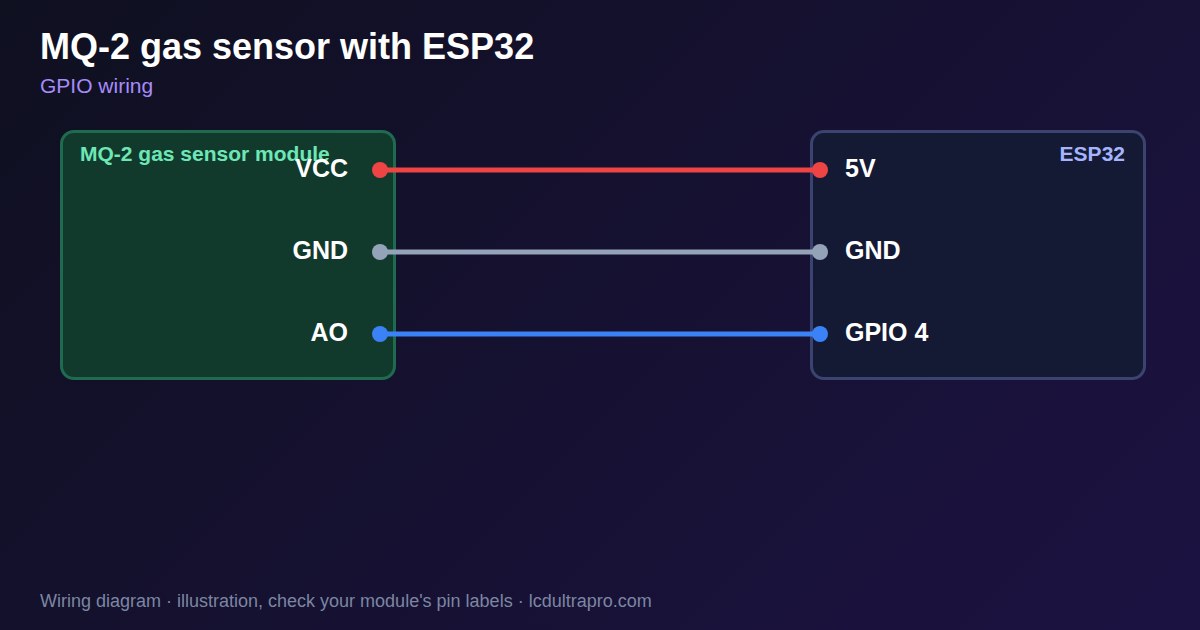
Wiring
| MQ-2 gas sensor | Connect to | Note |
|---|---|---|
| VCC | 5V | Not the 3.3 V pin |
| GND | GND | |
| AO | GPIO 4 | Through 10 kΩ, with 20 kΩ to GND |
Arduino code
const int AO_PIN = 4;             // an ADC1 pin, so WiFi can stay on
const float DIVIDER = 1.5;        // 10k + 20k divider

void setup() {
  Serial.begin(115200);
  Serial.println("Warming up for 2 minutes");
  delay(120000);
}

void loop() {
  int mv = analogReadMilliVolts(AO_PIN);
  Serial.printf("Sensor output %.2f V\n", mv * DIVIDER / 1000.0);
  delay(1000);
}
No extra library needed. Compiled for ESP32-S3 with arduino-esp32 3.x. Not yet tested by us on a physical sensor. Change the pins to match your board.
On a display
In LCD Ultra Pro a rule can read an analog pin and scale 0–4095 to any range, so a bar or label shows the relative value without code.
Design a display for MQ-2 gas sensorBoards with a ready connector
Only boards whose connectors we have surveyed. Others may still work on free GPIOs.
| Elecrow CrowPanel ESP32 HMI 2.4" | GPIO_D port: GPIO 32 (ADC) |
| Elecrow CrowPanel ESP32 HMI 2.8" | GPIO_D port: GPIO 32 (ADC) |
| Elecrow CrowPanel ESP32 HMI 3.5" | GPIO_D port: GPIO 32 (ADC) |
| LilyGO T-Display (classic) 1.14" | Right pin header: GPIO 36 (ADC)36 / 37 / 38 / 39 are input-only |
| M5Stack AtomS3 0.85" | Grove port: GPIO 2 (ADC) |
| M5Stack M5StickC Plus2 1.14" | Grove port: GPIO 32 (ADC) |
| Sunton ESP32-2432S028R 2.8" | GPIO header (P3): GPIO 35 (ADC)GPIO 21 is the display backlight — not usable. GPIO 35 is input-only. No 3V3 pin on P3 (only GND). |
| Waveshare ESP32-S3-LCD-7B | GPIO connector (J8): GPIO 6 (ADC) |
Good to know
- This is not a safety device.
- Use a divider on the analog output.
- It reacts to many gases and cannot separate them.
- It needs 5 V and warm-up time.
What it is good for
- Relative air change charts
- Workshop experiments
- Learning analog inputs
FAQ
Can an MQ-2 replace a gas alarm?
No. Use a certified alarm where safety depends on it.
Can I connect AO directly to an ESP32?
No, it can rise towards 5 V. Use a divider.
Why does the value fall slowly after power-on?
The heater is warming up. Wait before trusting it.
Sources
Related parts
Use this information at your own risk. It is for general guidance only: the example code compiles, but it has not been tested on every part, and modules differ between sellers. Check the manufacturer's data before you build. Product names belong to their owners, and LCD Ultra Pro is not affiliated with them. See our Terms.