Input devices
RC522 RFID with ESP32
The RC522 reads 13.56 MHz cards and key fobs, like the ones in starter kits and many office badges. Touch a card and you get its ID, which is a simple way to add sign-in or access control to a display panel.
Use 3.3 V. NXP's MFRC522 is rated up to 3.6 V, and 5 V on its supply can destroy it. It talks SPI here, with the extra RST pin, and draws about 13 to 26 mA. The IRQ pin is usually left unconnected, because the example polls for cards.
A card's UID is not a secret. Basic cards can be copied, so do not treat a UID alone as real security for a door or a payment. SPI needs several pins, and parallel RGB boards often have too few, so check the free pins on the board page. Read range is only a few centimetres, and metal behind the antenna reduces it. If the reader shows nothing, check that the module's headers are soldered: pressed-in pins are the most common fault on these kits.
Specifications
| Frequency | 13.56 MHz |
|---|---|
| Supply | 2.5–3.6 V, 3.3 V nominal |
| Current | About 13–26 mA |
| Interface | SPI, up to 10 Mbit/s |
| Read range | A few centimetres |
Power and logic levels
3.3 V: safe to connect directly
| Supply | 3.3 V (chip maximum 3.6 V) |
|---|---|
| Signal level | 3.3 V |
| On an ESP32 | Do not power it from 5 V. Its signals stay at 3.3 V, so an ESP32 needs no shifter. |
ESP32 pins, including those on a display board's connectors, work at 3.3 V and are not 5 V tolerant. Modules differ, so if in doubt, measure the signal before you connect it.
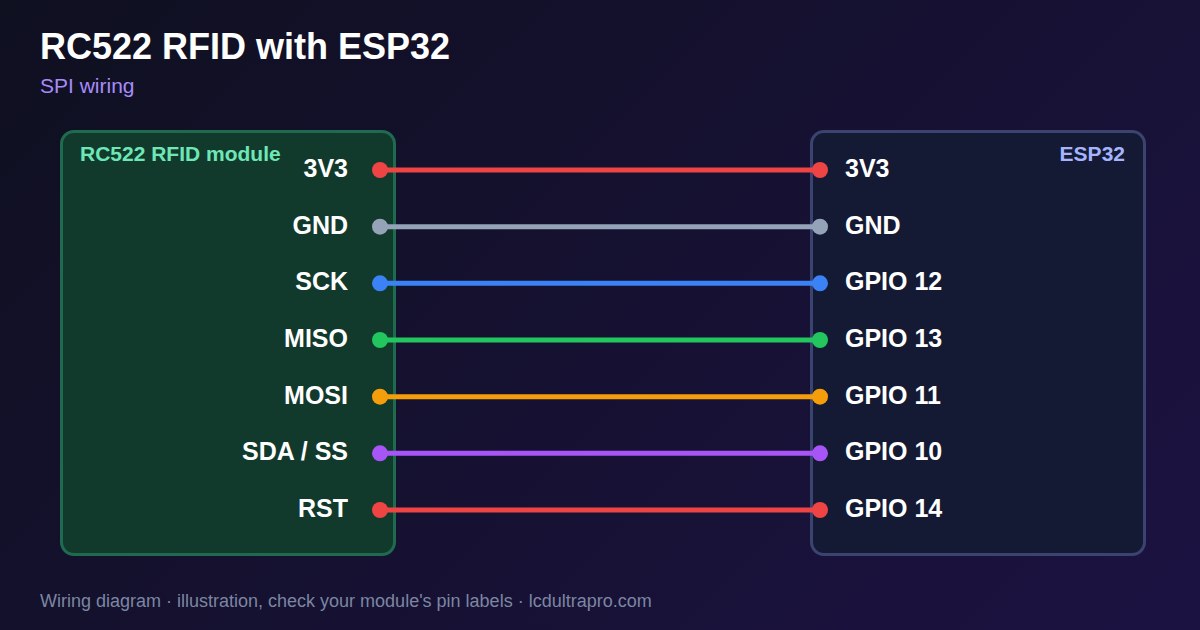
Wiring
| RC522 RFID | Connect to | Note |
|---|---|---|
| 3V3 | 3V3 | Not 5 V |
| GND | GND | |
| SCK | GPIO 12 | |
| MISO | GPIO 13 | |
| MOSI | GPIO 11 | |
| SDA / SS | GPIO 10 | |
| RST | GPIO 14 |
Arduino code
#include <SPI.h>
#include <MFRC522.h>

const int SCK_PIN = 12, MISO_PIN = 13, MOSI_PIN = 11, SS_PIN = 10, RST_PIN = 14;
MFRC522 rfid(SS_PIN, RST_PIN);

void setup() {
  Serial.begin(115200);
  SPI.begin(SCK_PIN, MISO_PIN, MOSI_PIN, SS_PIN);
  rfid.PCD_Init();
}

void loop() {
  if (!rfid.PICC_IsNewCardPresent() || !rfid.PICC_ReadCardSerial()) {
    delay(50);
    return;
  }
  for (byte i = 0; i < rfid.uid.size; i++) Serial.printf("%02X ", rfid.uid.uidByte[i]);
  Serial.println();
  rfid.PICC_HaltA();
}
Needs the MFRC522 library. Compiled for ESP32-S3 with arduino-esp32 3.x. Not yet tested by us on a physical sensor. Change the pins to match your board.
On a display
Read the value in your sketch and pass it to a label, or send it over MQTT and show it with an MQTT value in the editor.
Design a display for RC522 RFIDGood to know
- Use 3.3 V only.
- A UID alone is not secure.
- Solder the header. Pressed-in pins fail often.
- Metal behind the antenna reduces range.
What it is good for
- Sign-in panels
- Workshop tool access
- Tag-based menus
FAQ
Can the RC522 run on 5 V?
No. It is rated up to 3.6 V.
Why does my RC522 not read?
Unsoldered headers, wrong SPI pins or metal behind the antenna are common causes.
Is card UID secure?
No. Basic UIDs can be copied, so do not use it alone for real security.
Sources
Related parts
Use this information at your own risk. It is for general guidance only: the example code compiles, but it has not been tested on every part, and modules differ between sellers. Check the manufacturer's data before you build. Product names belong to their owners, and LCD Ultra Pro is not affiliated with them. See our Terms.