Communication and location
LoRa SX1276 with ESP32
LoRa sends small packets over long distances at low speed. An SX1276 module suits a remote sensor or a gate with no Wi-Fi coverage: send a few bytes, and show them on a display at home. It is not for streaming, and each message is short.
The module connects over SPI and needs 3.3 V. Modules sold as RFM95 use the same family. The frequency is a legal matter as well as a technical one: use 868 MHz in Europe and 915 MHz in North America, buy the matching module, and follow local duty-cycle and power limits.
Always connect the antenna before transmitting. Running a radio module without one can damage it. A plain quarter-wave wire works for tests, but a proper 50 Ω antenna gives a far better range, and buildings cut distance sharply. SPI needs several pins, which is hard on parallel RGB display boards, where most GPIOs are taken. Boards with SPI displays leave more room. Check the free pins on the board page first.
Specifications
| Chip range | 137–1020 MHz |
|---|---|
| Common modules | 433, 868 and 915 MHz |
| Supply | 3.3 V |
| Interface | SPI |
| Antenna | 50 Ω |
| Typical max output | 20 dBm, local limits apply |
Power and logic levels
3.3 V: safe to connect directly
| Supply | 3.3 V only |
|---|---|
| Signal level | 3.3 V |
| On an ESP32 | Do not power it from 5 V. Always fit the antenna. |
ESP32 pins, including those on a display board's connectors, work at 3.3 V and are not 5 V tolerant. Modules differ, so if in doubt, measure the signal before you connect it.
Wiring
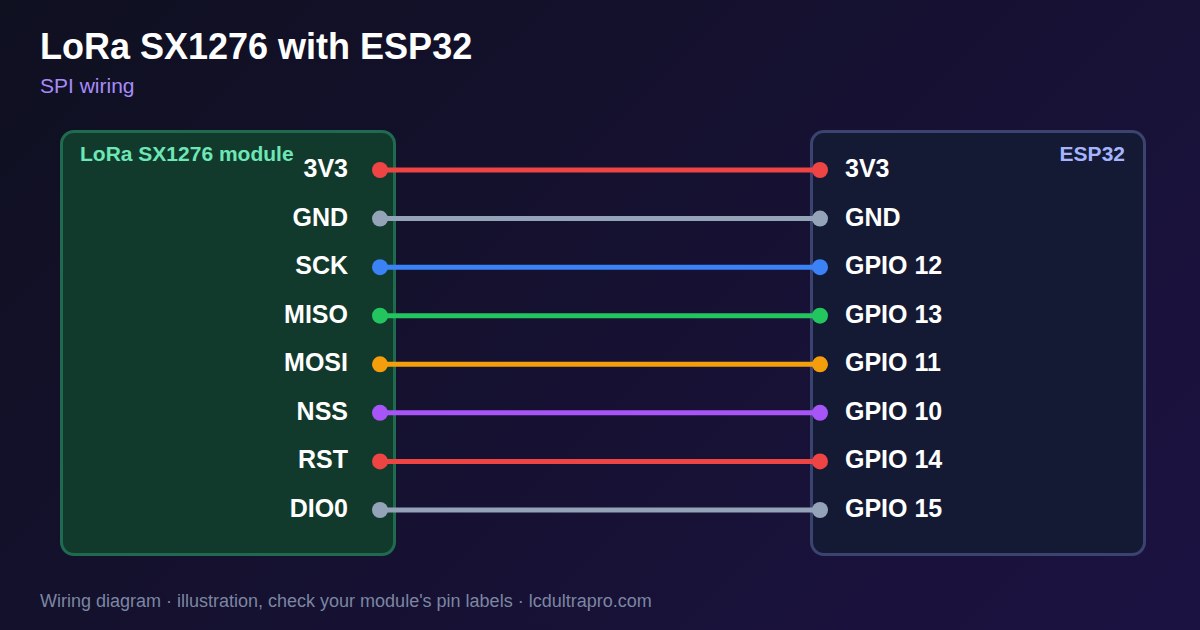
| LoRa SX1276 | Connect to | Note |
|---|---|---|
| 3V3 | 3V3 | Not 5 V |
| GND | GND | |
| SCK | GPIO 12 | |
| MISO | GPIO 13 | |
| MOSI | GPIO 11 | |
| NSS | GPIO 10 | |
| RST | GPIO 14 | |
| DIO0 | GPIO 15 | Interrupt |
Arduino code
#include <SPI.h>
#include <LoRa.h>

const int SCK_PIN = 12, MISO_PIN = 13, MOSI_PIN = 11, NSS = 10, RST = 14, DIO0 = 15;

void setup() {
  Serial.begin(115200);
  SPI.begin(SCK_PIN, MISO_PIN, MOSI_PIN, NSS);
  LoRa.setPins(NSS, RST, DIO0);
  if (!LoRa.begin(868E6)) {        // 915E6 in North America
    Serial.println("LoRa not found: check wiring");
    while (true) delay(1000);
  }
}

void loop() {
  LoRa.beginPacket();
  LoRa.print("hello");
  LoRa.endPacket();

  unsigned long start = millis();
  while (millis() - start < 5000) {
    if (LoRa.parsePacket()) {
      while (LoRa.available()) Serial.write(LoRa.read());
      Serial.println();
    }
  }
}
Needs the LoRa library. Compiled for ESP32-S3 with arduino-esp32 3.x. Not yet tested by us on a physical sensor. Change the pins to match your board.
On a display
Read the value in your sketch and pass it to a label, or send it over MQTT and show it with an MQTT value in the editor.
Design a display for LoRa SX1276Good to know
- Connect the antenna before transmitting.
- Use the frequency allowed in your country.
- Follow duty-cycle limits. Do not send every second in a product.
- SPI takes several pins. Parallel RGB boards may have too few.
What it is good for
- Remote sensors without Wi-Fi
- Gate and mailbox alerts
- Farm and field monitoring
FAQ
Which LoRa frequency should I use?
868 MHz in Europe, 915 MHz in North America. Check your local rules.
Can I run LoRa without an antenna?
No. Transmitting without one can damage the module.
How much data can LoRa send?
Small packets at low speed. It is meant for sensor values.
Sources
Related parts
Use this information at your own risk. It is for general guidance only: the example code compiles, but it has not been tested on every part, and modules differ between sellers. Check the manufacturer's data before you build. Product names belong to their owners, and LCD Ultra Pro is not affiliated with them. See our Terms.