Communication and location
NEO-6M GPS with ESP32
The NEO-6M is a low-cost GPS receiver that streams text over a serial port. By default it sends NMEA sentences at 9600 baud, so you connect two wires and can already see data in a terminal, before parsing anything.
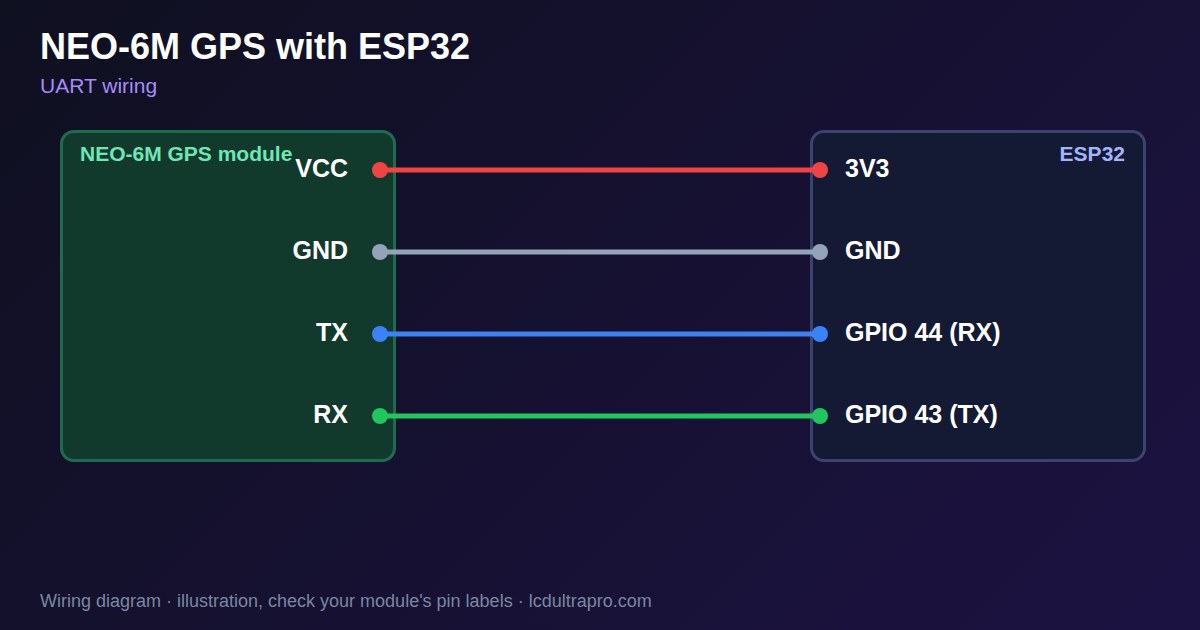
Connect the module's TX to an ESP32 RX pin, and RX to a TX pin: the wires cross. Modules usually accept 3 to 5 V, and the serial pins work at 3.3 V logic. Check your module, because boards differ. The first fix takes about 30 to 60 seconds under open sky on a cold start, and much longer indoors, where it may never get one. Testing beside a window is a common way to think the module is broken.
A small backup battery keeps satellite data between power cycles. If it is missing or dead, every start is a cold start. The default update rate is one fix per second. For 5 or 10 Hz, raise the baud rate too, or the serial buffer overflows. The code below prints raw sentences. To extract position, use a parser library. On a display board, check for a free UART first: many boards share theirs with USB, so see the table below.
Specifications
| Output | NMEA 0183 over UART |
|---|---|
| Default baud | 9600 |
| Module supply | 3–5 V, check your module |
| Logic | 3.3 V |
| Cold start | About 30–60 s under open sky |
| Update rate | 1 Hz default, higher with faster baud |
Power and logic levels
3.3 V: safe to connect directly
| Supply | Chip 2.7–3.6 V, modules 3.3–5 V |
|---|---|
| Signal level | TX is 3.3 V |
| On an ESP32 | VCC may take 5 V on a regulated module, but TX and RX stay at 3.3 V, so an ESP32 connects directly. |
ESP32 pins, including those on a display board's connectors, work at 3.3 V and are not 5 V tolerant. Modules differ, so if in doubt, measure the signal before you connect it.
Wiring
| NEO-6M GPS | Connect to | Note |
|---|---|---|
| VCC | 3V3 | Check your module |
| GND | GND | |
| TX | GPIO 44 (RX) | Wires cross |
| RX | GPIO 43 (TX) | Wires cross |
Arduino code
const int GPS_RX = 44, GPS_TX = 43;   // ESP32 side, use a free UART

void setup() {
  Serial.begin(115200);
  Serial1.begin(9600, SERIAL_8N1, GPS_RX, GPS_TX);
}

void loop() {
  while (Serial1.available()) Serial.write(Serial1.read());
}
No extra library needed. Compiled for ESP32-S3 with arduino-esp32 3.x. Not yet tested by us on a physical sensor. Change the pins to match your board.
On a display
Read the value in your sketch and pass it to a label, or send it over MQTT and show it with an MQTT value in the editor.
Design a display for NEO-6M GPSBoards with a ready connector
Only boards whose connectors we have surveyed. Others may still work on free GPIOs.
| Elecrow CrowPanel ESP32 HMI 2.4" | UART1 port: TX 17, RX 16 |
| Elecrow CrowPanel ESP32 HMI 2.8" | UART1 port: TX 17, RX 16 |
| Elecrow CrowPanel ESP32 HMI 3.5" | UART0 port: TX 1, RX 3Shared with the USB-C serial port — the serial monitor and uploads use it too |
| Elecrow CrowPanel ESP32-S3 HMI 4.3" | UART1 port: TX 17, RX 18 |
| Elecrow CrowPanel ESP32-S3 HMI 5.0" | UART0 port: TX 43, RX 44Shared with the USB-C serial port — the serial monitor and uploads use it too |
| Elecrow CrowPanel ESP32-S3 HMI 7.0" | UART0 port: TX 43, RX 44Shared with the USB-C serial port — the serial monitor and uploads use it too |
| Makerfabs MaTouch ESP32-S3 Rotary IPS 2.1 Round | Mabee UART (J2): TX 43, RX 44UART0 — the serial output goes here unless it is moved to the USB port |
| Sunton ESP32-2432S028R 2.8" | Serial header (P1): TX 1, RX 3Shared with the USB-UART bridge — the serial monitor and uploads use it too |
| Sunton ESP32-4827S043R/C 4.3" | UART header (P1): TX 43, RX 44Shared with the USB-UART bridge — the serial monitor and uploads use it too |
| Sunton ESP32-8048S043C 4.3" | UART header (P1): TX 43, RX 44Shared with the USB-UART bridge — the serial monitor and uploads use it too |
| Sunton ESP32-8048S050C 5.0" | UART header (P1): TX 43, RX 44Shared with the USB-UART bridge — the serial monitor and uploads use it too |
| Sunton ESP32-8048S070C 7.0" | UART header (P1): TX 43, RX 44Shared with the USB-UART bridge — the serial monitor and uploads use it too |
| Waveshare ESP32-S3 Touch LCD 2.1" round | 12-pin header: TX 43, RX 44The header also carries USB D- / D+ (GPIO 19 / 20) and the I2C bus (GPIO 15 / 7) — GPIO 0 is the BOOT button (keep it high at power-up) |
| Waveshare ESP32-S3 Touch LCD 2.8" | 12-pin header: TX 43, RX 44The header also carries USB D- / D+ (GPIO 19 / 20) and the I2C bus (GPIO 11 / 10) |
| Waveshare ESP32-S3 Touch LCD 2.8" Type B | 2x12 pin header: TX 43, RX 44The header also carries USB D- / D+ (GPIO 19 / 20) and the I2C bus (GPIO 15 / 7) — GPIO 0 is the BOOT button (keep it high at power-up) |
| Waveshare ESP32-S3-Touch-LCD-2.8C | 12-pin header: TX 43, RX 44The header also carries USB D- / D+ (GPIO 19 / 20) and the I2C bus (GPIO 15 / 7) — GPIO 0 is the BOOT button (keep it high at power-up) |
| Waveshare ESP32-S3-LCD-7B | UART2 connector (H3): TX 43, RX 44Only when switch SW1 selects UART2 — shared with the USB-to-UART port |
Good to know
- TX and RX cross over.
- A fix needs open sky. Do not judge it indoors.
- Without a backup battery, every start is a cold start.
- Many boards share their UART with USB. Uploads may need the wires disconnected.
What it is good for
- Vehicle dashboards and speedometers
- Trackers and loggers
- Accurate time without Wi-Fi
FAQ
Why does my NEO-6M show no position?
A cold start needs about 30 to 60 seconds under open sky. Indoors it may never get a fix.
What baud rate does the NEO-6M use?
9600 by default.
Why is there no position indoors?
GPS needs a view of the sky. Test outdoors or by a window, and allow time for the first fix.
Sources
Related parts
Use this information at your own risk. It is for general guidance only: the example code compiles, but it has not been tested on every part, and modules differ between sellers. Check the manufacturer's data before you build. Product names belong to their owners, and LCD Ultra Pro is not affiliated with them. See our Terms.