Communication and location
RS-485 (MAX3485) with ESP32
RS-485 carries serial data over long twisted-pair cables and is the usual link to industrial devices, energy meters and drives. The ESP32 only needs a transceiver chip to reach it, and on a display board that turns a screen into a machine panel. Check the chip marking first: a MAX3485 or SP3485 runs from 3.3 V, while the common MAX485 is a 5 V part.
Choose the transceiver with care. A cheap 5 V MAX485 module can output close to 5 V on its RO pin, which is not safe for an ESP32 RX input. A 3.3 V part such as MAX3485 or SP3485 avoids the problem. Two wires, A and B, form the bus, and all devices also share a reference, so run a ground wire on longer cables.
RS-485 is half duplex on two wires. Tie DE and /RE together on one GPIO, drive it HIGH before sending, and return it LOW after the last byte has really left, which is what Serial1.flush() waits for. Put one 120 Ω resistor at each physical end of the bus only. Many modules include one, so check before adding ten devices. Some boards, such as Waveshare's 7B, already have RS-485 on board. Check the board page before buying a module.
Specifications
| Transceiver | MAX3485 or SP3485 for 3.3 V |
|---|---|
| Not the same part | MAX485 is a 5 V chip, its RO output needs a divider |
| Wires | A, B and a common reference |
| Mode | Half duplex |
| Termination | 120 Ω at each physical end |
| Direction | DE and /RE together on one GPIO |
Power and logic levels
3.3 V: check your module first
| Supply | 3.3 V for MAX3485, 5 V for MAX485 |
|---|---|
| Signal level | RO follows the supply |
| On an ESP32 | A 5 V MAX485 needs a divider on RO. |
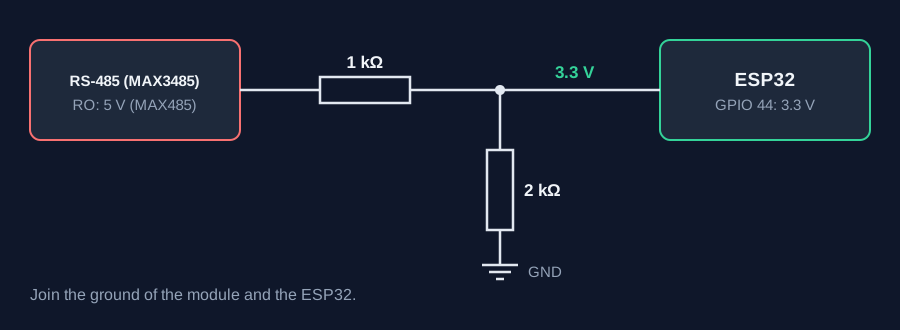
ESP32 pins, including those on a display board's connectors, work at 3.3 V and are not 5 V tolerant. Modules differ, so if in doubt, measure the signal before you connect it.
Wiring
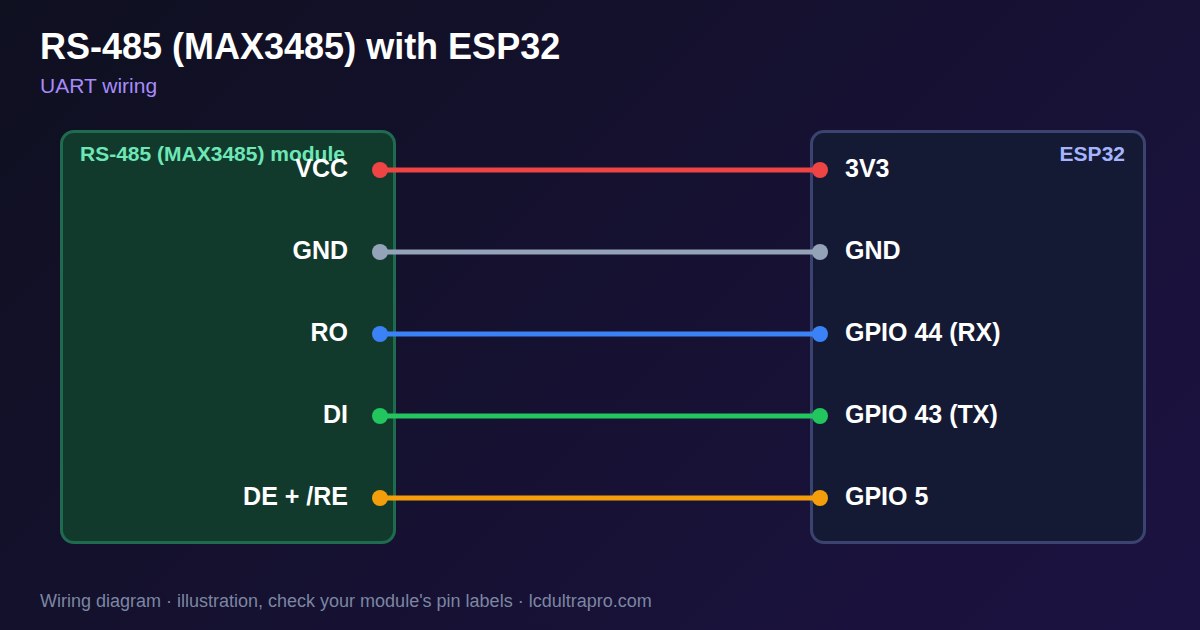
| RS-485 (MAX3485) | Connect to | Note |
|---|---|---|
| VCC | 3V3 | 3.3 V transceiver only |
| GND | GND | |
| RO | GPIO 44 (RX) | |
| DI | GPIO 43 (TX) | |
| DE + /RE | GPIO 5 | Tied together |
Arduino code
const int RX_PIN = 44, TX_PIN = 43, DIR_PIN = 5;   // use free pins

void setup() {
  Serial.begin(115200);
  pinMode(DIR_PIN, OUTPUT);
  digitalWrite(DIR_PIN, LOW);                       // receive
  Serial1.begin(9600, SERIAL_8N1, RX_PIN, TX_PIN);
}

void loop() {
  digitalWrite(DIR_PIN, HIGH);                      // transmit
  Serial1.print("hello\n");
  Serial1.flush();                                  // wait for the last bit
  digitalWrite(DIR_PIN, LOW);                       // receive
  unsigned long start = millis();
  while (millis() - start < 1000) {
    if (Serial1.available()) Serial.write(Serial1.read());
  }
}
No extra library needed. Compiled for ESP32-S3 with arduino-esp32 3.x. Not yet tested by us on a physical sensor. Change the pins to match your board.
On a display
Read the value in your sketch and pass it to a label, or send it over MQTT and show it with an MQTT value in the editor.
Design a display for RS-485 (MAX3485)Boards with a ready connector
Only boards whose connectors we have surveyed. Others may still work on free GPIOs.
| Elecrow CrowPanel ESP32 HMI 2.4" | UART1 port: TX 17, RX 16 |
| Elecrow CrowPanel ESP32 HMI 2.8" | UART1 port: TX 17, RX 16 |
| Elecrow CrowPanel ESP32 HMI 3.5" | UART0 port: TX 1, RX 3Shared with the USB-C serial port — the serial monitor and uploads use it too |
| Elecrow CrowPanel ESP32-S3 HMI 4.3" | UART1 port: TX 17, RX 18 |
| Elecrow CrowPanel ESP32-S3 HMI 5.0" | UART0 port: TX 43, RX 44Shared with the USB-C serial port — the serial monitor and uploads use it too |
| Elecrow CrowPanel ESP32-S3 HMI 7.0" | UART0 port: TX 43, RX 44Shared with the USB-C serial port — the serial monitor and uploads use it too |
| Makerfabs MaTouch ESP32-S3 Rotary IPS 2.1 Round | Mabee UART (J2): TX 43, RX 44UART0 — the serial output goes here unless it is moved to the USB port |
| Sunton ESP32-2432S028R 2.8" | Serial header (P1): TX 1, RX 3Shared with the USB-UART bridge — the serial monitor and uploads use it too |
| Sunton ESP32-4827S043R/C 4.3" | UART header (P1): TX 43, RX 44Shared with the USB-UART bridge — the serial monitor and uploads use it too |
| Sunton ESP32-8048S043C 4.3" | UART header (P1): TX 43, RX 44Shared with the USB-UART bridge — the serial monitor and uploads use it too |
| Sunton ESP32-8048S050C 5.0" | UART header (P1): TX 43, RX 44Shared with the USB-UART bridge — the serial monitor and uploads use it too |
| Sunton ESP32-8048S070C 7.0" | UART header (P1): TX 43, RX 44Shared with the USB-UART bridge — the serial monitor and uploads use it too |
| Waveshare ESP32-S3 Touch LCD 2.1" round | 12-pin header: TX 43, RX 44The header also carries USB D- / D+ (GPIO 19 / 20) and the I2C bus (GPIO 15 / 7) — GPIO 0 is the BOOT button (keep it high at power-up) |
| Waveshare ESP32-S3 Touch LCD 2.8" | 12-pin header: TX 43, RX 44The header also carries USB D- / D+ (GPIO 19 / 20) and the I2C bus (GPIO 11 / 10) |
| Waveshare ESP32-S3 Touch LCD 2.8" Type B | 2x12 pin header: TX 43, RX 44The header also carries USB D- / D+ (GPIO 19 / 20) and the I2C bus (GPIO 15 / 7) — GPIO 0 is the BOOT button (keep it high at power-up) |
| Waveshare ESP32-S3-Touch-LCD-2.8C | 12-pin header: TX 43, RX 44The header also carries USB D- / D+ (GPIO 19 / 20) and the I2C bus (GPIO 15 / 7) — GPIO 0 is the BOOT button (keep it high at power-up) |
| Waveshare ESP32-S3-LCD-7B | UART2 connector (H3): TX 43, RX 44Only when switch SW1 selects UART2 — shared with the USB-to-UART port |
Good to know
- Do not feed 5 V from a MAX485 RO pin into an ESP32.
- Terminate only the two physical ends of the bus.
- Release the bus after Serial1.flush(), not before.
- If A and B are swapped, nothing works but nothing breaks. Swap them and retry.
What it is good for
- Modbus energy meters
- Industrial sensors
- Long cable runs between panels
FAQ
Can I use a MAX485 with an ESP32?
A 5 V module can output nearly 5 V on RO. Use a 3.3 V part such as MAX3485 or SP3485.
Where do termination resistors go?
One 120 Ω resistor at each physical end of the bus, not on every device.
Why do I receive only garbage?
Check A and B, the baud rate and the DE timing. Swapping A and B is safe to try.
Sources
Related parts
Use this information at your own risk. It is for general guidance only: the example code compiles, but it has not been tested on every part, and modules differ between sellers. Check the manufacturer's data before you build. Product names belong to their owners, and LCD Ultra Pro is not affiliated with them. See our Terms.