Light, distance and motion
AS5600 magnetic encoder with ESP32
Unlike a rotary encoder, the AS5600 knows its absolute angle the moment it powers up, with nothing touching the shaft. A small magnet on the shaft end sits above the chip, and it reports a full turn in 4096 steps, about 0.1° each. That makes it good for knobs that must survive a reboot, or for a wind vane.
The magnet has to be diametric, magnetised across its diameter. An ordinary axial disc will not work, and most modules ship with the right one, so keep it. Centre it over the chip. Distance matters too, so check the datasheet for your magnet. The status register tells you if the setup is right: it reports magnet detected, too strong and too weak. The example prints that, and you should look at it before you trust any angle. Shafts made of steel distort the field, so non-magnetic mounting helps.
Tie the DIR pin to a defined level: it sets the direction of rotation, with low as clockwise in the common library, and it should not float. The address is fixed at 0x36, so only one fits on a bus. The AS5600L is a different part at 0x40 that can be changed. The library author reports that pull-ups are mandatory, and that an ESP32 can block for up to a second if the sensor connection fails. So avoid polling it in a path that the display depends on. Some modules also have a resistor on PGO that disables the OUT pin.
Specifications
| Resolution | 12-bit, 4096 steps per turn |
|---|---|
| Angle step | About 0.1° |
| Reading | Absolute, known at power-up |
| I2C address | 0x36, fixed |
| Magnet | Diametric, centred |
| Status | Detected, too weak, too strong |
Power and logic levels
3.3 V: check your module first
| Supply | Chip: 3–3.6 V mode or 4.5–5.5 V mode |
|---|---|
| Signal level | I2C follows the supply |
| On an ESP32 | On the bare chip, 3.3 V mode needs VDD5V and VDD3V3 tied together. Use a module rated for 3.3 V. |
ESP32 pins, including those on a display board's connectors, work at 3.3 V and are not 5 V tolerant. Modules differ, so if in doubt, measure the signal before you connect it.
Wiring
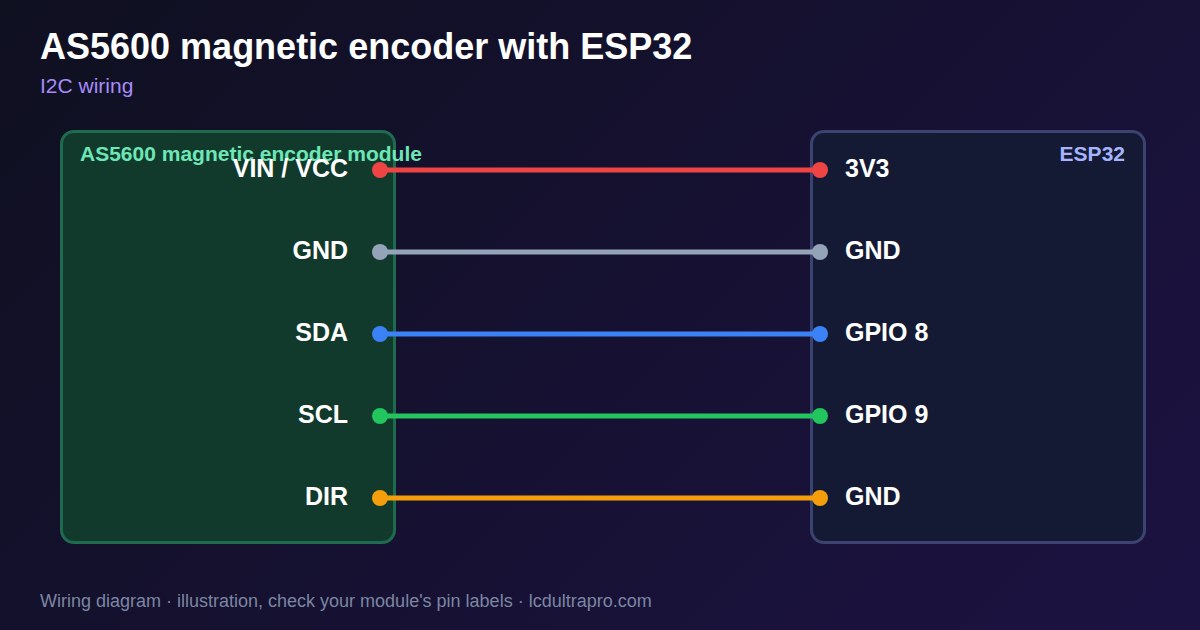
| AS5600 magnetic encoder | Connect to | Note |
|---|---|---|
| VIN / VCC | 3V3 | |
| GND | GND | |
| SDA | GPIO 8 | Any free pin, set in Wire.begin() |
| SCL | GPIO 9 | Any free pin, set in Wire.begin() |
| DIR | GND | Do not leave floating |
Arduino code
#include <Wire.h>

const int SDA_PIN = 8, SCL_PIN = 9;
const uint8_t ADDR = 0x36;

uint16_t read(uint8_t reg, uint8_t n) {
  Wire.beginTransmission(ADDR);
  Wire.write(reg);
  Wire.endTransmission();
  Wire.requestFrom(ADDR, n);
  uint16_t v = 0;
  while (n--) v = (v << 8) | Wire.read();
  return v;
}

void setup() {
  Serial.begin(115200);
  Wire.begin(SDA_PIN, SCL_PIN);
}

void loop() {
  uint8_t status = read(0x0B, 1);
  uint16_t raw = read(0x0C, 2) & 0x0FFF;
  Serial.printf("%.1f deg  magnet %s%s%s\n", raw * 360.0 / 4096,
                status & 0x20 ? "found" : "MISSING",
                status & 0x10 ? ", too weak" : "", status & 0x08 ? ", too strong" : "");
  delay(200);
}
No extra library needed. Compiled for ESP32-S3 with arduino-esp32 3.x. Not yet tested by us on a physical sensor. Change the pins to match your board.
On a display
Read the value in your sketch and pass it to a label, or send it over MQTT and show it with an MQTT value in the editor.
Design a display for AS5600 magnetic encoderBoards with a ready connector
Only boards whose connectors we have surveyed. Others may still work on free GPIOs.
| Elecrow CrowPanel ESP32 HMI 2.4" | I2C port: SDA 22, SCL 21Not shared with the touch controller (it is on SPI) — free for sensors |
| Elecrow CrowPanel ESP32 HMI 2.8" | I2C port: SDA 22, SCL 21Not shared with the touch controller (it is on SPI) — free for sensors |
| Elecrow CrowPanel ESP32 HMI 3.5" | I2C port: SDA 22, SCL 21Not shared with the touch controller (it is on SPI) — free for sensors |
| Elecrow CrowPanel ESP32-S3 HMI 5.0" | I2C port: SDA 19, SCL 20Same I2C bus as the GT911 touch (0x14 / 0x5D) and, on V3.0 boards, the PCA9557 touch-reset expander (0x18) |
| Elecrow CrowPanel ESP32-S3 HMI 7.0" | I2C port: SDA 19, SCL 20Same I2C bus as the GT911 touch (0x14 / 0x5D) and, on V3.0 boards, the PCA9557 touch-reset expander (0x18) |
| LilyGO T-Display-S3-Pro 2.33" | QWIIC RIGHT: SDA 5, SCL 6I2C only — same bus as the touch, the PMU (SY6970) and the light sensor |
| M5Stack AtomS3 0.85" | Bottom I2C pins: SDA 38, SCL 39Same I2C bus as the built-in IMU (MPU6886, 0x68) |
| Makerfabs MaTouch ESP32-S3 Rotary IPS 2.1 Round | Mabee I2C (J1): SDA 17, SCL 18Same I2C bus as the touch controller (CST826) |
| Makerfabs MaTouch ESP32-S3 Parallel TFT 4.3" | Mabee I2C: SDA 17, SCL 18Same I2C bus as the touch controller (GT911) |
| Makerfabs MaTouch ESP32-S3 Parallel TFT with Touch 5.0" | Mabee I2C: SDA 17, SCL 18Same I2C bus as the touch controller (GT911) |
| Makerfabs MaTouch ESP32-S3 Parallel TFT with Touch 7.0" | Mabee I2C: SDA 17, SCL 18Same I2C bus as the touch controller (GT911) |
| Sunton ESP32-4827S043R/C 4.3" | I2C header (P3): SDA 19, SCL 20Same I2C bus as the GT911 touch controller. P3 also carries GPIO 17 / 18. |
| Sunton ESP32-8048S043C 4.3" | I2C header (P3): SDA 19, SCL 20Same I2C bus as the GT911 touch controller. P3 also carries GPIO 17 / 18. |
| Sunton ESP32-8048S050C 5.0" | I2C header (P3): SDA 19, SCL 20Same I2C bus as the GT911 touch controller. P3 also carries GPIO 17 / 18. |
| Sunton ESP32-8048S070C 7.0" | I2C header (P3): SDA 19, SCL 20Same I2C bus as the GT911 touch controller. P3 also carries GPIO 17 / 18. |
| Waveshare ESP32-S3 Touch LCD 2.1" round | I2C connector: SDA 15, SCL 7Same I2C bus as the touch controller, the IO expander, the RTC and the IMU (addresses 0x15/0x5D, 0x20, 0x51, 0x6B, 0x7E taken) |
| Waveshare ESP32-S3 Touch LCD 2.8" | I2C connector: SDA 11, SCL 10Same I2C bus as the RTC and the IMU (0x51, 0x6B, 0x7E taken) — the touch has its own bus |
| Waveshare ESP32-S3 Touch LCD 2.8" Type B | I2C connector: SDA 15, SCL 7Same I2C bus as the touch controller, the IO expander, the RTC and the IMU (addresses 0x15/0x5D, 0x20, 0x51, 0x6B, 0x7E taken) |
| Waveshare ESP32-S3-Touch-LCD-2.8C | I2C connector: SDA 15, SCL 7Same I2C bus as the touch controller, the IO expander, the RTC and the IMU (addresses 0x15/0x5D, 0x20, 0x51, 0x6B, 0x7E taken) |
| Waveshare ESP32-S3-LCD-7B | I2C connector (H1): SDA 8, SCL 9Same I2C bus as the touch controller (GT911) and the IO expander (CH422G) |
Good to know
- It needs a diametric magnet.
- Check the magnet status first.
- The address is fixed.
- Do not leave DIR floating.
What it is good for
- Absolute knobs
- Wind vanes
- Motor and robot joint angles
FAQ
Why does the angle jump around?
Check the magnet status. It may be too far, too close or off centre.
Will a normal magnet work?
It needs a diametrically magnetised one.
Can two share one bus?
Not two AS5600 chips: the address is fixed at 0x36.
Sources
Related parts
Use this information at your own risk. It is for general guidance only: the example code compiles, but it has not been tested on every part, and modules differ between sellers. Check the manufacturer's data before you build. Product names belong to their owners, and LCD Ultra Pro is not affiliated with them. See our Terms.