Temperature, humidity and air
MLX90614 IR thermometer with ESP32
The MLX90614 reads a surface's temperature from its infrared radiation, so it suits things you cannot touch: a rotating motor, a hot bearing or a heater plate. Melexis gives -70 to 380 °C for the object and -40 to 125 °C for the sensor itself, with ±0.5 °C around room temperature. That accuracy applies near room temperature only. It does not hold across the full range.
The reading is an average of everything the sensor can see. The common BAA version has a 90° field of view, so it needs to be very close to a small target: from a distance, it reports the target mixed with the background. Narrow versions exist, such as a 5° DCI, and they cost more. Check the part code before you buy for a distance measurement.
Polished metal is the other trap. The sensor is set for an emissivity of 1, which is close to skin or matt paint. Shiny metal reflects its surroundings and reads wrong, often far too low. A piece of matt black tape on the target fixes that without code. Emissivity can be changed in the sensor's EEPROM, but leave that until you need it. The bus has to run at 100 kHz or less, which may affect other chips sharing it, so the example sets that. The address is 0x5A by default, and modules with a regulator and pull-ups work on 3.3 V or 5 V.
Specifications
| Object range | -70 to 380 °C |
|---|---|
| Sensor range | -40 to 125 °C |
| Accuracy | ±0.5 °C near room temperature |
| Field of view | 90° BAA, 5° DCI, varies by part |
| Emissivity default | 1.0 |
| I2C | 0x5A, 100 kHz or less |
Power and logic levels
3.3 V: check your module first
| Supply | BAA chip 3 V, AAA chip 5 V, some modules have a regulator |
|---|---|
| Signal level | Follows the chip or module |
| On an ESP32 | Check the code on the chip. A bare BAA must not get 5 V, and a bare AAA is a 5 V part. |
ESP32 pins, including those on a display board's connectors, work at 3.3 V and are not 5 V tolerant. Modules differ, so if in doubt, measure the signal before you connect it.
Wiring
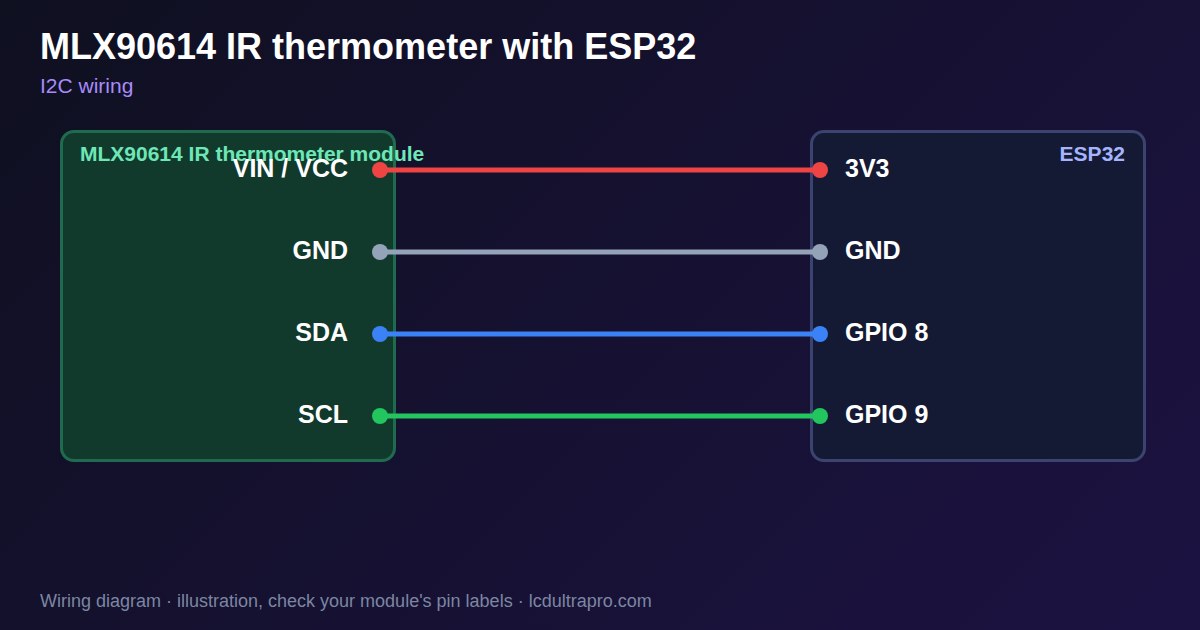
| MLX90614 IR thermometer | Connect to | Note |
|---|---|---|
| VIN / VCC | 3V3 | |
| GND | GND | |
| SDA | GPIO 8 | Any free pin, set in Wire.begin() |
| SCL | GPIO 9 | Any free pin, set in Wire.begin() |
Arduino code
#include <Wire.h>

const int SDA_PIN = 8, SCL_PIN = 9;
const uint8_t ADDR = 0x5A;

float readTemp(uint8_t reg) {           // 0x06 sensor, 0x07 object
  Wire.beginTransmission(ADDR);
  Wire.write(reg);
  Wire.endTransmission(false);
  Wire.requestFrom(ADDR, (uint8_t)3);   // low, high, PEC
  uint16_t raw = Wire.read();
  raw |= Wire.read() << 8;
  Wire.read();
  return raw * 0.02 - 273.15;
}

void setup() {
  Serial.begin(115200);
  Wire.begin(SDA_PIN, SCL_PIN);
  Wire.setClock(100000);
}

void loop() {
  Serial.printf("object %.2f C  sensor %.2f C\n", readTemp(0x07), readTemp(0x06));
  delay(1000);
}
No extra library needed. Compiled for ESP32-S3 with arduino-esp32 3.x. Not yet tested by us on a physical sensor. Change the pins to match your board.
On a display
Read the value in your sketch and pass it to a label, or send it over MQTT and show it with an MQTT value in the editor.
Design a display for MLX90614 IR thermometerBoards with a ready connector
Only boards whose connectors we have surveyed. Others may still work on free GPIOs.
| Elecrow CrowPanel ESP32 HMI 2.4" | I2C port: SDA 22, SCL 21Not shared with the touch controller (it is on SPI) — free for sensors |
| Elecrow CrowPanel ESP32 HMI 2.8" | I2C port: SDA 22, SCL 21Not shared with the touch controller (it is on SPI) — free for sensors |
| Elecrow CrowPanel ESP32 HMI 3.5" | I2C port: SDA 22, SCL 21Not shared with the touch controller (it is on SPI) — free for sensors |
| Elecrow CrowPanel ESP32-S3 HMI 5.0" | I2C port: SDA 19, SCL 20Same I2C bus as the GT911 touch (0x14 / 0x5D) and, on V3.0 boards, the PCA9557 touch-reset expander (0x18) |
| Elecrow CrowPanel ESP32-S3 HMI 7.0" | I2C port: SDA 19, SCL 20Same I2C bus as the GT911 touch (0x14 / 0x5D) and, on V3.0 boards, the PCA9557 touch-reset expander (0x18) |
| LilyGO T-Display-S3-Pro 2.33" | QWIIC RIGHT: SDA 5, SCL 6I2C only — same bus as the touch, the PMU (SY6970) and the light sensor |
| M5Stack AtomS3 0.85" | Bottom I2C pins: SDA 38, SCL 39Same I2C bus as the built-in IMU (MPU6886, 0x68) |
| Makerfabs MaTouch ESP32-S3 Rotary IPS 2.1 Round | Mabee I2C (J1): SDA 17, SCL 18Same I2C bus as the touch controller (CST826) |
| Makerfabs MaTouch ESP32-S3 Parallel TFT 4.3" | Mabee I2C: SDA 17, SCL 18Same I2C bus as the touch controller (GT911) |
| Makerfabs MaTouch ESP32-S3 Parallel TFT with Touch 5.0" | Mabee I2C: SDA 17, SCL 18Same I2C bus as the touch controller (GT911) |
| Makerfabs MaTouch ESP32-S3 Parallel TFT with Touch 7.0" | Mabee I2C: SDA 17, SCL 18Same I2C bus as the touch controller (GT911) |
| Sunton ESP32-4827S043R/C 4.3" | I2C header (P3): SDA 19, SCL 20Same I2C bus as the GT911 touch controller. P3 also carries GPIO 17 / 18. |
| Sunton ESP32-8048S043C 4.3" | I2C header (P3): SDA 19, SCL 20Same I2C bus as the GT911 touch controller. P3 also carries GPIO 17 / 18. |
| Sunton ESP32-8048S050C 5.0" | I2C header (P3): SDA 19, SCL 20Same I2C bus as the GT911 touch controller. P3 also carries GPIO 17 / 18. |
| Sunton ESP32-8048S070C 7.0" | I2C header (P3): SDA 19, SCL 20Same I2C bus as the GT911 touch controller. P3 also carries GPIO 17 / 18. |
| Waveshare ESP32-S3 Touch LCD 2.1" round | I2C connector: SDA 15, SCL 7Same I2C bus as the touch controller, the IO expander, the RTC and the IMU (addresses 0x15/0x5D, 0x20, 0x51, 0x6B, 0x7E taken) |
| Waveshare ESP32-S3 Touch LCD 2.8" | I2C connector: SDA 11, SCL 10Same I2C bus as the RTC and the IMU (0x51, 0x6B, 0x7E taken) — the touch has its own bus |
| Waveshare ESP32-S3 Touch LCD 2.8" Type B | I2C connector: SDA 15, SCL 7Same I2C bus as the touch controller, the IO expander, the RTC and the IMU (addresses 0x15/0x5D, 0x20, 0x51, 0x6B, 0x7E taken) |
| Waveshare ESP32-S3-Touch-LCD-2.8C | I2C connector: SDA 15, SCL 7Same I2C bus as the touch controller, the IO expander, the RTC and the IMU (addresses 0x15/0x5D, 0x20, 0x51, 0x6B, 0x7E taken) |
| Waveshare ESP32-S3-LCD-7B | I2C connector (H1): SDA 8, SCL 9Same I2C bus as the touch controller (GT911) and the IO expander (CH422G) |
Good to know
- It averages everything in its field of view.
- Shiny metal reads wrong. Use matt tape.
- The bus must run at 100 kHz or less.
- Accuracy is best near room temperature.
What it is good for
- Motors and bearings
- Heater and hob surfaces
- Moving objects
FAQ
Why does it read too low on metal?
Shiny metal has low emissivity. Add matt tape to the target.
Why is the reading too cool from a distance?
A wide field of view includes the background. Move closer or use a narrow version.
Can I change the address?
Yes, it is stored in the device, but most projects keep 0x5A.
Sources
Related parts
Use this information at your own risk. It is for general guidance only: the example code compiles, but it has not been tested on every part, and modules differ between sellers. Check the manufacturer's data before you build. Product names belong to their owners, and LCD Ultra Pro is not affiliated with them. See our Terms.