Light, distance and motion
TCS34725 colour sensor with ESP32
Colour readings from a TCS34725 mean little unless the light is controlled. Room lighting changes through the day, so the same object reads differently at noon and at night. The module's white LED fixes that when it is the main light: put the sensor at a fixed distance, block stray light with a small tube, and readings repeat. Good for sorting parts by colour or checking a liquid.
The sensor gives four numbers: red, green, blue and clear. They are not ready-made RGB colours for a display. Divide each by the clear value to get ratios, which change less with distance and brightness. Two settings control sensitivity: integration time from 2.4 to 700 ms, and gain of 1, 4, 16 or 60. Too much of either saturates at 65535, and then ratios are useless. A published calibration method starts at gain 1, raises the time until clear saturates, then steps it back. Accuracy also falls below 154 ms, according to ESPHome.
The address is 0x29 and cannot be changed. The LED pin floats by default, and that leaves the LED on. Ground it to turn it off, or drive it from a GPIO so it is lit only while sampling. That keeps it from running all day, and you can take one reading with the LED off and subtract it to remove room light. Boards with a regulator work from 3.3 V or 5 V, while others take 3.3 V only. Dark or shiny targets are hard, so test yours.
Specifications
| Outputs | Red, green, blue, clear (16-bit) |
|---|---|
| Integration time | 2.4–700 ms |
| Gain | 1, 4, 16, 60 |
| I2C address | 0x29, fixed |
| LED pin | Floating = on, GND = off |
Power and logic levels
3.3 V: check your module first
| Supply | Chip 2.7–3.6 V, only regulated boards take 5 V |
|---|---|
| Signal level | 3.3 V |
| On an ESP32 | Without a regulator, 5 V can damage the sensor. Run it from 3V3, so the I2C lines stay at 3.3 V. |
ESP32 pins, including those on a display board's connectors, work at 3.3 V and are not 5 V tolerant. Modules differ, so if in doubt, measure the signal before you connect it.
Wiring
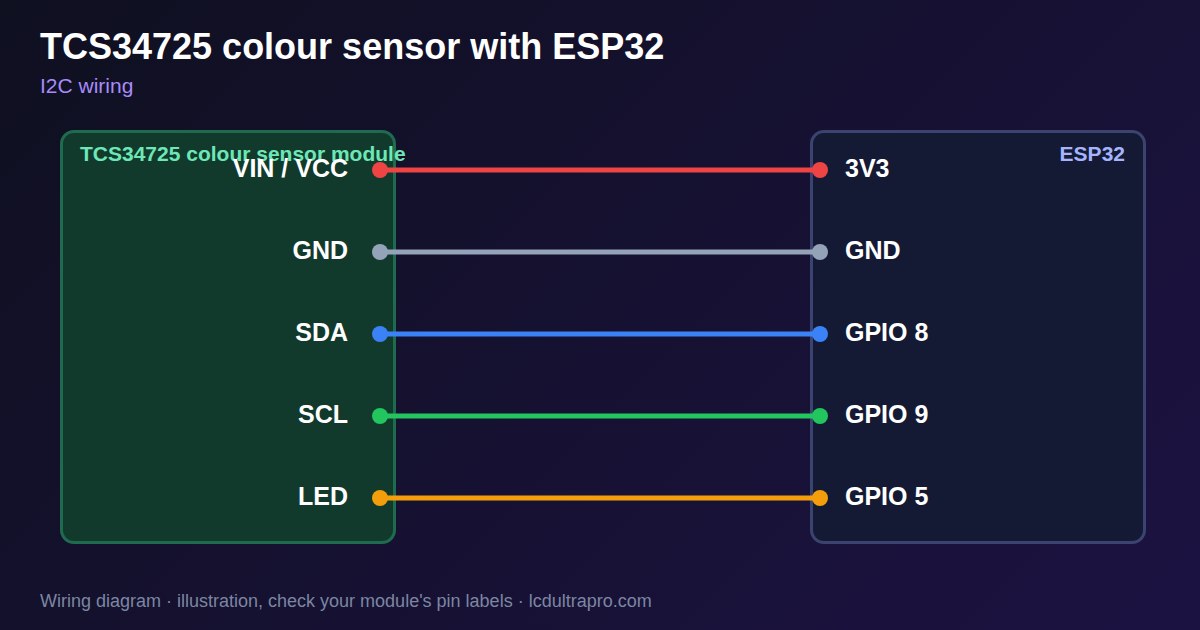
| TCS34725 colour sensor | Connect to | Note |
|---|---|---|
| VIN / VCC | 3V3 | |
| GND | GND | |
| SDA | GPIO 8 | Any free pin, set in Wire.begin() |
| SCL | GPIO 9 | Any free pin, set in Wire.begin() |
| LED | GPIO 5 | Optional, low turns the LED off |
Arduino code
#include <Wire.h>

const int SDA_PIN = 8, SCL_PIN = 9;
const uint8_t ADDR = 0x29;
const uint8_t CMD = 0x80, AUTO_INC = 0x20;

void writeReg(uint8_t reg, uint8_t value) {
  Wire.beginTransmission(ADDR);
  Wire.write(CMD | reg); Wire.write(value);
  Wire.endTransmission();
}

uint16_t read16(uint8_t reg) {
  Wire.beginTransmission(ADDR);
  Wire.write(CMD | AUTO_INC | reg);
  Wire.endTransmission();
  Wire.requestFrom(ADDR, (uint8_t)2);
  uint16_t v = Wire.read();
  return v | (Wire.read() << 8);
}

void setup() {
  Serial.begin(115200);
  Wire.begin(SDA_PIN, SCL_PIN);
  writeReg(0x00, 0x01);               // power on
  delay(3);
  writeReg(0x00, 0x03);               // ADC on
  writeReg(0x01, 0xC0);               // 64 cycles, about 154 ms
  writeReg(0x0F, 0x01);               // gain 4
}

void loop() {
  delay(200);
  float c = read16(0x14);
  if (c == 0) return;
  Serial.printf("clear %.0f  r %.2f  g %.2f  b %.2f\n", c,
                read16(0x16) / c, read16(0x18) / c, read16(0x1A) / c);
}
No extra library needed. Compiled for ESP32-S3 with arduino-esp32 3.x. Not yet tested by us on a physical sensor. Change the pins to match your board.
On a display
Read the value in your sketch and pass it to a label, or send it over MQTT and show it with an MQTT value in the editor.
Design a display for TCS34725 colour sensorBoards with a ready connector
Only boards whose connectors we have surveyed. Others may still work on free GPIOs.
| Elecrow CrowPanel ESP32 HMI 2.4" | I2C port: SDA 22, SCL 21Not shared with the touch controller (it is on SPI) — free for sensors |
| Elecrow CrowPanel ESP32 HMI 2.8" | I2C port: SDA 22, SCL 21Not shared with the touch controller (it is on SPI) — free for sensors |
| Elecrow CrowPanel ESP32 HMI 3.5" | I2C port: SDA 22, SCL 21Not shared with the touch controller (it is on SPI) — free for sensors |
| Elecrow CrowPanel ESP32-S3 HMI 5.0" | I2C port: SDA 19, SCL 20Same I2C bus as the GT911 touch (0x14 / 0x5D) and, on V3.0 boards, the PCA9557 touch-reset expander (0x18) |
| Elecrow CrowPanel ESP32-S3 HMI 7.0" | I2C port: SDA 19, SCL 20Same I2C bus as the GT911 touch (0x14 / 0x5D) and, on V3.0 boards, the PCA9557 touch-reset expander (0x18) |
| LilyGO T-Display-S3-Pro 2.33" | QWIIC RIGHT: SDA 5, SCL 6I2C only — same bus as the touch, the PMU (SY6970) and the light sensor |
| M5Stack AtomS3 0.85" | Bottom I2C pins: SDA 38, SCL 39Same I2C bus as the built-in IMU (MPU6886, 0x68) |
| Makerfabs MaTouch ESP32-S3 Rotary IPS 2.1 Round | Mabee I2C (J1): SDA 17, SCL 18Same I2C bus as the touch controller (CST826) |
| Makerfabs MaTouch ESP32-S3 Parallel TFT 4.3" | Mabee I2C: SDA 17, SCL 18Same I2C bus as the touch controller (GT911) |
| Makerfabs MaTouch ESP32-S3 Parallel TFT with Touch 5.0" | Mabee I2C: SDA 17, SCL 18Same I2C bus as the touch controller (GT911) |
| Makerfabs MaTouch ESP32-S3 Parallel TFT with Touch 7.0" | Mabee I2C: SDA 17, SCL 18Same I2C bus as the touch controller (GT911) |
| Sunton ESP32-4827S043R/C 4.3" | I2C header (P3): SDA 19, SCL 20Same I2C bus as the GT911 touch controller. P3 also carries GPIO 17 / 18. |
| Sunton ESP32-8048S043C 4.3" | I2C header (P3): SDA 19, SCL 20Same I2C bus as the GT911 touch controller. P3 also carries GPIO 17 / 18. |
| Sunton ESP32-8048S050C 5.0" | I2C header (P3): SDA 19, SCL 20Same I2C bus as the GT911 touch controller. P3 also carries GPIO 17 / 18. |
| Sunton ESP32-8048S070C 7.0" | I2C header (P3): SDA 19, SCL 20Same I2C bus as the GT911 touch controller. P3 also carries GPIO 17 / 18. |
| Waveshare ESP32-S3 Touch LCD 2.1" round | I2C connector: SDA 15, SCL 7Same I2C bus as the touch controller, the IO expander, the RTC and the IMU (addresses 0x15/0x5D, 0x20, 0x51, 0x6B, 0x7E taken) |
| Waveshare ESP32-S3 Touch LCD 2.8" | I2C connector: SDA 11, SCL 10Same I2C bus as the RTC and the IMU (0x51, 0x6B, 0x7E taken) — the touch has its own bus |
| Waveshare ESP32-S3 Touch LCD 2.8" Type B | I2C connector: SDA 15, SCL 7Same I2C bus as the touch controller, the IO expander, the RTC and the IMU (addresses 0x15/0x5D, 0x20, 0x51, 0x6B, 0x7E taken) |
| Waveshare ESP32-S3-Touch-LCD-2.8C | I2C connector: SDA 15, SCL 7Same I2C bus as the touch controller, the IO expander, the RTC and the IMU (addresses 0x15/0x5D, 0x20, 0x51, 0x6B, 0x7E taken) |
| Waveshare ESP32-S3-LCD-7B | I2C connector (H1): SDA 8, SCL 9Same I2C bus as the touch controller (GT911) and the IO expander (CH422G) |
Good to know
- Control the light for repeatable results.
- Compare ratios, not raw values.
- Saturation at 65535 ruins a reading.
- The LED stays on unless you ground it.
What it is good for
- Colour sorting
- Liquid and test strip checks
- Ambient colour tint display
FAQ
Why do colours change during the day?
Room light is getting in. Use a shroud and the LED.
How do I turn off the LED?
Ground the LED pin, or drive it from a GPIO.
Why do all channels read 65535?
It is saturated. Reduce the gain or integration time.
Sources
Related parts
Use this information at your own risk. It is for general guidance only: the example code compiles, but it has not been tested on every part, and modules differ between sellers. Check the manufacturer's data before you build. Product names belong to their owners, and LCD Ultra Pro is not affiliated with them. See our Terms.