Current, voltage and power
PZEM-004T with ESP32
One side of this board connects to mains voltage, so treat it with respect. Switch off the breaker before you touch the wiring, enclose the board, and use a fuse or breaker on the measured circuit. Users disagree about how well the two sides are isolated, and optocouplers on the serial lines do not by themselves prove the whole module is safe to touch, and forum posts question whether it meets safety standards, so assume the worst and keep it away from anything you touch. If you are not comfortable working on mains, have an electrician connect it. It suits a monitoring project, not billing.
In return, you get real numbers with little code. This page covers the 100 A version, which reads 80 to 260 V AC through an external clamp. The 10 A version looks similar but is wired differently: it has a built-in shunt, and the load current passes through the module itself, up to 10 A. Check which one you have. It reports voltage, current, power, energy, frequency and power factor over a serial link at 9600 baud, 8N1, using Modbus RTU. Put the clamp around one conductor only: around a whole cable, live and neutral cancel out and it reads zero. Do not swap in a different clamp without checking its ratio.
The logic side has 5V, RX, TX and GND. This port is passive: the 5V pin powers only its optocouplers, so all four wires are needed, and the measuring chip itself runs from the mains, so the module needs AC connected to answer at all. TX can reach 5 V, which is too much for an ESP32 pin, and the RX optocoupler expects a 5 V signal. So treat the two directions separately: one 74AHCT125 channel gives RX a clean 5 V signal, and a 10 kΩ and 20 kΩ divider brings TX down to about 3.3 V. Cheap bidirectional BSS138 boards are made mainly for I2C, so check one before you rely on it. Many display boards have only one spare UART, which may already be taken. Each module needs a unique Modbus address if you share the bus; the example uses the general address 0xF8, which works with one module only. This code reads the registers directly, with no library, and checks the Modbus CRC on every reply, so a corrupted frame is not shown as a reading.
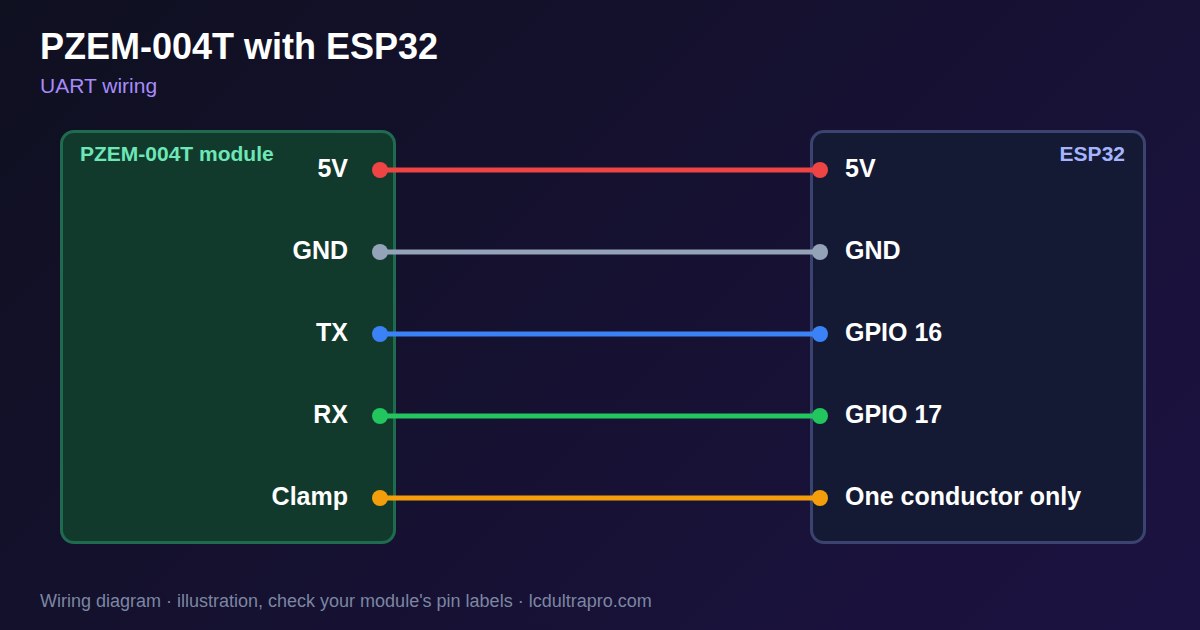
Specifications
| Voltage range | 80–260 V AC |
|---|---|
| Current | 0–100 A via clamp (10 A version: built-in shunt) |
| Interface | UART, Modbus RTU |
| Serial | 9600 baud, 8N1 |
| Logic side | 5V, RX, TX, GND, passive and optocoupled |
| Reads | V, A, W, Wh, Hz, power factor |
Power and logic levels
5 V signal: needs a divider or level shifter
| Supply | 5 V logic side, mains on the other |
|---|---|
| Signal level | TX and RX are 5 V optocoupler lines |
| On an ESP32 | Treat each direction separately: 74AHCT125 on RX, a divider on TX. Connect 5V and GND too. |
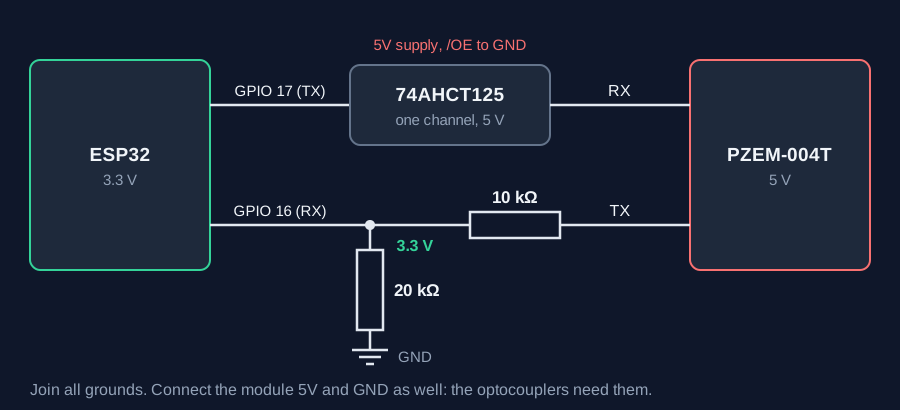
ESP32 pins, including those on a display board's connectors, work at 3.3 V and are not 5 V tolerant. Modules differ, so if in doubt, measure the signal before you connect it.
Wiring
| PZEM-004T | Connect to | Note |
|---|---|---|
| 5V | 5V | |
| GND | GND | |
| TX | GPIO 16 | Through 10 kΩ, with 20 kΩ to GND |
| RX | GPIO 17 | Through a 74AHCT125 channel |
| Clamp | One conductor only | 100 A version. Mains off while fitting |
Arduino code
HardwareSerial pzem(1);
const int RX_PIN = 16, TX_PIN = 17;

uint16_t crc16(const uint8_t *b, size_t n) {   // Modbus CRC
  uint16_t c = 0xFFFF;
  while (n--) {
    c ^= *b++;
    for (int i = 0; i < 8; i++) c = (c & 1) ? (c >> 1) ^ 0xA001 : c >> 1;
  }
  return c;
}

uint32_t dword(const uint8_t *b) {     // low word comes first
  return (uint32_t)b[0] << 8 | b[1] | (uint32_t)b[2] << 24 | (uint32_t)b[3] << 16;
}

void setup() {
  Serial.begin(115200);
  pzem.begin(9600, SERIAL_8N1, RX_PIN, TX_PIN);
}

void loop() {
  uint8_t req[8] = {0xF8, 0x04, 0x00, 0x00, 0x00, 0x0A};   // 0xF8: one module only
  uint16_t c = crc16(req, 6);
  req[6] = c & 0xFF;
  req[7] = c >> 8;
  uint8_t r[25];
  while (pzem.available()) pzem.read();
  pzem.write(req, sizeof(req));
  if (pzem.readBytes(r, 25) == 25 && r[1] == 0x04 &&
      crc16(r, 23) == (uint16_t)(r[23] | r[24] << 8)) {
    Serial.printf("%.1f V  %.3f A  %.1f W  %.3f kWh  %.1f Hz  PF %.2f\n",
                  (r[3] << 8 | r[4]) / 10.0, dword(r + 5) / 1000.0, dword(r + 9) / 10.0,
                  dword(r + 13) / 1000.0, (r[17] << 8 | r[18]) / 10.0, (r[19] << 8 | r[20]) / 100.0);
  } else {
    Serial.println("No valid answer");
  }
  delay(2000);
}
No extra library needed. Compiled for ESP32-S3 with arduino-esp32 3.x. Not yet tested by us on a physical sensor. Change the pins to match your board.
On a display
Read the value in your sketch and pass it to a label, or send it over MQTT and show it with an MQTT value in the editor.
Design a display for PZEM-004TBoards with a ready connector
Only boards whose connectors we have surveyed. Others may still work on free GPIOs.
| Elecrow CrowPanel ESP32 HMI 2.4" | UART1 port: TX 17, RX 16 |
| Elecrow CrowPanel ESP32 HMI 2.8" | UART1 port: TX 17, RX 16 |
| Elecrow CrowPanel ESP32 HMI 3.5" | UART0 port: TX 1, RX 3Shared with the USB-C serial port — the serial monitor and uploads use it too |
| Elecrow CrowPanel ESP32-S3 HMI 4.3" | UART1 port: TX 17, RX 18 |
| Elecrow CrowPanel ESP32-S3 HMI 5.0" | UART0 port: TX 43, RX 44Shared with the USB-C serial port — the serial monitor and uploads use it too |
| Elecrow CrowPanel ESP32-S3 HMI 7.0" | UART0 port: TX 43, RX 44Shared with the USB-C serial port — the serial monitor and uploads use it too |
| Makerfabs MaTouch ESP32-S3 Rotary IPS 2.1 Round | Mabee UART (J2): TX 43, RX 44UART0 — the serial output goes here unless it is moved to the USB port |
| Sunton ESP32-2432S028R 2.8" | Serial header (P1): TX 1, RX 3Shared with the USB-UART bridge — the serial monitor and uploads use it too |
| Sunton ESP32-4827S043R/C 4.3" | UART header (P1): TX 43, RX 44Shared with the USB-UART bridge — the serial monitor and uploads use it too |
| Sunton ESP32-8048S043C 4.3" | UART header (P1): TX 43, RX 44Shared with the USB-UART bridge — the serial monitor and uploads use it too |
| Sunton ESP32-8048S050C 5.0" | UART header (P1): TX 43, RX 44Shared with the USB-UART bridge — the serial monitor and uploads use it too |
| Sunton ESP32-8048S070C 7.0" | UART header (P1): TX 43, RX 44Shared with the USB-UART bridge — the serial monitor and uploads use it too |
| Waveshare ESP32-S3 Touch LCD 2.1" round | 12-pin header: TX 43, RX 44The header also carries USB D- / D+ (GPIO 19 / 20) and the I2C bus (GPIO 15 / 7) — GPIO 0 is the BOOT button (keep it high at power-up) |
| Waveshare ESP32-S3 Touch LCD 2.8" | 12-pin header: TX 43, RX 44The header also carries USB D- / D+ (GPIO 19 / 20) and the I2C bus (GPIO 11 / 10) |
| Waveshare ESP32-S3 Touch LCD 2.8" Type B | 2x12 pin header: TX 43, RX 44The header also carries USB D- / D+ (GPIO 19 / 20) and the I2C bus (GPIO 15 / 7) — GPIO 0 is the BOOT button (keep it high at power-up) |
| Waveshare ESP32-S3-Touch-LCD-2.8C | 12-pin header: TX 43, RX 44The header also carries USB D- / D+ (GPIO 19 / 20) and the I2C bus (GPIO 15 / 7) — GPIO 0 is the BOOT button (keep it high at power-up) |
| Waveshare ESP32-S3-LCD-7B | UART2 connector (H3): TX 43, RX 44Only when switch SW1 selects UART2 — shared with the USB-to-UART port |
Good to know
- This is mains voltage. Keep it enclosed and switch off to work on it.
- Clamp one conductor, not a whole cable.
- Check the TX level before connecting an ESP32.
- It is not a billing meter.
- The 10 A and 100 A versions are wired differently.
What it is good for
- Whole-house or circuit energy displays
- Appliance power monitoring
- Home Assistant energy data
FAQ
Why does the PZEM read zero current?
The clamp may be around both conductors. It must go around one.
Why is there no answer on the serial port?
Check that TX and RX are crossed, that 5V and GND are both connected, and that AC is connected.
Is it safe to install myself?
Only if you are qualified for mains work. Otherwise use an electrician.
Sources
- https://github.com/mandulaj/PZEM-004T-v30
- https://git.sudo.is/home-assistant/esphome-docs/src/branch/current/components/sensor/pzemac.rst
- https://forum.arduino.cc/t/pzem-004t-safety-issues/1179487
- https://tasmota.github.io/docs/PZEM-0XX/
- https://github.com/arendst/Tasmota/issues/9518
- https://innovatorsguru.com/pzem-004t-v3/
Related parts
Use this information at your own risk. It is for general guidance only: the example code compiles, but it has not been tested on every part, and modules differ between sellers. Check the manufacturer's data before you build. Product names belong to their owners, and LCD Ultra Pro is not affiliated with them. See our Terms.