Input devices
YF-S201 flow sensor with ESP32
The YF-S201 counts water with a small turbine and a Hall sensor. Each litre gives about 450 pulses, and the frequency follows F = 7.5 × Q, with Q in litres per minute. Those are nominal figures, and units vary. To do better, run a measured 10 litres through yours, count the pulses and divide by 10. One guide reports this gets you within 2 to 3 percent.
Power it from 5 V. Listed ranges vary a little, starting at 4.5 or 5 V, so 3.3 V is not a safe choice. The signal needs care on an ESP32: one reference describes an open-collector output, and other guides warn of 5 V pulses. Use a divider such as 10 kΩ and 20 kΩ on the signal line, or a level shifter, and check with a meter what your sensor really outputs. If you see no pulses through the divider, the output is probably open collector: remove the divider and use a 10 kΩ pull-up to 3.3 V instead.
Count pulses in an interrupt, and keep that routine to a single line that increments a counter. Do the maths once a second in the main loop. Avoid strapping pins for the input. Keep the wire away from the display cable, because a noisy pulse is counted as water. The sensor sits in the pipe, so check the arrow on the body for the flow direction. Check your version's pressure and temperature limits before fitting it. Very low flow may not turn the rotor at all, and this sensor's listed range starts at about 1 litre per minute.
Specifications
| Flow range | 1–30 L/min |
|---|---|
| Pulses | About 450 per litre |
| Formula | F (Hz) = 7.5 × Q (L/min) |
| Supply | 5 V |
| Output | Pulses, protect the 3.3 V input |
Power and logic levels
5 V signal: needs a divider or level shifter
| Supply | 5 V |
|---|---|
| Signal level | Pulses may be 5 V |
| On an ESP32 | Use a divider, or a pull-up to 3.3 V if the output is open collector. |
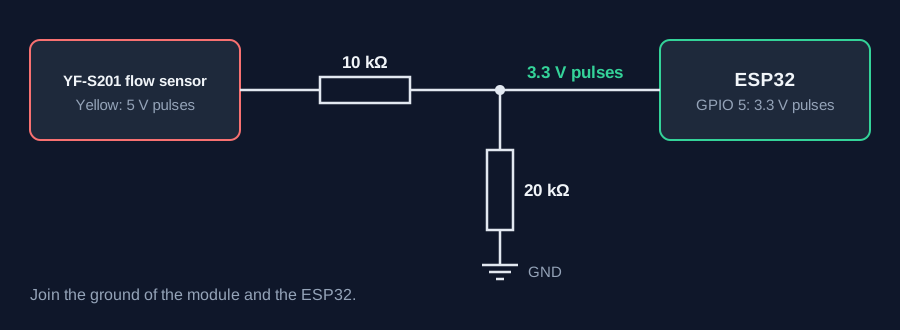
ESP32 pins, including those on a display board's connectors, work at 3.3 V and are not 5 V tolerant. Modules differ, so if in doubt, measure the signal before you connect it.
Wiring
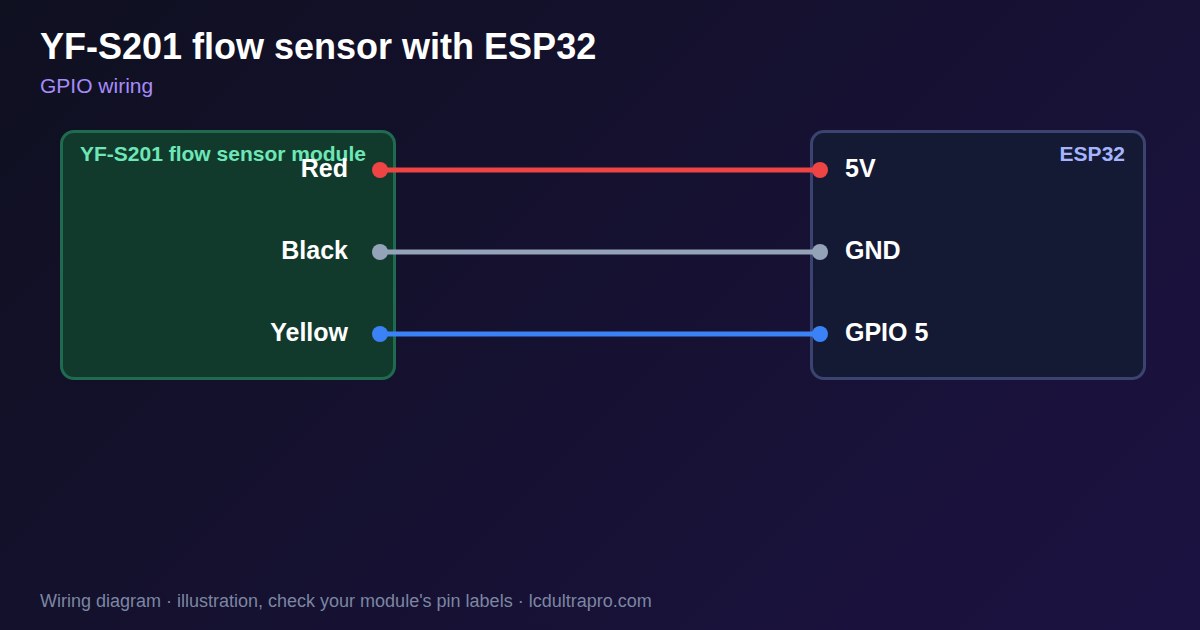
| YF-S201 flow sensor | Connect to | Note |
|---|---|---|
| Red | 5V | |
| Black | GND | |
| Yellow | GPIO 5 | Through 10 kΩ, with 20 kΩ to GND |
Arduino code
const int FLOW_PIN = 5;
const float PULSES_PER_LITRE = 450.0;   // calibrate with a measured volume
volatile uint32_t pulses = 0;
float litres = 0;

void IRAM_ATTR onPulse() { pulses++; }

void setup() {
  Serial.begin(115200);
  pinMode(FLOW_PIN, INPUT);
  attachInterrupt(digitalPinToInterrupt(FLOW_PIN), onPulse, FALLING);
}

void loop() {
  delay(1000);
  noInterrupts();
  uint32_t n = pulses;
  pulses = 0;
  interrupts();
  litres += n / PULSES_PER_LITRE;
  Serial.printf("%.2f L/min  total %.2f L\n", n / 7.5, litres);
}
No extra library needed. Compiled for ESP32-S3 with arduino-esp32 3.x. Not yet tested by us on a physical sensor. Change the pins to match your board.
On a display
Read the value in your sketch and pass it to a label, or send it over MQTT and show it with an MQTT value in the editor.
Design a display for YF-S201 flow sensorBoards with a ready connector
Only boards whose connectors we have surveyed. Others may still work on free GPIOs.
| Elecrow CrowPanel ESP32 HMI 2.4" | GPIO_D port: GPIO 25 |
| Elecrow CrowPanel ESP32 HMI 2.8" | GPIO_D port: GPIO 25 |
| Elecrow CrowPanel ESP32 HMI 3.5" | GPIO_D port: GPIO 25 |
| Elecrow CrowPanel ESP32-S3 HMI 4.3" | GPIO_D port: GPIO 37 |
| Elecrow CrowPanel ESP32-S3 HMI 5.0" | GPIO_D port: GPIO 38 |
| Elecrow CrowPanel ESP32-S3 HMI 7.0" | GPIO_D port: GPIO 38 |
| LilyGO T-Display (classic) 1.14" | Left pin header: GPIO 21 |
| LilyGO T-Display-S3-Pro 2.33" | QWIIC LEFT: GPIO 43 |
| LilyGO T-Deck 2.8" | Grove connector: GPIO 43On the T-Deck Plus this port is taken by the built-in GPS |
| M5Stack AtomS3 0.85" | Grove port: GPIO 2 |
| M5Stack M5StickC Plus2 1.14" | Grove port: GPIO 32 |
| Sunton ESP32-2432S028R 2.8" | GPIO header (P3): GPIO 22GPIO 21 is the display backlight — not usable. GPIO 35 is input-only. No 3V3 pin on P3 (only GND). |
| Sunton ESP32-4827S043R/C 4.3" | GPIO header (P4): GPIO 17P3 carries the same two pins |
| Sunton ESP32-8048S043C 4.3" | GPIO header (P4): GPIO 17P3 carries the same two pins |
| Sunton ESP32-8048S050C 5.0" | GPIO header (P4): GPIO 17P5 carries the same pins. Shared with the I2S amplifier of the speaker output (P6). |
| Sunton ESP32-8048S070C 7.0" | GPIO header (P4): GPIO 17P5 carries the same pins. Shared with the I2S amplifier of the speaker output (P6). |
| Waveshare ESP32-S3 Touch LCD 1.28" round | SH1.0 GPIO header: GPIO 15Six GPIOs led out per the wiki pin table |
| Waveshare ESP32-S3 Touch LCD 1.28" round (CNC metal housing) | SH1.0 GPIO header: GPIO 15Six GPIOs led out per the wiki pin table |
| Waveshare ESP32-S3-LCD-7B | GPIO connector (J8): GPIO 6 |
Good to know
- Calibrate with a measured volume.
- Protect the input from 5 V pulses.
- Very low flow may not register.
- Fit it in the direction of the arrow.
What it is good for
- Irrigation monitors
- Water use displays
- Dosing and filling projects
FAQ
How many pulses per litre does a YF-S201 give?
About 450, but calibrate your own unit.
Why does it read nothing at a trickle?
The rotor needs a minimum flow, about 1 L/min.
Why does it count without water?
Electrical noise on the signal wire, or a floating input.
Why do I get no pulses?
An open-collector output needs a pull-up to 3.3 V. Check that the rotor turns, then check the signal wire.
Sources
Related parts
Use this information at your own risk. It is for general guidance only: the example code compiles, but it has not been tested on every part, and modules differ between sellers. Check the manufacturer's data before you build. Product names belong to their owners, and LCD Ultra Pro is not affiliated with them. See our Terms.