Outputs and switching
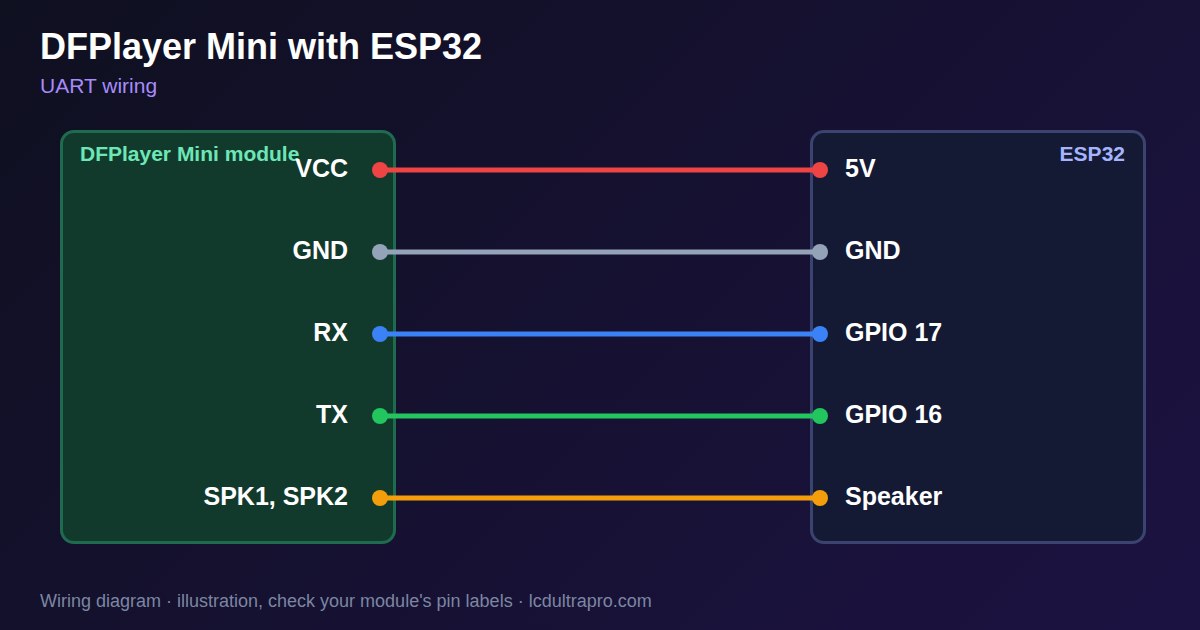
DFPlayer Mini with ESP32
A DFPlayer Mini does the whole audio job by itself. It reads MP3 files from a microSD card and drives a small speaker, while your ESP32 only sends short serial commands. That suits a display board well, since no heavy decoding competes with the screen. It needs one UART and takes about 3 W into 4 Ω at 5 V, which is why power is the first thing to get right.
Do not run it from the same weak 5 V rail as a display. Loud sounds cause voltage drops, and those can reset the board. A separate supply helps, as does a 100 to 470 µF capacitor at the module. Put a 1 kΩ resistor between the ESP32 TX pin and the module's RX. Sources differ on why, but most recommend it. Connect the speaker between SPK1 and SPK2, not to ground.
Most 'module not found' reports come from the card or wiring. Use FAT32 or FAT16, because exFAT does not work, and insert the card before power-up. The file order is a trap: the player can sort by the order files were copied onto the card, so 0003.mp3 copied first plays as track one. Copy them one at a time in order. The player has no file system view from your code, so keep a list of tracks in the sketch. Sources disagree on how folders work, so start with a few files in the root. Many boards lack a free UART, so check before you buy. The example builds the 10-byte command itself, sets volume and plays track 1.
Specifications
| Supply | 3.2–5 V, 5 V preferred |
|---|---|
| Amplifier | About 3 W into 4 Ω |
| Interface | UART, 9600 baud |
| Card format | FAT16 or FAT32, no exFAT |
| Speaker | SPK1 and SPK2, not GND |
Power and logic levels
3.3 V: safe to connect directly
| Supply | 3.2–5 V |
|---|---|
| Signal level | 3.3 V TTL serial |
| On an ESP32 | A 3.3 V ESP32 matches it. The manual asks for 1 kΩ on RX with 5 V controllers, and it does no harm here. |
ESP32 pins, including those on a display board's connectors, work at 3.3 V and are not 5 V tolerant. Modules differ, so if in doubt, measure the signal before you connect it.
Wiring
| DFPlayer Mini | Connect to | Note |
|---|---|---|
| VCC | 5V | Own supply if the board resets |
| GND | GND | |
| RX | GPIO 17 | Through 1 kΩ |
| TX | GPIO 16 | |
| SPK1, SPK2 | Speaker | Not to ground |
Arduino code
HardwareSerial player(1);
const int RX_PIN = 16, TX_PIN = 17;

void command(uint8_t cmd, uint16_t arg) {
  uint8_t f[10] = {0x7E, 0xFF, 0x06, cmd, 0x00,
                   (uint8_t)(arg >> 8), (uint8_t)arg, 0, 0, 0xEF};
  uint16_t sum = 0;
  for (int i = 1; i < 7; i++) sum += f[i];
  sum = -sum;                         // checksum
  f[7] = sum >> 8;
  f[8] = sum;
  player.write(f, 10);
}

void setup() {
  player.begin(9600, SERIAL_8N1, RX_PIN, TX_PIN);
  delay(2000);                        // card is read at start-up
  command(0x06, 15);                  // volume 0 to 30
  delay(100);
  command(0x03, 1);                   // play track 1
}

void loop() {}
No extra library needed. Compiled for ESP32-S3 with arduino-esp32 3.x. Not yet tested by us on a physical sensor. Change the pins to match your board.
On a display
Read the value in your sketch and pass it to a label, or send it over MQTT and show it with an MQTT value in the editor.
Design a display for DFPlayer MiniBoards with a ready connector
Only boards whose connectors we have surveyed. Others may still work on free GPIOs.
| Elecrow CrowPanel ESP32 HMI 2.4" | UART1 port: TX 17, RX 16 |
| Elecrow CrowPanel ESP32 HMI 2.8" | UART1 port: TX 17, RX 16 |
| Elecrow CrowPanel ESP32 HMI 3.5" | UART0 port: TX 1, RX 3Shared with the USB-C serial port — the serial monitor and uploads use it too |
| Elecrow CrowPanel ESP32-S3 HMI 4.3" | UART1 port: TX 17, RX 18 |
| Elecrow CrowPanel ESP32-S3 HMI 5.0" | UART0 port: TX 43, RX 44Shared with the USB-C serial port — the serial monitor and uploads use it too |
| Elecrow CrowPanel ESP32-S3 HMI 7.0" | UART0 port: TX 43, RX 44Shared with the USB-C serial port — the serial monitor and uploads use it too |
| Makerfabs MaTouch ESP32-S3 Rotary IPS 2.1 Round | Mabee UART (J2): TX 43, RX 44UART0 — the serial output goes here unless it is moved to the USB port |
| Sunton ESP32-2432S028R 2.8" | Serial header (P1): TX 1, RX 3Shared with the USB-UART bridge — the serial monitor and uploads use it too |
| Sunton ESP32-4827S043R/C 4.3" | UART header (P1): TX 43, RX 44Shared with the USB-UART bridge — the serial monitor and uploads use it too |
| Sunton ESP32-8048S043C 4.3" | UART header (P1): TX 43, RX 44Shared with the USB-UART bridge — the serial monitor and uploads use it too |
| Sunton ESP32-8048S050C 5.0" | UART header (P1): TX 43, RX 44Shared with the USB-UART bridge — the serial monitor and uploads use it too |
| Sunton ESP32-8048S070C 7.0" | UART header (P1): TX 43, RX 44Shared with the USB-UART bridge — the serial monitor and uploads use it too |
| Waveshare ESP32-S3 Touch LCD 2.1" round | 12-pin header: TX 43, RX 44The header also carries USB D- / D+ (GPIO 19 / 20) and the I2C bus (GPIO 15 / 7) — GPIO 0 is the BOOT button (keep it high at power-up) |
| Waveshare ESP32-S3 Touch LCD 2.8" | 12-pin header: TX 43, RX 44The header also carries USB D- / D+ (GPIO 19 / 20) and the I2C bus (GPIO 11 / 10) |
| Waveshare ESP32-S3 Touch LCD 2.8" Type B | 2x12 pin header: TX 43, RX 44The header also carries USB D- / D+ (GPIO 19 / 20) and the I2C bus (GPIO 15 / 7) — GPIO 0 is the BOOT button (keep it high at power-up) |
| Waveshare ESP32-S3-Touch-LCD-2.8C | 12-pin header: TX 43, RX 44The header also carries USB D- / D+ (GPIO 19 / 20) and the I2C bus (GPIO 15 / 7) — GPIO 0 is the BOOT button (keep it high at power-up) |
| Waveshare ESP32-S3-LCD-7B | UART2 connector (H3): TX 43, RX 44Only when switch SW1 selects UART2 — shared with the USB-to-UART port |
Good to know
- Give it a strong 5 V supply.
- Copy files one at a time, in order.
- Use FAT32, not exFAT.
- Connect the speaker between SPK1 and SPK2.
What it is good for
- Voice prompts
- Sound effects
- Announcements on a wall panel
FAQ
Why is the wrong track playing?
The order often follows copying order. Copy files one at a time.
Why does the board reset on loud sounds?
The supply is dropping. Use a stronger 5 V and a capacitor.
What card format does it need?
FAT32 or FAT16, not exFAT.
Sources
Related parts
Use this information at your own risk. It is for general guidance only: the example code compiles, but it has not been tested on every part, and modules differ between sellers. Check the manufacturer's data before you build. Product names belong to their owners, and LCD Ultra Pro is not affiliated with them. See our Terms.