Temperature, humidity and air
DHT22 / AM2302 with ESP32
The DHT22, also sold as AM2302, reads temperature and humidity over a single data pin with its own timing protocol, not I2C. That saves a pin compared with a two-wire bus, and only one sensor fits on each pin. The AM2302 name usually means the wired version with three leads.
The important limit is speed: it can only be read once every 2 seconds. Ask it faster and you get old or bad data, so do not poll it from a display loop. Datasheet copies list ±2 %RH typical and ±5 %RH worst case, and ±0.5 °C. Supply figures vary between 3.3–6 V and 3.3–5.5 V, so 3.3 V from the ESP32 is the safe choice, because the data line then also stays at 3.3 V.
The bit timing is sensitive to interrupts. On a display board that redraws through DMA this usually works, but occasional failed reads are normal, so check for NaN and keep the last good value on screen. If the reading must be solid, an I2C sensor such as the SHT31 is the better part. The data line needs a pull-up of about 10 kΩ, and many modules already include it.
Specifications
| Measures | Temperature and humidity |
|---|---|
| Supply | 3.3–5.5 V |
| Humidity accuracy | ±2 %RH typical, ±5 %RH max |
| Temperature accuracy | ±0.5 °C |
| Humidity range | 0–99.9 %RH |
| Temperature range | -40 to 80 °C |
| Read interval | 2 s minimum |
Power and logic levels
3.3 V: safe to connect directly
| Supply | 3.3–5.5 V, use 3V3 |
|---|---|
| Signal level | Data line follows its pull-up |
| On an ESP32 | Pull the data line up to 3V3, not 5 V. |
ESP32 pins, including those on a display board's connectors, work at 3.3 V and are not 5 V tolerant. Modules differ, so if in doubt, measure the signal before you connect it.
Wiring
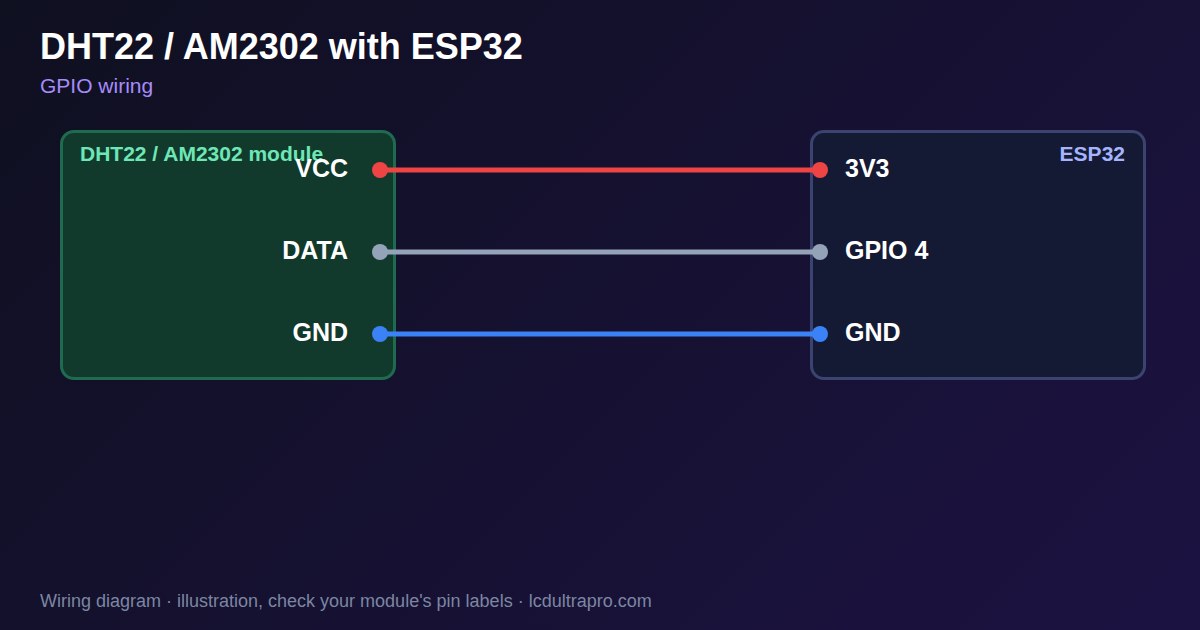
| DHT22 / AM2302 | Connect to | Note |
|---|---|---|
| VCC | 3V3 | |
| DATA | GPIO 4 | Any free pin, 10 kΩ pull-up to 3V3 |
| GND | GND |
Arduino code
#include <DHT.h>

const int DHT_PIN = 4;        // any free GPIO
DHT dht(DHT_PIN, DHT22);

void setup() {
  Serial.begin(115200);
  dht.begin();
}

void loop() {
  delay(2500);                // 2 s minimum between reads
  float t = dht.readTemperature();
  float h = dht.readHumidity();
  if (isnan(t) || isnan(h)) {
    Serial.println("Read failed, keeping the last value");
    return;
  }
  Serial.printf("%.1f C  %.1f %%\n", t, h);
}
Needs the DHT sensor library. Compiled for ESP32-S3 with arduino-esp32 3.x. Not yet tested by us on a physical sensor. Change the pins to match your board.
On a display
LCD Ultra Pro has this sensor as a built-in value source. Choose it in a rule, and a label or gauge shows the reading without writing code.
Design a display for DHT22 / AM2302Boards with a ready connector
Only boards whose connectors we have surveyed. Others may still work on free GPIOs.
| Elecrow CrowPanel ESP32 HMI 2.4" | GPIO_D port: GPIO 25 |
| Elecrow CrowPanel ESP32 HMI 2.8" | GPIO_D port: GPIO 25 |
| Elecrow CrowPanel ESP32 HMI 3.5" | GPIO_D port: GPIO 25 |
| Elecrow CrowPanel ESP32-S3 HMI 4.3" | GPIO_D port: GPIO 37 |
| Elecrow CrowPanel ESP32-S3 HMI 5.0" | GPIO_D port: GPIO 38 |
| Elecrow CrowPanel ESP32-S3 HMI 7.0" | GPIO_D port: GPIO 38 |
| LilyGO T-Display (classic) 1.14" | Left pin header: GPIO 21 |
| LilyGO T-Display-S3-Pro 2.33" | QWIIC LEFT: GPIO 43 |
| LilyGO T-Deck 2.8" | Grove connector: GPIO 43On the T-Deck Plus this port is taken by the built-in GPS |
| M5Stack AtomS3 0.85" | Grove port: GPIO 2 |
| M5Stack M5StickC Plus2 1.14" | Grove port: GPIO 32 |
| Sunton ESP32-2432S028R 2.8" | GPIO header (P3): GPIO 22GPIO 21 is the display backlight — not usable. GPIO 35 is input-only. No 3V3 pin on P3 (only GND). |
| Sunton ESP32-4827S043R/C 4.3" | GPIO header (P4): GPIO 17P3 carries the same two pins |
| Sunton ESP32-8048S043C 4.3" | GPIO header (P4): GPIO 17P3 carries the same two pins |
| Sunton ESP32-8048S050C 5.0" | GPIO header (P4): GPIO 17P5 carries the same pins. Shared with the I2S amplifier of the speaker output (P6). |
| Sunton ESP32-8048S070C 7.0" | GPIO header (P4): GPIO 17P5 carries the same pins. Shared with the I2S amplifier of the speaker output (P6). |
| Waveshare ESP32-S3 Touch LCD 1.28" round | SH1.0 GPIO header: GPIO 15Six GPIOs led out per the wiki pin table |
| Waveshare ESP32-S3 Touch LCD 1.28" round (CNC metal housing) | SH1.0 GPIO header: GPIO 15Six GPIOs led out per the wiki pin table |
| Waveshare ESP32-S3-LCD-7B | GPIO connector (J8): GPIO 6 |
Good to know
- Read at most once every 2 seconds.
- Expect an occasional failed read. Check for NaN.
- Bare sensors need a pull-up. Many modules include one.
- One sensor per pin, unlike the DS18B20.
What it is good for
- Simple room climate displays
- Low-cost thermostats
- Projects with one free pin
FAQ
How often can I read a DHT22?
Once every 2 seconds at most.
What is the difference between DHT22 and AM2302?
They are the same sensor. AM2302 usually means the wired version.
Why does my DHT22 return NaN?
Reading too fast, a missing pull-up or timing disturbed by interrupts. Keep the last good value and retry.
Sources
Related parts
Use this information at your own risk. It is for general guidance only: the example code compiles, but it has not been tested on every part, and modules differ between sellers. Check the manufacturer's data before you build. Product names belong to their owners, and LCD Ultra Pro is not affiliated with them. See our Terms.