Outputs and switching
Piezo buzzer with ESP32
Two parts sold under one name behave very differently. An active buzzer has its own oscillator: give it power and it makes one fixed note, around 2.3 kHz on one listed module. A passive buzzer needs a frequency from your code, so it can play alarms or melodies. If ledcWriteTone gives odd crackling or only one note, you probably have an active buzzer. Most active ones have a sealed underside, while passive ones often show bare board. Tell them apart properly with a quick test: connect 3.3 V briefly, and a steady tone means active.
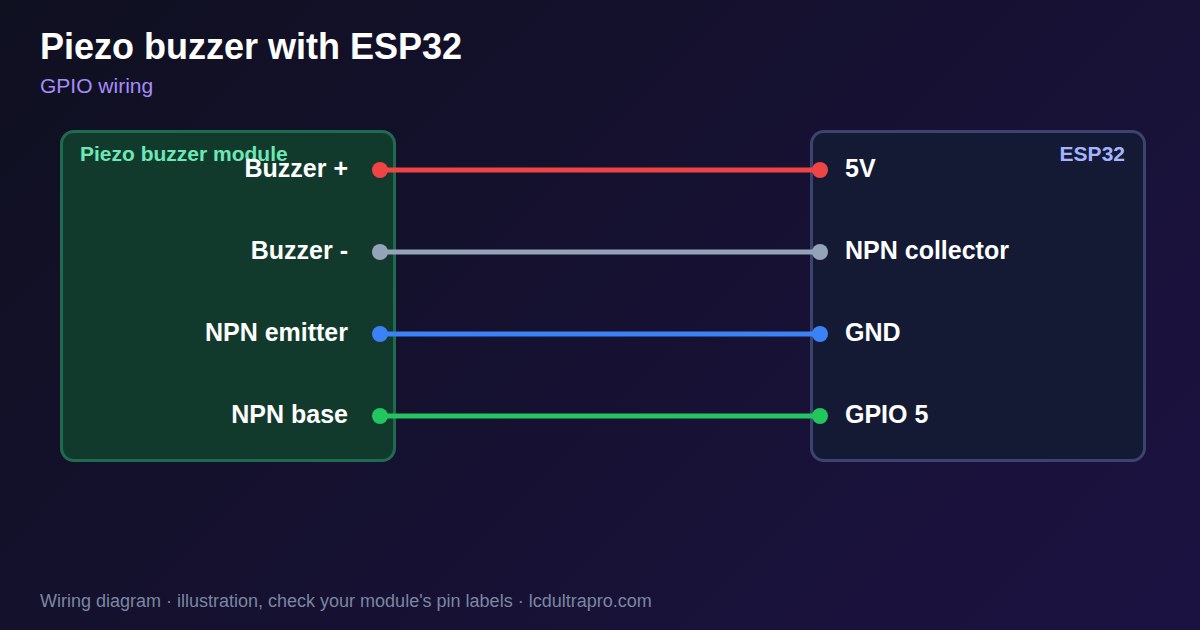
Current decides the wiring. One active module lists about 25 mA at 5 V, too much to drive directly from a GPIO. Use an NPN transistor such as an S8050: buzzer + to 5V, buzzer - to the collector, emitter to GND, and the GPIO to the base through about 1 kΩ. That is also louder, since the buzzer gets 5 V. Add a flyback diode across a magnetic coil buzzer.
Code differs across core versions. Core 3 uses the pin number in ledcAttach and ledcWriteTone, and core 2 used channel numbers, so old examples can fail to compile. For a notification on a panel, keep beeps short, and offer a mute option: a buzzer that cannot be silenced gets disconnected. Several display boards have a speaker or amplifier already, so check the board page first. LCD Ultra Pro has a Beep action for a passive buzzer, and an active one only needs a rule that sets its pin on or off.
Specifications
| Active | Own oscillator, fixed tone, digitalWrite |
|---|---|
| Passive | Needs a frequency, ledcWriteTone |
| Typical current | About 25 mA on one active module |
| Driver | NPN transistor, 1 kΩ on the base |
| Supply | 3.3–5 V, louder at 5 V |
Power and logic levels
3.3 V: safe to connect directly
| Supply | 3.3–5 V |
|---|---|
| Signal level | ESP32 drives a transistor |
| On an ESP32 | With a transistor, 5 V never reaches the GPIO. |
ESP32 pins, including those on a display board's connectors, work at 3.3 V and are not 5 V tolerant. Modules differ, so if in doubt, measure the signal before you connect it.
Wiring
| Piezo buzzer | Connect to | Note |
|---|---|---|
| Buzzer + | 5V | |
| Buzzer - | NPN collector | |
| NPN emitter | GND | |
| NPN base | GPIO 5 | Through 1 kΩ |
Arduino code
const int BUZZER_PIN = 5;              // passive buzzer

void setup() {
  ledcAttach(BUZZER_PIN, 2000, 8);
}

void loop() {
  ledcWriteTone(BUZZER_PIN, 2000);
  delay(150);
  ledcWriteTone(BUZZER_PIN, 2600);
  delay(150);
  ledcWriteTone(BUZZER_PIN, 0);         // silence
  delay(2000);
}
No extra library needed. Compiled for ESP32-S3 with arduino-esp32 3.x. Not yet tested by us on a physical sensor. Change the pins to match your board.
On a display
In LCD Ultra Pro the Beep action drives a passive buzzer, and Set pin on / off drives an active one, so a button or an alarm can beep without code.
Design a display for Piezo buzzerBoards with a ready connector
Only boards whose connectors we have surveyed. Others may still work on free GPIOs.
| Elecrow CrowPanel ESP32 HMI 2.4" | GPIO_D port: GPIO 25 |
| Elecrow CrowPanel ESP32 HMI 2.8" | GPIO_D port: GPIO 25 |
| Elecrow CrowPanel ESP32 HMI 3.5" | GPIO_D port: GPIO 25 |
| Elecrow CrowPanel ESP32-S3 HMI 4.3" | GPIO_D port: GPIO 37 |
| Elecrow CrowPanel ESP32-S3 HMI 5.0" | GPIO_D port: GPIO 38 |
| Elecrow CrowPanel ESP32-S3 HMI 7.0" | GPIO_D port: GPIO 38 |
| LilyGO T-Display (classic) 1.14" | Left pin header: GPIO 21 |
| LilyGO T-Display-S3-Pro 2.33" | QWIIC LEFT: GPIO 43 |
| LilyGO T-Deck 2.8" | Grove connector: GPIO 43On the T-Deck Plus this port is taken by the built-in GPS |
| M5Stack AtomS3 0.85" | Grove port: GPIO 2 |
| M5Stack M5StickC Plus2 1.14" | Grove port: GPIO 32 |
| Sunton ESP32-2432S028R 2.8" | GPIO header (P3): GPIO 22GPIO 21 is the display backlight — not usable. GPIO 35 is input-only. No 3V3 pin on P3 (only GND). |
| Sunton ESP32-4827S043R/C 4.3" | GPIO header (P4): GPIO 17P3 carries the same two pins |
| Sunton ESP32-8048S043C 4.3" | GPIO header (P4): GPIO 17P3 carries the same two pins |
| Sunton ESP32-8048S050C 5.0" | GPIO header (P4): GPIO 17P5 carries the same pins. Shared with the I2S amplifier of the speaker output (P6). |
| Sunton ESP32-8048S070C 7.0" | GPIO header (P4): GPIO 17P5 carries the same pins. Shared with the I2S amplifier of the speaker output (P6). |
| Waveshare ESP32-S3 Touch LCD 1.28" round | SH1.0 GPIO header: GPIO 15Six GPIOs led out per the wiki pin table |
| Waveshare ESP32-S3 Touch LCD 1.28" round (CNC metal housing) | SH1.0 GPIO header: GPIO 15Six GPIOs led out per the wiki pin table |
| Waveshare ESP32-S3-LCD-7B | GPIO connector (J8): GPIO 6 |
Good to know
- Check whether yours is active or passive.
- Use a transistor rather than a bare GPIO.
- Core 2 examples may not compile on core 3.
- Provide a mute option.
What it is good for
- Touch feedback
- Alarms and timers
- Status beeps
FAQ
What is the difference between active and passive?
Active makes one tone on power. Passive needs a frequency.
Why is it so quiet?
A GPIO gives little current. Drive it from 5 V with a transistor.
Why does ledcWriteTone not compile?
Check the core version. Core 3 uses pins, core 2 channels.
Sources
Related parts
Use this information at your own risk. It is for general guidance only: the example code compiles, but it has not been tested on every part, and modules differ between sellers. Check the manufacturer's data before you build. Product names belong to their owners, and LCD Ultra Pro is not affiliated with them. See our Terms.