Communication and location
SIM800L GSM with ESP32
Almost every SIM800L that answers nothing has a power problem. The module wants about 4 V, within 3.4 to 4.4 V, so a 3.3 V pin is too low and 5 V is over its range. Transmit bursts reach 2 A for a few milliseconds, and below 3.4 V it resets itself, so a blinking status LED that keeps restarting points to the supply. Use a buck converter set to 4.0 V or a single lithium cell, with bulk capacitors such as 100 µF and 1000 µF near the module.
Check the network before you buy. SIM800L is a 2G module, and carriers have been closing 2G in many countries. Ask yours whether your SIM still gets it, and if a working module answers AT but never registers, this may be why. For a new design, consider an LTE module instead. It costs more, but it does not depend on an old network.
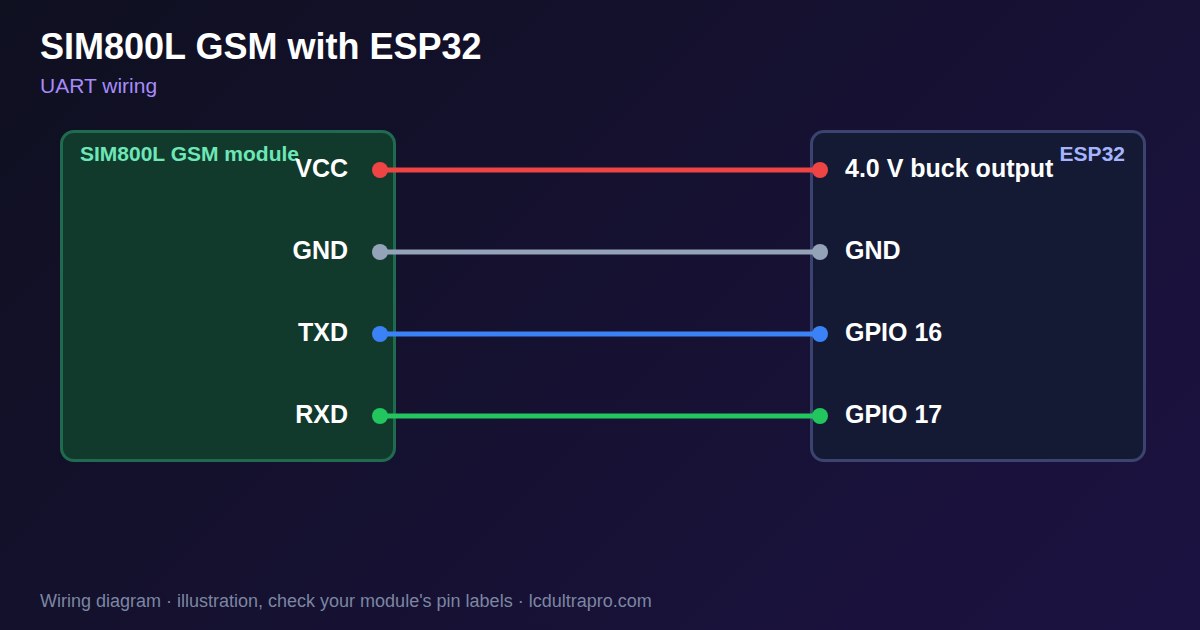
Connect it with crossed TX and RX and a common ground. Guides disagree on the logic level: one wires RXD and TXD directly, while a module listing gives a 2.8 V UART maximum, so divide the ESP32 TX line to be safe. The default speed is 9600 or 115200 baud. Test in this order: AT should answer OK, AT+CSQ gives signal strength, and AT+CREG? shows if it has registered. Send SMS only after those work. Fit the antenna before you transmit, and keep it away from the display's touch panel, since transmit bursts can cause interference. Display boards often have no spare UART, so check that first.
Specifications
| Supply | 3.4–4.4 V, about 4.0 V ideal |
|---|---|
| Peak current | 2 A in short bursts |
| Average | 200–400 mA during a call or GPRS |
| UART | 9600 or 115200 baud |
| Network | 2G only |
Power and logic levels
5 V signal: needs a divider or level shifter
| Supply | 3.4–4.4 V |
|---|---|
| Signal level | UART listed at 2.8 V maximum on one module |
| On an ESP32 | Its TX suits an ESP32 RX. Divide the ESP32 TX line to about 2.8 V. |
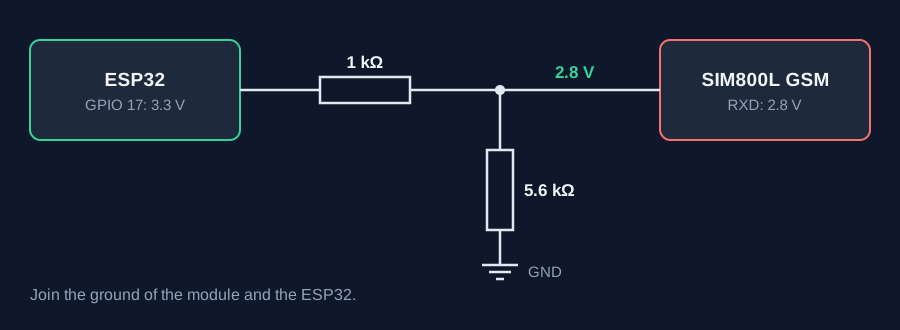
ESP32 pins, including those on a display board's connectors, work at 3.3 V and are not 5 V tolerant. Modules differ, so if in doubt, measure the signal before you connect it.
Wiring
| SIM800L GSM | Connect to | Note |
|---|---|---|
| VCC | 4.0 V buck output | Not 3.3 V, not 5 V |
| GND | GND | Common ground |
| TXD | GPIO 16 | |
| RXD | GPIO 17 | Through 1 kΩ, with 5.6 kΩ to GND |
Arduino code
HardwareSerial gsm(1);
const int RX_PIN = 16, TX_PIN = 17;

void at(const char *cmd) {
  gsm.println(cmd);
  unsigned long t = millis();
  while (millis() - t < 1000) {
    while (gsm.available()) Serial.write(gsm.read());
  }
}

void setup() {
  Serial.begin(115200);
  gsm.begin(9600, SERIAL_8N1, RX_PIN, TX_PIN);
  delay(3000);
  at("AT");                           // should answer OK
  at("AT+CSQ");                       // signal strength
  at("AT+CREG?");                     // network registration
}

void loop() {}
No extra library needed. Compiled for ESP32-S3 with arduino-esp32 3.x. Not yet tested by us on a physical sensor. Change the pins to match your board.
On a display
Read the value in your sketch and pass it to a label, or send it over MQTT and show it with an MQTT value in the editor.
Design a display for SIM800L GSMBoards with a ready connector
Only boards whose connectors we have surveyed. Others may still work on free GPIOs.
| Elecrow CrowPanel ESP32 HMI 2.4" | UART1 port: TX 17, RX 16 |
| Elecrow CrowPanel ESP32 HMI 2.8" | UART1 port: TX 17, RX 16 |
| Elecrow CrowPanel ESP32 HMI 3.5" | UART0 port: TX 1, RX 3Shared with the USB-C serial port — the serial monitor and uploads use it too |
| Elecrow CrowPanel ESP32-S3 HMI 4.3" | UART1 port: TX 17, RX 18 |
| Elecrow CrowPanel ESP32-S3 HMI 5.0" | UART0 port: TX 43, RX 44Shared with the USB-C serial port — the serial monitor and uploads use it too |
| Elecrow CrowPanel ESP32-S3 HMI 7.0" | UART0 port: TX 43, RX 44Shared with the USB-C serial port — the serial monitor and uploads use it too |
| Makerfabs MaTouch ESP32-S3 Rotary IPS 2.1 Round | Mabee UART (J2): TX 43, RX 44UART0 — the serial output goes here unless it is moved to the USB port |
| Sunton ESP32-2432S028R 2.8" | Serial header (P1): TX 1, RX 3Shared with the USB-UART bridge — the serial monitor and uploads use it too |
| Sunton ESP32-4827S043R/C 4.3" | UART header (P1): TX 43, RX 44Shared with the USB-UART bridge — the serial monitor and uploads use it too |
| Sunton ESP32-8048S043C 4.3" | UART header (P1): TX 43, RX 44Shared with the USB-UART bridge — the serial monitor and uploads use it too |
| Sunton ESP32-8048S050C 5.0" | UART header (P1): TX 43, RX 44Shared with the USB-UART bridge — the serial monitor and uploads use it too |
| Sunton ESP32-8048S070C 7.0" | UART header (P1): TX 43, RX 44Shared with the USB-UART bridge — the serial monitor and uploads use it too |
| Waveshare ESP32-S3 Touch LCD 2.1" round | 12-pin header: TX 43, RX 44The header also carries USB D- / D+ (GPIO 19 / 20) and the I2C bus (GPIO 15 / 7) — GPIO 0 is the BOOT button (keep it high at power-up) |
| Waveshare ESP32-S3 Touch LCD 2.8" | 12-pin header: TX 43, RX 44The header also carries USB D- / D+ (GPIO 19 / 20) and the I2C bus (GPIO 11 / 10) |
| Waveshare ESP32-S3 Touch LCD 2.8" Type B | 2x12 pin header: TX 43, RX 44The header also carries USB D- / D+ (GPIO 19 / 20) and the I2C bus (GPIO 15 / 7) — GPIO 0 is the BOOT button (keep it high at power-up) |
| Waveshare ESP32-S3-Touch-LCD-2.8C | 12-pin header: TX 43, RX 44The header also carries USB D- / D+ (GPIO 19 / 20) and the I2C bus (GPIO 15 / 7) — GPIO 0 is the BOOT button (keep it high at power-up) |
| Waveshare ESP32-S3-LCD-7B | UART2 connector (H3): TX 43, RX 44Only when switch SW1 selects UART2 — shared with the USB-to-UART port |
Good to know
- It needs about 4 V, with 2 A peaks.
- Check that your carrier still has 2G.
- Cross TX and RX.
- Fit the antenna.
What it is good for
- SMS alarms in remote locations
- Sites with no WiFi
- Legacy GSM projects
FAQ
Why does my SIM800L not respond?
Power is the usual cause. Use 4 V with 2 A peaks and capacitors.
Why does it keep restarting?
The supply drops under 3.4 V during transmit bursts.
Why does it never register?
Check the antenna and SIM, and ask whether your carrier still runs 2G.
Sources
Related parts
Use this information at your own risk. It is for general guidance only: the example code compiles, but it has not been tested on every part, and modules differ between sellers. Check the manufacturer's data before you build. Product names belong to their owners, and LCD Ultra Pro is not affiliated with them. See our Terms.