Outputs and switching
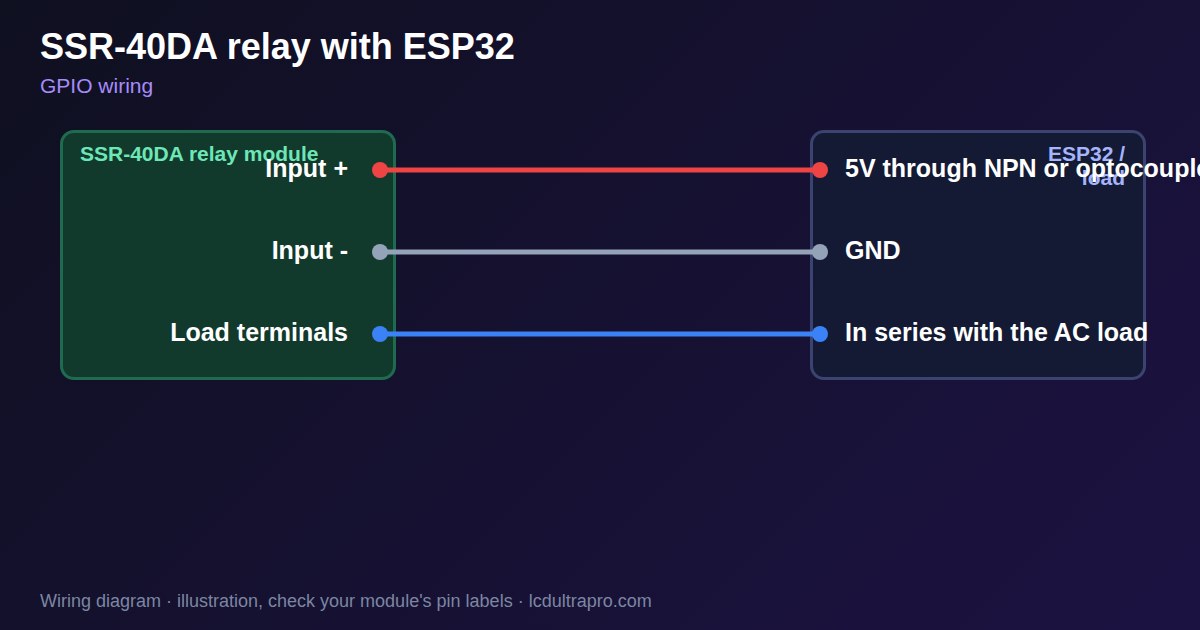
SSR-40DA relay with ESP32
An SSR-40DA switches AC only. The DA means DC control and AC load, and it will not switch a 12 V or 24 V DC load: it may turn on and never turn off. If that surprises you, choose a MOSFET or an SSR rated for DC output.
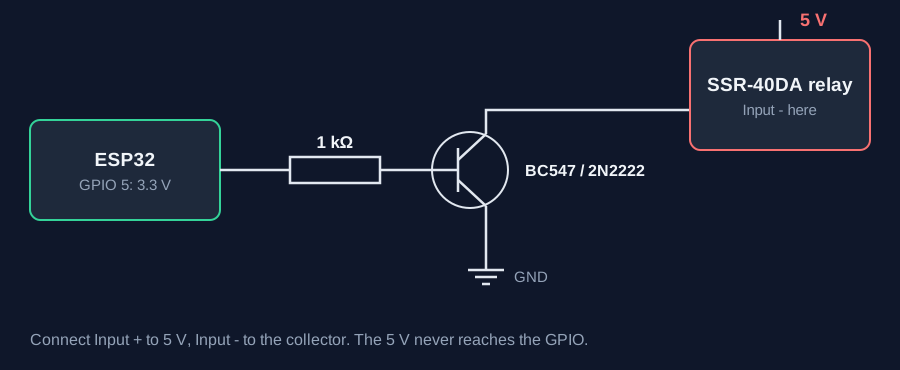
This is mains equipment, so turn off the supply before you wire it, use proper terminals and an enclosure, and add a fuse. Have an electrician do the job if you are not qualified. On the control side, watch the 3.3 V margin. Listings give 3 to 32 V, with on above 2.4 V, but one vendor notes that a newer version needs 4 to 32 V. A transistor switching 5 V to the input removes the doubt, and one published build used an optocoupler for the same reason.
The '40 A' on the label is not a figure you can use. About 1.6 V is lost across the relay, which is about 64 W of heat at 40 A. One seller recommends a heatsink above 4 A and running at no more than half the rating. Without a heatsink it will fail at a far smaller load. Off-state leakage is 2 to 3 mA in listings, enough for a small LED lamp to glow and for a load to read as live. It is not an isolator, so treat the output as live even when off. Spec sheets vary between clones, and there is no easy way to confirm a genuine part. Switching is silent, and suits heaters with slow on and off cycles. For fast PWM it does not work, as these parts usually turn on near zero crossing. LCD Ultra Pro can set a pin on or off from a rule or switch without code.
Specifications
| Control input | 3–32 V DC (new version 4–32 V) |
|---|---|
| Load | AC only, 24–380 V |
| Label current | 40 A |
| Voltage drop | About 1.6 V |
| Off-state leakage | 2–3 mA |
| Heatsink | Recommended above 4 A |
Power and logic levels
3.3 V: check your module first
| Supply | Input 3–32 V or 4–32 V |
|---|---|
| Signal level | 3.3 V may not be enough |
| On an ESP32 | Drive it with a transistor if yours needs 4 V. |
ESP32 pins, including those on a display board's connectors, work at 3.3 V and are not 5 V tolerant. Modules differ, so if in doubt, measure the signal before you connect it.
Wiring
| SSR-40DA relay | Connect to | Note |
|---|---|---|
| Input + | 5V | |
| Input - | NPN collector | |
| NPN emitter | GND | |
| NPN base | GPIO 5 | Through 1 kΩ |
| Load terminals | In series with the AC load | Mains: power off, fuse, enclosure |
Arduino code
const int SSR_PIN = 5;
const unsigned long WINDOW_MS = 2000;
int powerPct = 40;                    // heater power, 0 to 100

void setup() {
  pinMode(SSR_PIN, OUTPUT);
}

void loop() {                         // slow on/off cycle, not PWM
  unsigned long t = millis() % WINDOW_MS;
  digitalWrite(SSR_PIN, t < WINDOW_MS * powerPct / 100);
}
No extra library needed. Compiled for ESP32-S3 with arduino-esp32 3.x. Not yet tested by us on a physical sensor. Change the pins to match your board.
On a display
In LCD Ultra Pro a switch or a rule can set a pin on or off, so simple heater control needs no code.
Design a display for SSR-40DA relayBoards with a ready connector
Only boards whose connectors we have surveyed. Others may still work on free GPIOs.
| Elecrow CrowPanel ESP32 HMI 2.4" | GPIO_D port: GPIO 25 |
| Elecrow CrowPanel ESP32 HMI 2.8" | GPIO_D port: GPIO 25 |
| Elecrow CrowPanel ESP32 HMI 3.5" | GPIO_D port: GPIO 25 |
| Elecrow CrowPanel ESP32-S3 HMI 4.3" | GPIO_D port: GPIO 37 |
| Elecrow CrowPanel ESP32-S3 HMI 5.0" | GPIO_D port: GPIO 38 |
| Elecrow CrowPanel ESP32-S3 HMI 7.0" | GPIO_D port: GPIO 38 |
| LilyGO T-Display (classic) 1.14" | Left pin header: GPIO 21 |
| LilyGO T-Display-S3-Pro 2.33" | QWIIC LEFT: GPIO 43 |
| LilyGO T-Deck 2.8" | Grove connector: GPIO 43On the T-Deck Plus this port is taken by the built-in GPS |
| M5Stack AtomS3 0.85" | Grove port: GPIO 2 |
| M5Stack M5StickC Plus2 1.14" | Grove port: GPIO 32 |
| Sunton ESP32-2432S028R 2.8" | GPIO header (P3): GPIO 22GPIO 21 is the display backlight — not usable. GPIO 35 is input-only. No 3V3 pin on P3 (only GND). |
| Sunton ESP32-4827S043R/C 4.3" | GPIO header (P4): GPIO 17P3 carries the same two pins |
| Sunton ESP32-8048S043C 4.3" | GPIO header (P4): GPIO 17P3 carries the same two pins |
| Sunton ESP32-8048S050C 5.0" | GPIO header (P4): GPIO 17P5 carries the same pins. Shared with the I2S amplifier of the speaker output (P6). |
| Sunton ESP32-8048S070C 7.0" | GPIO header (P4): GPIO 17P5 carries the same pins. Shared with the I2S amplifier of the speaker output (P6). |
| Waveshare ESP32-S3 Touch LCD 1.28" round | SH1.0 GPIO header: GPIO 15Six GPIOs led out per the wiki pin table |
| Waveshare ESP32-S3 Touch LCD 1.28" round (CNC metal housing) | SH1.0 GPIO header: GPIO 15Six GPIOs led out per the wiki pin table |
| Waveshare ESP32-S3-LCD-7B | GPIO connector (J8): GPIO 6 |
Good to know
- It switches AC only.
- Check that 3.3 V can drive your unit.
- Use a heatsink. 40 A is not a usable rating.
- Off does not mean disconnected.
What it is good for
- Heaters and ovens
- Silent AC switching
- Frequent on and off cycles
FAQ
Can an SSR-40DA switch DC?
No. DA means DC control and AC load.
Why does my lamp glow when off?
Off-state leakage. Use a mechanical relay for that lamp.
Does it need a heatsink?
Yes for anything above a few amps.
Sources
- https://hackaday.com/2017/09/26/an-introduction-to-solid-state-relays
- https://docs.cirkitdesigner.com/component/b97d5804-295d-4a63-b66d-23cafcd44586/ssr-40da
- https://fabacademy.org/2023/labs/kitakagaya/students/hiroe-takeda/assignments/week09/1.output_devices/
- https://forum.arduino.cc/t/solid-state-relay-leaking-current/602129
Related parts
Use this information at your own risk. It is for general guidance only: the example code compiles, but it has not been tested on every part, and modules differ between sellers. Check the manufacturer's data before you build. Product names belong to their owners, and LCD Ultra Pro is not affiliated with them. See our Terms.