Input devices
TTP223 touch button with ESP32
A touch pad that works through the wall of a plastic case needs no hole, so nothing leaks in and there is no switch to wear out. The TTP223 module does this for pennies, using one GPIO. The output goes high while you touch it, with no pull-up or debounce needed, since the chip handles that.
Power it from 3V3 on an ESP32. The supply range is 2.0 to 5.5 V, but one manual says the output follows the supply, so a module on 5 V could put 5 V on your pin. Keep it simple and use 3.3 V.
Two solder pads change the behaviour. With both open, it is momentary and active high. One pad switches it to toggle mode, like a latching switch, and the other inverts the output. Sources disagree on which pad is which: most say A sets polarity and B sets toggle, while one manual says the reverse. Bridge one and test with a meter. Do not assume. Sources say it works through thin acrylic, glass or plastic, but they give no thickness limit, so try your actual case. Metal in front of it will not work. Water and a wet finger can trigger it, which is a poor match for outdoor panels. It is also a bad choice for anything with safety impact. LCD Ultra Pro can read a hardware pin as 0 or 1, so a rule can react to a touch without code.
Specifications
| Supply | 2.0–5.5 V, use 3.3 V |
|---|---|
| Output | High when touched (default) |
| Modes | Momentary or toggle, by jumper |
| Pins | 1 GPIO |
| Works through | Thin plastic, acrylic, glass |
Power and logic levels
3.3 V: safe to connect directly
| Supply | 2–5.5 V, use 3V3 |
|---|---|
| Signal level | Output follows the supply |
| On an ESP32 | At 5 V the output can reach 5 V. Keep it on 3V3. |
ESP32 pins, including those on a display board's connectors, work at 3.3 V and are not 5 V tolerant. Modules differ, so if in doubt, measure the signal before you connect it.
Wiring
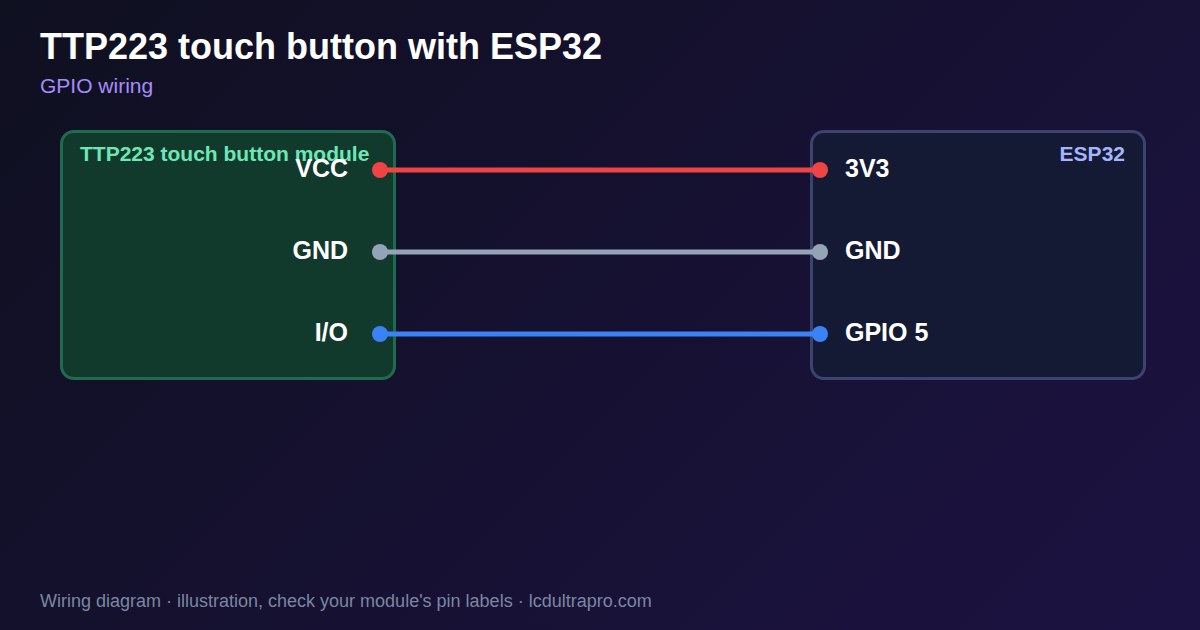
| TTP223 touch button | Connect to | Note |
|---|---|---|
| VCC | 3V3 | |
| GND | GND | |
| I/O | GPIO 5 | No pull-up needed |
Arduino code
const int TOUCH_PIN = 5;
int last = LOW;

void setup() {
  Serial.begin(115200);
  pinMode(TOUCH_PIN, INPUT);
}

void loop() {
  int now = digitalRead(TOUCH_PIN);
  if (now != last) {
    last = now;
    Serial.println(now ? "Touched" : "Released");
  }
  delay(10);
}
No extra library needed. Compiled for ESP32-S3 with arduino-esp32 3.x. Not yet tested by us on a physical sensor. Change the pins to match your board.
On a display
In LCD Ultra Pro a rule can read a hardware pin as 0 or 1, so a touch can change a screen or a label without code.
Design a display for TTP223 touch buttonBoards with a ready connector
Only boards whose connectors we have surveyed. Others may still work on free GPIOs.
| Elecrow CrowPanel ESP32 HMI 2.4" | GPIO_D port: GPIO 25 |
| Elecrow CrowPanel ESP32 HMI 2.8" | GPIO_D port: GPIO 25 |
| Elecrow CrowPanel ESP32 HMI 3.5" | GPIO_D port: GPIO 25 |
| Elecrow CrowPanel ESP32-S3 HMI 4.3" | GPIO_D port: GPIO 37 |
| Elecrow CrowPanel ESP32-S3 HMI 5.0" | GPIO_D port: GPIO 38 |
| Elecrow CrowPanel ESP32-S3 HMI 7.0" | GPIO_D port: GPIO 38 |
| LilyGO T-Display (classic) 1.14" | Left pin header: GPIO 21 |
| LilyGO T-Display-S3-Pro 2.33" | QWIIC LEFT: GPIO 43 |
| LilyGO T-Deck 2.8" | Grove connector: GPIO 43On the T-Deck Plus this port is taken by the built-in GPS |
| M5Stack AtomS3 0.85" | Grove port: GPIO 2 |
| M5Stack M5StickC Plus2 1.14" | Grove port: GPIO 32 |
| Sunton ESP32-2432S028R 2.8" | GPIO header (P3): GPIO 22GPIO 21 is the display backlight — not usable. GPIO 35 is input-only. No 3V3 pin on P3 (only GND). |
| Sunton ESP32-4827S043R/C 4.3" | GPIO header (P4): GPIO 17P3 carries the same two pins |
| Sunton ESP32-8048S043C 4.3" | GPIO header (P4): GPIO 17P3 carries the same two pins |
| Sunton ESP32-8048S050C 5.0" | GPIO header (P4): GPIO 17P5 carries the same pins. Shared with the I2S amplifier of the speaker output (P6). |
| Sunton ESP32-8048S070C 7.0" | GPIO header (P4): GPIO 17P5 carries the same pins. Shared with the I2S amplifier of the speaker output (P6). |
| Waveshare ESP32-S3 Touch LCD 1.28" round | SH1.0 GPIO header: GPIO 15Six GPIOs led out per the wiki pin table |
| Waveshare ESP32-S3 Touch LCD 1.28" round (CNC metal housing) | SH1.0 GPIO header: GPIO 15Six GPIOs led out per the wiki pin table |
| Waveshare ESP32-S3-LCD-7B | GPIO connector (J8): GPIO 6 |
Good to know
- Power it from 3.3 V on an ESP32.
- Test the jumper pads on your module.
- Try your real case material.
- Water can trigger it.
What it is good for
- Buttons through a sealed case
- Hidden controls
- Lamps and small panels
FAQ
Does the TTP223 work through plastic?
Yes, through thin non-conductive material. Test yours.
How do I make it latch?
Bridge the toggle pad. Check which pad on your module.
Can it run on 5 V with an ESP32?
Avoid it: the output can follow the supply.
Sources
Related parts
Use this information at your own risk. It is for general guidance only: the example code compiles, but it has not been tested on every part, and modules differ between sellers. Check the manufacturer's data before you build. Product names belong to their owners, and LCD Ultra Pro is not affiliated with them. See our Terms.