Waveshare · ESP32-C6 · 2.73" · 320×320
Waveshare ESP32-C6-LCD-2.73 specifications
This page collects the pinout, free GPIOs and hardware details of the ESP32-C6-LCD-2.73. The board isn't in the LCD Ultra Pro™ editor yet, so there's no driver for it there.
A square 2.73-inch screen at 320×320 is an unusual format, and Waveshare drives it from an ILI9488 in 18-bit colour over SPI. There's no touch. Input comes from three buttons labelled PREV, NEXT and ENTER on GPIO 4, 5 and 9, which suits menus and step-through dashboards.
The display and the microSD card share the SPI bus: clock GPIO 0, MOSI 1, MISO 18, with LCD CS 8, DC 19 and card CS 10. LCD reset and backlight PWM are handled by a CH32V003 helper chip at I2C 0x24, which also measures the battery and exposes spare I/O lines. I2C itself runs on GPIO 20 (SDA) and 2 (SCL).
On that bus sit a QMI8658 IMU, a PCF85063 clock and an SHTC3 temperature and humidity sensor. The module is an ESP32-C6-WROOM-1-N16 with 16 MB of flash. Waveshare's own spec lists 240 MHz for the C6, which is more than the chip's usual 160 MHz, so I wouldn't rely on that number.
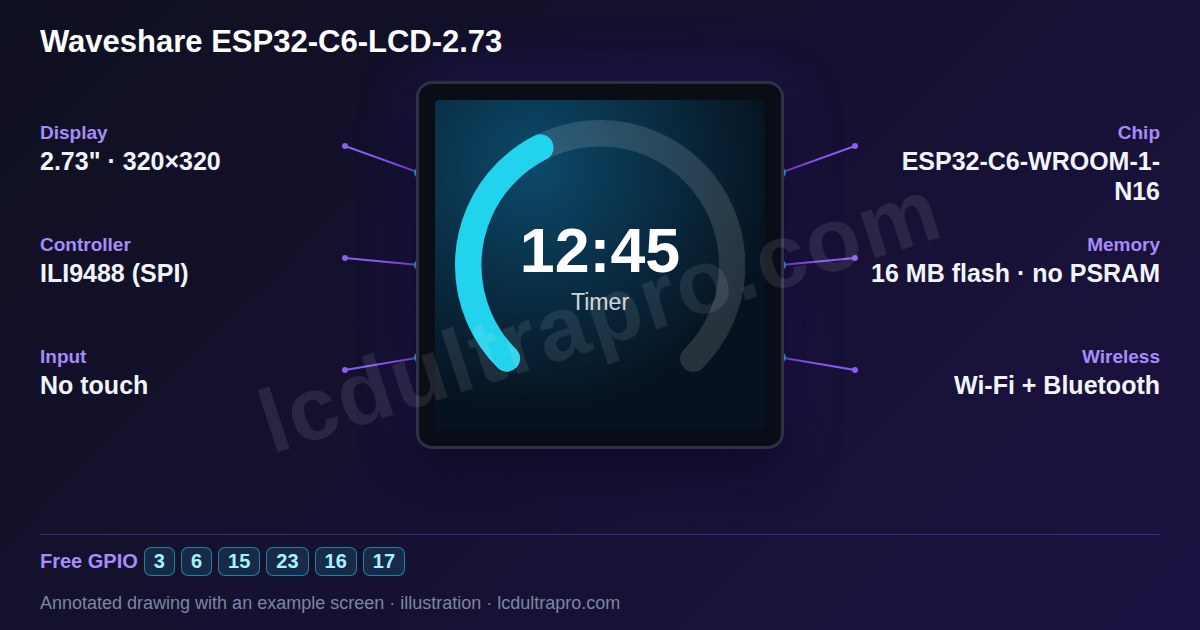
- Screen
- 2.73" · 320×320
- Chip
- ESP32-C6
- Memory
- 16 MB flash, no PSRAM
- Input
- no touch
Key features
- 2.73-inch square, 320×320, ILI9488
- Three navigation buttons
- ESP32-C6-WROOM-1-N16
- CH32V003 helper (backlight, reset, battery)
- QMI8658, PCF85063, SHTC3
- microSD
Specifications
| Manufacturer | Waveshare |
|---|---|
| Screen size | 2.73" |
| Resolution | 320×320 px |
| Colour depth | 18-bit |
| Display controller | ILI9488 (SPI) |
| Display interface | SPI |
| Touch | None (3 buttons) |
| Microcontroller | ESP32-C6 |
| Module | ESP32-C6-WROOM-1-N16 |
| CPU clock | 160 MHz |
| Internal SRAM | 512 KB |
| PSRAM | None |
| Flash | 16 MB |
| Wi-Fi | Yes |
| Bluetooth | Yes |
| Hardware variant | Square 320x320 panel. A CH32V003 I/O chip (I2C 0x24) handles LCD reset, backlight PWM, battery ADC and spare EXIO lines. QMI8658 IMU, PCF85063 RTC, SHTC3 temperature / humidity sensor, microSD. |
| Display | 320×320, ILI9488, SPI: SCK 0, MOSI 1, MISO 18, CS 8, DC 19 |
| Buttons | PREV 4, NEXT 5, BOOT / ENTER 9 |
| I2C | SDA 20, SCL 2: IMU, RTC, SHTC3, CH32V003 (0x24) |
| microSD | CS 10 on the display SPI bus |
| UART | TX 16, RX 17 |
GPIO pinout
The GPIOs the board itself uses for the display, touch and on-board peripherals, as published in the manufacturer’s documentation.
| GPIO | Function |
|---|---|
| GPIO 0 | SPI SCK (LCD, microSD) |
| GPIO 1 | SPI MOSI (LCD, microSD) |
| GPIO 2 | I2C SCL (IMU, RTC, sensor, expander) |
| GPIO 3 | Header GPIO |
| GPIO 4 | PREV button |
| GPIO 5 | NEXT button |
| GPIO 6 | Header GPIO |
| GPIO 7 | I/O helper interrupt (also on the header) |
| GPIO 8 | LCD CS |
| GPIO 9 | BOOT / ENTER button |
| GPIO 10 | microSD CS |
| GPIO 11 | LCD tearing effect (TE) |
| GPIO 12 | USB D- |
| GPIO 13 | USB D+ |
| GPIO 15 | Header GPIO |
| GPIO 16 | UART TX |
| GPIO 17 | UART RX |
| GPIO 18 | SPI MISO (LCD, microSD) |
| GPIO 19 | LCD DC |
| GPIO 20 | I2C SDA (IMU, RTC, sensor, expander) |
| GPIO 23 | Header GPIO |
Source: github.com, docs.waveshare.com, github.com. Always check against your board revision before wiring.
Free GPIOs and connectors
These GPIOs are not used by the display, touch or on-board peripherals, so you can wire your own sensors, buttons or relays to them.
| Pin | Capabilities | Note |
|---|---|---|
| GPIO 3 | GPIO, PWM, ADC | On the pin-out header |
| GPIO 6 | GPIO, PWM, ADC | On the pin-out header |
| GPIO 15 | GPIO, PWM | On the pin-out header |
| GPIO 23 | GPIO, PWM | On the pin-out header |
| GPIO 16 | GPIO, UART_TX | UART0 TX on the pin-out header |
| GPIO 17 | GPIO, UART_RX | UART0 RX on the pin-out header |
- Pin-out header — GPIO 2, 3, 6, 7, 9, 12, 13, 15, 16, 17, 20, 23 · pin header
GPIO 20 / 2 are the on-board I2C bus (SDA / SCL), 9 is BOOT, 12 / 13 native USB; also EXIO lines of the CH32V003 helper
Good to know before you start
- Not available in the LCD Ultra Pro editor yet.
- Backlight and reset need the CH32V003 driver.
- The ESP32-C6 has no PSRAM, so keep LVGL buffers to a fraction of the screen.
What it is good for
- •Climate and weather panels
- •Button-driven menus
- •Zigbee status displays
LVGL support in LCD Ultra Pro™
This board is documented in the wiki, but it is not in the LCD Ultra Pro™ editor yet, so you can’t pick it there or export a project for it. The specs, pins and connectors on this page come from the manufacturer’s own material and are there to help you wire and configure it. See the board list for boards the editor supports today.
Frequently asked questions
Does the ESP32-C6-LCD-2.73 have touch?
No. It has PREV, NEXT and ENTER buttons on GPIO 4, 5 and 9.
Which display controller does it use?
An ILI9488 over SPI, 320×320 pixels.
What does the CH32V003 do?
It is an I/O helper at I2C 0x24 that drives LCD reset and backlight PWM and reads the battery voltage.
Sources
Specifications cross-checked against the manufacturer’s documentation (last checked 2026-11-04):
More in the Waveshare ESP32-C3 / C6 family
- Waveshare ESP32-C6-LCD-0.85
- Waveshare ESP32-C6 1.3" LCD
- Waveshare ESP32-C3 1.47" LCD
- Waveshare ESP32-C6 1.47" LCD
- Waveshare ESP32-C6 Touch LCD 1.47"
- Waveshare ESP32-C6-Touch-LCD-1.54
- Waveshare ESP32-C6 Touch LCD 1.69"
- Waveshare ESP32-C6-Touch-LCD-1.83
- Waveshare ESP32-C6-LCD-1.9
- Waveshare ESP32-C6-Touch-LCD-2.8
Tools for this board
Connect sensors and parts
- 28BYJ-48 stepper
- A4988 stepper driver
- ACS712 current sensor
- ADS1115 ADC
- ADXL345 accelerometer
- AHT20
- AS5600 magnetic encoder
- BH1750
- BME280
- BME680
- BMP280
- BTS7960 motor driver
- CAN bus (SN65HVD230)
- Capacitive soil moisture
- DFPlayer Mini
- DHT22 / AM2302
- DS18B20
- DS3231 RTC
- EC11 rotary encoder
- ENS160
- HC-SR04
- HC-SR501 PIR
- HX711 load cell
- INA219
- INA226
- INMP441 microphone
- IRLZ44N MOSFET
- KY-023 joystick
- 4x4 matrix keypad
- LD2410 radar
- LDR photoresistor
- MAX31855 thermocouple
- MAX7219 LED matrix
- MAX98357A I2S amp
- MCP23017 GPIO expander
- microSD card
- MLX90614 IR thermometer
- MPU6050
- MQ-2 gas sensor
- NEO-6M GPS
- NTC thermistor 10k
- PCA9685 PWM driver
- Piezo buzzer
- Push button
- PZEM-004T
- RC522 RFID
- 5 V relay module
- RS-485 (MAX3485)
- SCD40
- SG90 servo
- SHT31 / SHT3x
- SIM800L GSM
- SSD1306 OLED
- SSR-40DA relay
- LoRa SX1276
- TB6612FNG motor driver
- TCS34725 colour sensor
- TP4056 battery charger
- TTP223 touch button
- VL53L0X
- WS2812B LED strip
- YF-S201 flow sensor
Last updated:
Adding I2C sensors to this board?See which addresses its own chips already use, and what would clash.Open the checkerSomething wrong on this page?
Tell me what you found. I check every report and fix the page.